
1. General Information
Bynder is a cloud-based digital asset management (DAM) platform that organizations use to create, find, use, and share brand and marketing assets such as images, videos, and documents. The Bynder API is a RESTful web service for accessing and managing assets, collections, metaproperties, and related content in a Bynder portal.
The OneTeg Bynder Connector integrates with the Bynder API, enabling users to manage digital assets and metadata directly from OneTeg automation workflows. This connector supports three authentication options: OAuth Authorization Code (recommended), Bearer Token, and Custom.
Bynder’s API is accessed through your account-specific portal domain (for example yourcompany.bynder.com). Bynder promotes OAuth 2.0, and when the authorization request includes the offline scope, OneTeg receives a refresh token and can renew access automatically without repeated logins.
2. Connect Bynder to OneTeg
Bynder utilizes OAuth 2.0 protocol to authenticate its APIs. To authorize API requests via OAuth 2.0, it is necessary to create a client within the Bynder portal.
Bynder App and Token Creation
Access the Portal Settings by navigating to your user menu and selecting Additional Settings.
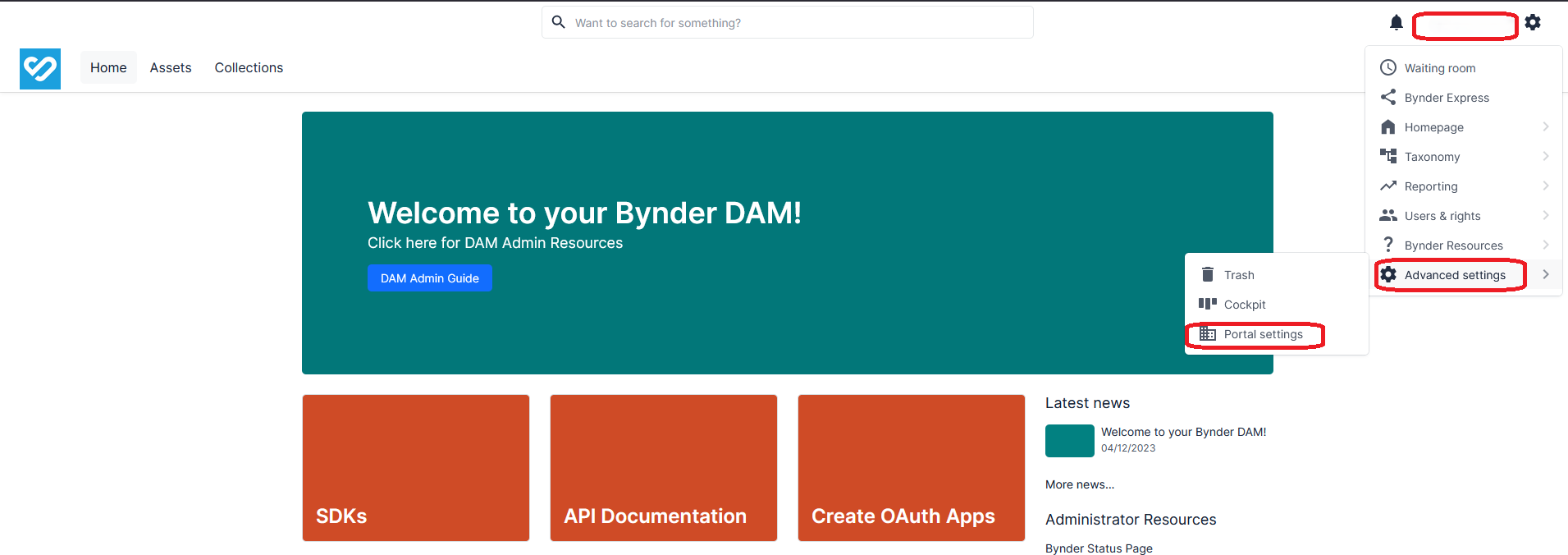
Navigate to Portal Settings and access the OAuth Apps section to create a new application or retrieve existing ones.
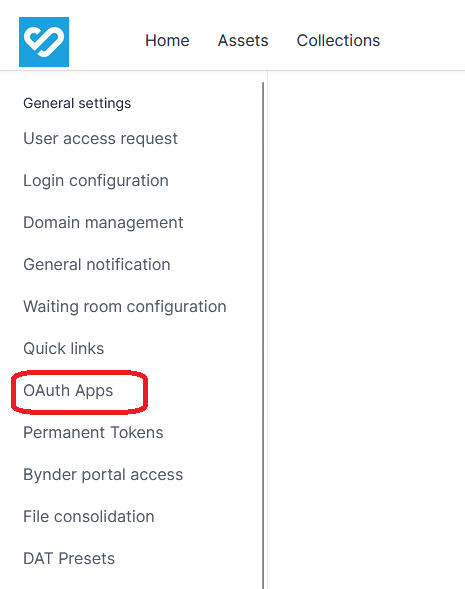
Please either create a new OAuth App or utilize an existing one. The Client ID and Client Secret credentials will be required for establishing the OneTeg connection.
3. Connection Settings and Configuration for OneTeg
In OneTeg, navigate to Connections and create a new connection using the Bynder Connector. Choose your preferred authentication option below.
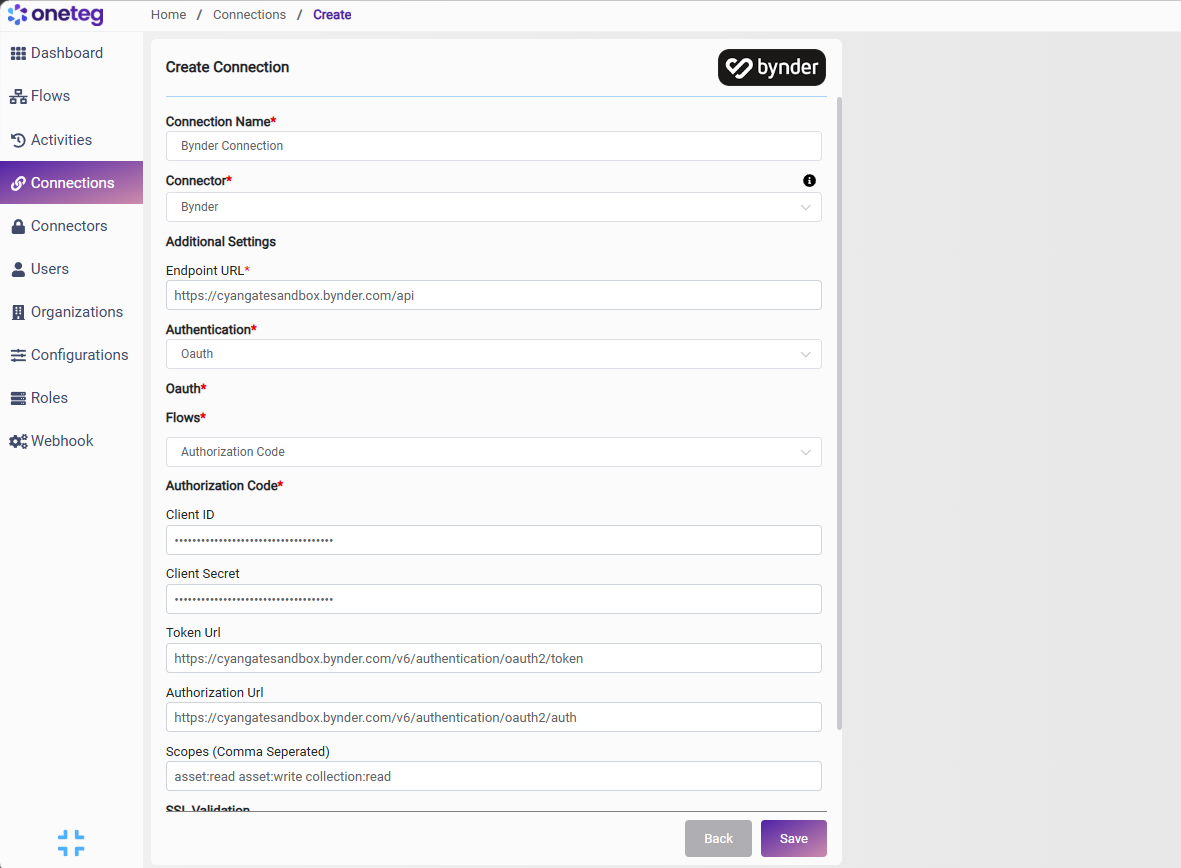
Option 1 — OAuth Authorization Code
Use this flow for ongoing automation. It requires a one-time browser login to grant access; when the offline scope is included, OneTeg receives a refresh token and renews access automatically without further logins. This is Bynder’s promoted, modern authentication method.
|
Settings Parameters |
Value / Sample Value |
Description |
Required (Y/N) |
|
Connection Name |
Bynder Connection |
Choose a name for your Connection |
Y |
|
Connector |
bynderConnector-v1.1 |
Auto-populated once the Bynder Connector is selected |
Y |
|
Endpoint URL |
https://{yourportal}.bynder.com/api |
The base URL of the Bynder API — your account-specific Bynder portal domain (for example yourcompany.bynder.com) followed by /api |
Y |
|
Authentication |
Oauth |
Select Oauth as the authentication method |
Y |
|
Flows |
Authorization Code |
Select Authorization Code as the OAuth flow |
Y |
|
Client ID |
Your OAuth App Client ID |
The Client ID of your Bynder OAuth app (Settings → Advanced Settings → Portal Settings → OAuth Apps) |
Y |
|
Client Secret |
Your OAuth App Client Secret |
The Client Secret of your Bynder OAuth app (shown only once at creation) |
Y |
|
Token Url |
https://{yourportal}.bynder.com/v6/authentication/oauth2/token |
The Bynder token endpoint used to obtain and refresh access tokens |
Y |
|
Authorization Url |
https://{yourportal}.bynder.com/v6/authentication/oauth2/auth |
The Bynder authorization endpoint where the user grants access |
Y |
|
Scopes |
offline, current.user:read, asset:read, asset:write, collection:read, collection:write, meta.assetbank:read |
The scopes to request; they must match those configured on your OAuth app. Include offline to receive a refresh token so the connection does not require repeated logins |
N |
Option 2 — Bearer Token
Use this flow to authenticate with a Bynder access token you have already obtained.
|
Settings Parameters |
Value / Sample Value |
Description |
Required (Y/N) |
|
Connection Name |
Bynder Connection |
Choose a name for your Connection |
Y |
|
Connector |
bynderConnector-v1.1 |
Auto-populated once the Bynder Connector is selected |
Y |
|
Endpoint URL |
https://{yourportal}.bynder.com/api |
The base URL of the Bynder API — your account-specific Bynder portal domain (for example yourcompany.bynder.com) followed by /api |
Y |
|
Authentication |
Bearer |
Select Bearer as the authentication method |
Y |
|
token |
Your Bynder access token |
A Bynder OAuth 2.0 access token, passed as a Bearer token in the Authorization header |
Y |
Note that Bynder access tokens expire after approximately 1 hour — you will need to manually update the token when it expires, making this method less suitable for long-running automations. For sustained automation, use Option 1 with the offline scope instead.
Option 3 — Custom
Use this flow to have OneTeg obtain and maintain a session automatically using a username and password. Provide the credentials, the token endpoint, and a URL OneTeg can use to verify that the session is still valid.
|
Settings Parameters |
Value / Sample Value |
Description |
Required (Y/N) |
|
Connection Name |
Bynder Connection |
Choose a name for your Connection |
Y |
|
Connector |
bynderConnector-v1.1 |
Auto-populated once the Bynder Connector is selected |
Y |
|
Endpoint URL |
https://{yourportal}.bynder.com/api |
The base URL of the Bynder API — your account-specific Bynder portal domain (for example yourcompany.bynder.com) followed by /api |
Y |
|
Authentication |
Custom |
Select Custom as the authentication method |
Y |
|
username |
Your Bynder username |
The username used to obtain an access token from the endpoint below |
Y |
|
password |
Your Bynder password |
The password for the account above |
Y |
|
Endpoint |
https://{yourportal}.bynder.com/v6/authentication/oauth2/token |
The endpoint OneTeg calls to obtain an access token |
Y |
|
Session Validity URL |
https://{yourportal}.bynder.com/api/v4/users/ |
An endpoint OneTeg uses to verify that the current session / token is still valid |
Y |
4. Supported Bynder Actions and Options
For the full list of supported endpoints, parameters, and options, see the page below: