
1. General Information
The Mail Connector sends email over SMTP (Simple Mail Transfer Protocol). It lets OneTeg workflows send messages — including attachments — through any SMTP mail server, such as a corporate mail server or a hosted email provider (for example Gmail or Microsoft 365).
The OneTeg Mail Connector connects to your SMTP server using the server host, port, and account credentials. This connector authenticates using BASIC authentication — an SMTP username and password.
The Endpoint is your SMTP server host and Port is its port. Common combinations are port 587 with StartTLS, port 465 with SSL, or port 25 for an unencrypted connection. The User Name is also used as the From address when sending, unless a separate From Address is provided.
2. Connect Mail to OneTeg
The connector uses your SMTP server details. Follow the steps below to gather what you will enter into OneTeg.
Step 1 - Gather Your SMTP Server Details
Obtain the SMTP host (Endpoint), port, username, and password from your email provider or mail server administrator. For hosted providers, use their documented SMTP settings — for example, smtp.gmail.com for Gmail or smtp.office365.com for Microsoft 365.
Step 2 - Determine Your Encryption Settings
Decide how the connection is secured: STARTTLS (typically port 587, enable Enable StartTLS), SSL/SMTPS (typically port 465, enable Enable SSL), or no encryption (port 25). Enable Authenticate if your server requires a username and password to send.
For providers that enforce multi-factor authentication (such as Gmail or Microsoft 365), use an app-specific password rather than the account password, and store it securely.
3. Connection Settings and Configuration for OneTeg
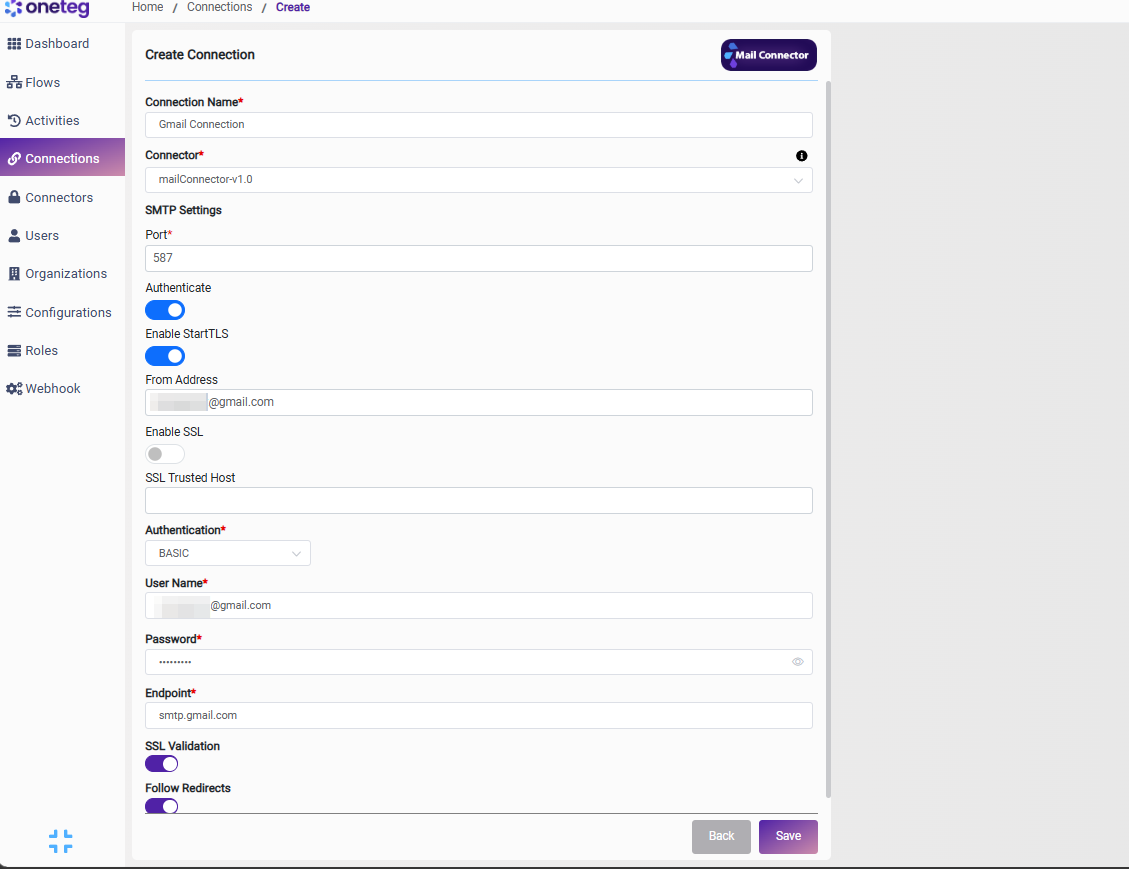
In OneTeg, navigate to Connections and create a new connection using the Mail Connector. Enter the settings below.
|
Settings Parameters |
Value / Sample Value |
Description |
Required (Y/N) |
|
Connection Name |
Mail Connection |
Choose a name for your Connection |
Y |
|
Connector |
mailConnector-v1.0 |
Auto-populated once the Mail Connector is selected |
Y |
|
Port |
587 |
The SMTP server port (for example 587 for StartTLS, 465 for SSL, or 25 for unencrypted) |
Y |
|
Authenticate |
On / Off (toggle) |
Enable if the SMTP server requires a username and password to send email |
N |
|
Enable StartTLS |
On / Off (toggle) |
Enable to upgrade the connection to TLS via STARTTLS, typically with port 587 |
N |
|
From Address |
The email address shown as the sender (From). If left empty, the User Name is used as the From address |
N |
|
|
Enable SSL |
On / Off (toggle) |
Enable to use a fully encrypted SSL/SMTPS connection, typically with port 465 |
N |
|
SSL Trusted Host |
Optional trusted host used when validating the server’s SSL certificate |
N |
|
|
Authentication |
BASIC |
Select BASIC as the authentication method |
Y |
|
User Name |
The SMTP username; this address is also used as the From address when sending (unless From Address is set) |
Y |
|
|
Password |
Your SMTP password |
The password (or app-specific password) for the SMTP account |
Y |
|
Endpoint |
The SMTP server host |
Y |
4. Supported Mail Actions and Options
For the full list of supported actions, parameters, and options, see the page below: