
1. General Information
Aviary (by AVP) is a cloud-based platform for audiovisual digital asset management, used by cultural heritage organizations, archives, and libraries to organize, describe, and provide secure online access to audiovisual collections — with features such as time-coded transcripts, indexes, and annotations. The Aviary API provides programmatic access to an organization’s resources and media.
The OneTeg Aviary Connector integrates with the Aviary API, enabling users to work with audiovisual resources and metadata directly from OneTeg automation workflows. This connector supports three authentication options: Apikey, Bearer, and Custom.
Aviary’s API is accessed through your organization’s subdomain (for example yourorg.aviaryplatform.com), and its authentication is based on an API Key that you generate in your Aviary account. The Apikey and Bearer options use this same API Key — the Apikey option sends it as an API key, and the Bearer option sends it as a Bearer token in the Authorization header.
2. Connect Aviary to OneTeg
The Apikey and Bearer options use an API Key generated in Aviary. Follow the steps below to obtain the key and identify the URL you will enter into OneTeg.
Step 1 - Generate an API Key
In your Aviary account, generate an API Key — Aviary requires generating an API Key before the API can be used. Copy the key and keep it somewhere secure.
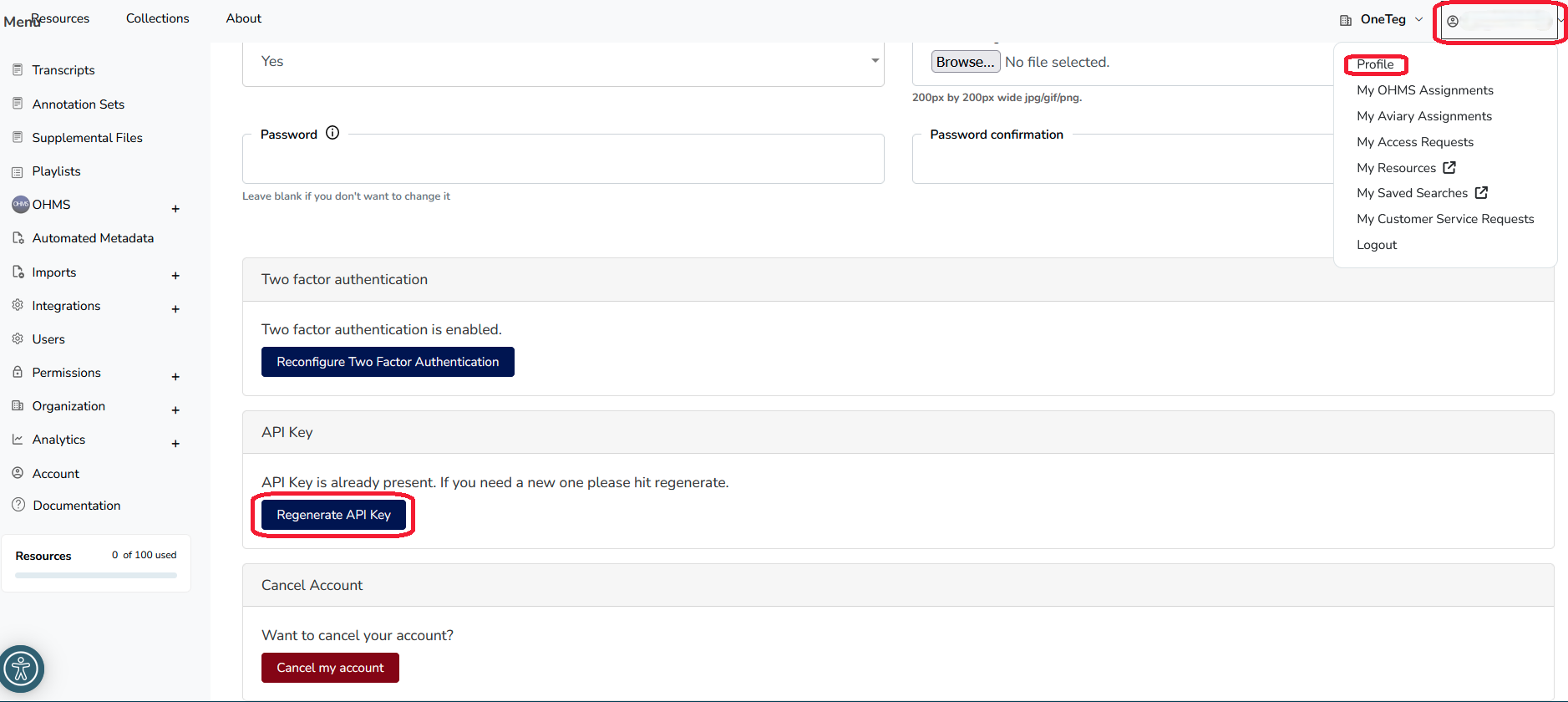
Step 2 - Identify Your Organization Subdomain
Your Endpoint URL is https://{your-organization}.aviaryplatform.com, where {your-organization} is your Aviary organization subdomain. You can view or edit it in Aviary under the Organization tab → Profile → Subdomain field.
3. Connection Settings and Configuration for OneTeg
In OneTeg, navigate to Connections and create a new connection using the Aviary Connector. Choose one of the authentication options below.
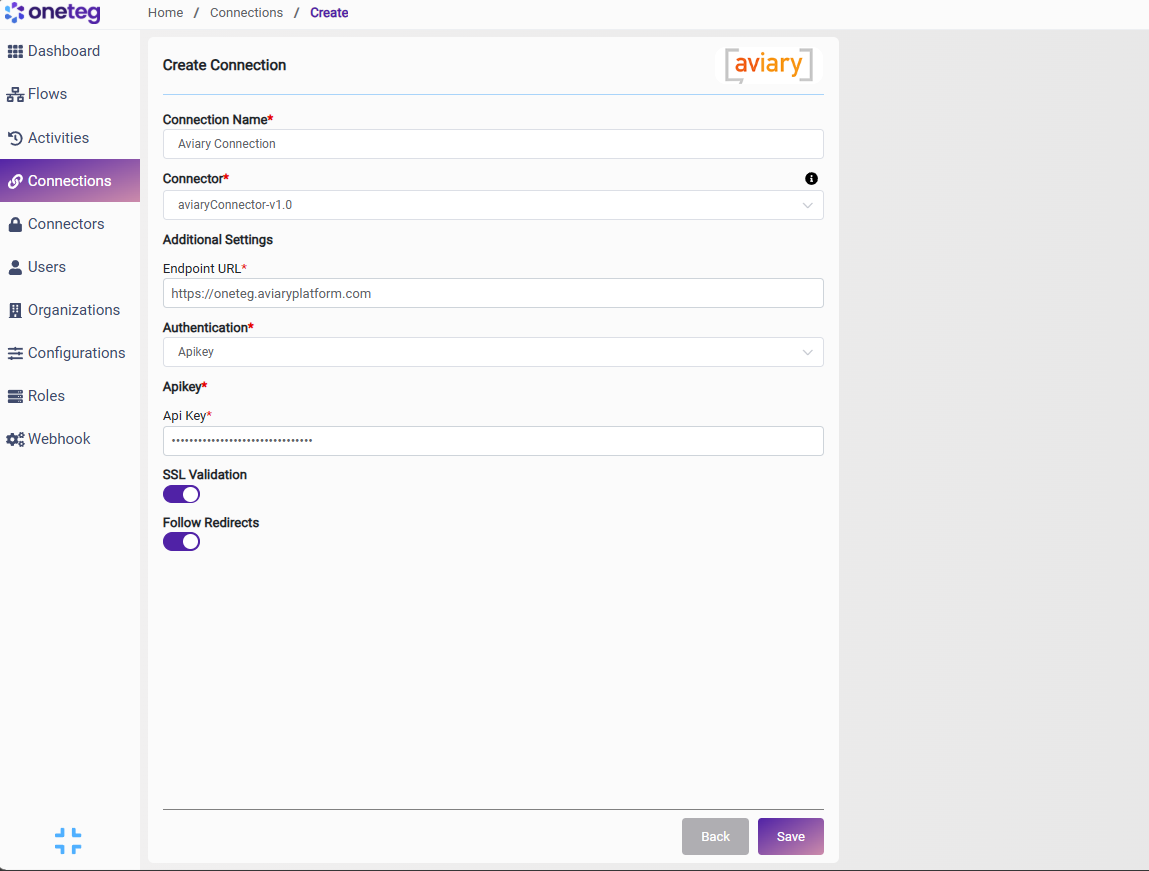
Option 1 — Apikey
|
Settings Parameters |
Value / Sample Value |
Description |
Required (Y/N) |
|
Connection Name |
Aviary Connection |
Choose a name for your Connection |
Y |
|
Connector |
aviaryConnector-v1.0 |
Auto-populated once the Aviary Connector is selected |
Y |
|
Endpoint URL |
https://{your-organization}.aviaryplatform.com |
The base URL of your Aviary organization, where {your-organization} is your Aviary subdomain (Organization → Profile → Subdomain) |
Y |
|
Authentication |
Apikey |
Select Apikey as the authentication method |
Y |
|
Api Key |
Your Aviary API key |
The API key generated in your Aviary account, used to authenticate API requests |
Y |
Option 2 — Bearer
|
Settings Parameters |
Value / Sample Value |
Description |
Required (Y/N) |
|
Connection Name |
Aviary Connection |
Choose a name for your Connection |
Y |
|
Connector |
aviaryConnector-v1.0 |
Auto-populated once the Aviary Connector is selected |
Y |
|
Endpoint URL |
https://{your-organization}.aviaryplatform.com |
The base URL of your Aviary organization, where {your-organization} is your Aviary subdomain (Organization → Profile → Subdomain) |
Y |
|
Authentication |
Bearer |
Select Bearer as the authentication method |
Y |
|
token |
Your Aviary API key |
The same Aviary API key used for the Apikey option, sent as a Bearer token in the Authorization header |
Y |
Option 3 — Custom
|
Settings Parameters |
Value / Sample Value |
Description |
Required (Y/N) |
|
Connection Name |
Aviary Connection |
Choose a name for your Connection |
Y |
|
Connector |
aviaryConnector-v1.0 |
Auto-populated once the Aviary Connector is selected |
Y |
|
Endpoint URL |
https://{your-organization}.aviaryplatform.com |
The base URL of your Aviary organization, where {your-organization} is your Aviary subdomain (Organization → Profile → Subdomain) |
Y |
|
Authentication |
Custom |
Select Custom as the authentication method |
Y |
|
password |
Your Aviary account password |
The password of the Aviary account used to authenticate |
Y |
|
Endpoint |
https://{your-organization}.aviaryplatform.com |
The endpoint OneTeg calls to authenticate and obtain a session |
Y |
|
Session Validity URL |
https://{your-organization}.aviaryplatform.com |
A URL OneTeg uses to verify that the current session is still valid |
Y |
|
|
Your Aviary account email |
The email address of the Aviary account used to authenticate |
Y |
4. Supported Aviary Actions and Options
For the full list of supported endpoints, parameters, and options, see the page below: