
1. General Information
Creative Force is an end-to-end workflow management platform for e-commerce content production, used by studios and brands to plan, produce, and deliver product photography, video, and copy at scale. It manages the entire production pipeline — from sample tracking and shot planning to post-production, review, and delivery. The Creative Force Gateway API provides programmatic access to production data such as products, tasks, and assets.
The OneTeg Creative Force Connector integrates with the Creative Force Gateway API, enabling users to manage production workflows and content data directly from OneTeg automation workflows. This connector authenticates using OAuth with two supported flows: Client Credentials and Authorization Code.
Client Credentials is the recommended flow for OneTeg integrations, as it authenticates at the application level without requiring a user login or browser interaction. Accessing the API requires a Creative Force user with Developer API permissions.
2. Connect Creative Force to OneTeg
Both OAuth flows use the same registered app in Creative Force. Follow the steps below to register your app and obtain the Client ID and Client Secret.
Step 1 - Ensure Developer API Permissions
Accessing the Creative Force Gateway API requires a Creative Force user with Developer API permissions. Confirm your account has this permission, or ask your Creative Force administrator to grant it via user roles and permissions.
Step 2 - Register a New App
Log in to Creative Force and navigate to Studio settings → Integrations → Register Apps. Register a new app with a descriptive name — for example, "OneTeg Integration". If you plan to use the Authorization Code flow, also configure the OneTeg OAuth callback URL (https://app.oneteg.com/rest/v1/oauth2/callback) as the app's redirect URI.
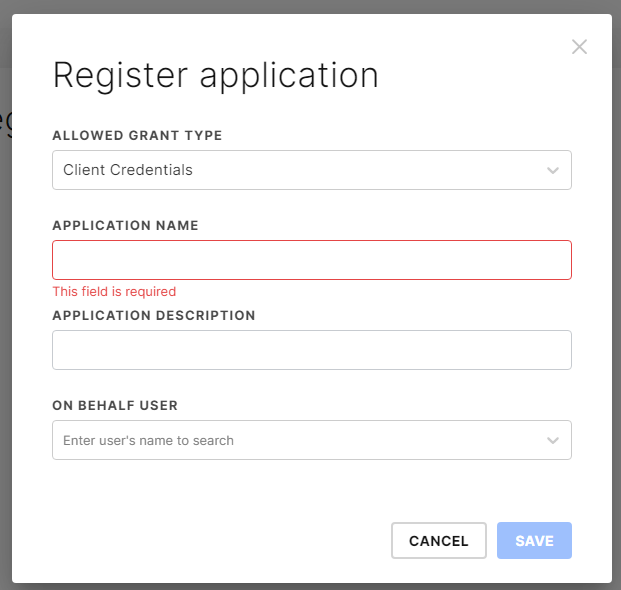
Step 3 - Copy the Application ID and Secret Key
The registered app is assigned a unique Application ID (this is the OAuth Client ID) and a Secret Key (the OAuth Client Secret). Copy both values — you will enter them into OneTeg in the next step. Do not share the Secret Key.
Access tokens obtained via Client Credentials expire after 1 hour and are re-acquired automatically by OneTeg using the stored Client ID and Client Secret — no manual token management is needed. The Client Credentials token is application-level and separate from any user's token.
3. Connection Settings and Configuration for OneTeg
In OneTeg, navigate to Connections and create a new connection using the Creative Force Connector. Choose your preferred OAuth flow below.
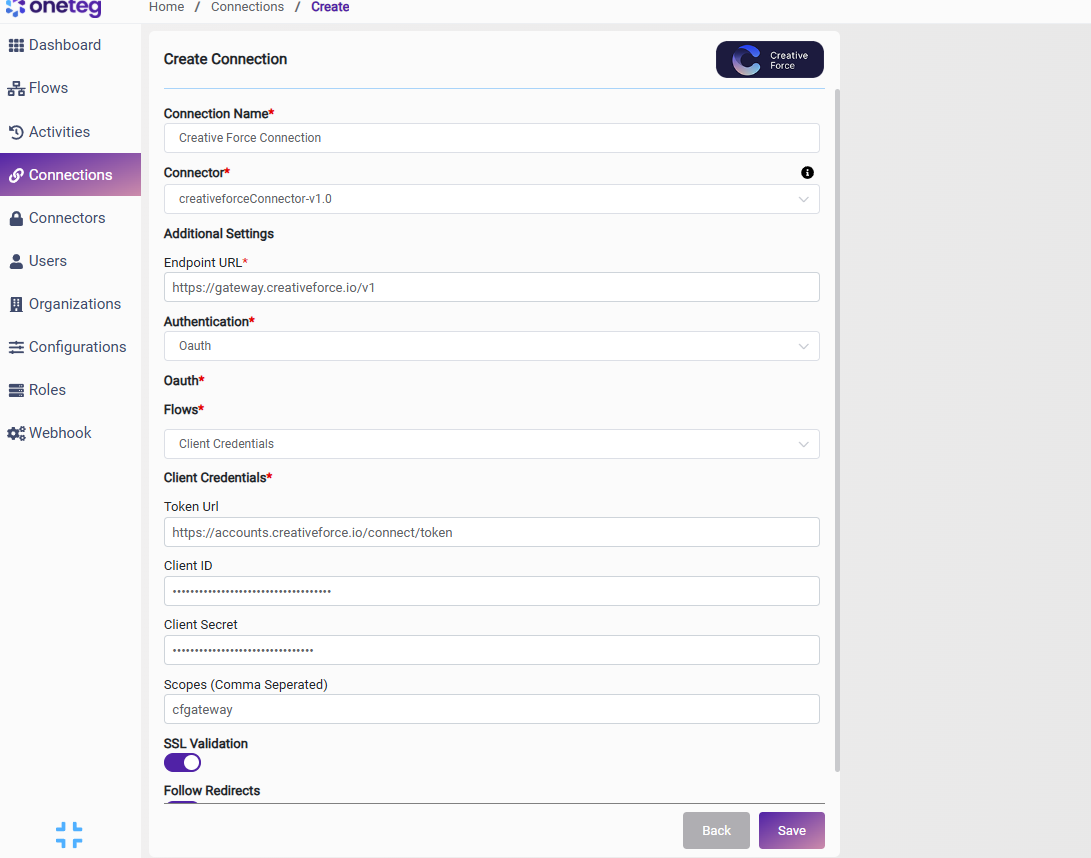
Option 1 — Client Credentials
Use this flow for unattended, application-level integrations. No user login or browser interaction is required.
|
Settings Parameters |
Value / Sample Value |
Description |
Required (Y/N) |
|
Connection Name |
Creative Force Connection |
Choose a name for your Connection |
Y |
|
Connector |
creativeforceConnector-v1.0 |
Auto-populated once the Creative Force Connector is selected |
Y |
|
Endpoint URL |
https://gateway.creativeforce.io/v1 |
The base URL of the Creative Force Gateway API |
Y |
|
Authentication |
Oauth |
Select Oauth as the authentication method |
Y |
|
Flows |
Client Credentials |
Select Client Credentials as the OAuth flow |
Y |
|
Token Url |
https://accounts.creativeforce.io/connect/token |
The Creative Force token endpoint used to obtain application access tokens |
Y |
|
Client ID |
Your Application ID |
The Application ID of your registered app in Creative Force (Studio settings → Integrations → Register Apps) |
Y |
|
Client Secret |
Your Secret Key |
The Secret Key of your registered app |
Y |
|
Scopes |
cfgateway |
The scope required to access the Creative Force Gateway API |
Y |
Option 2 — Authorization Code
Use this flow when API actions should run on behalf of a specific Creative Force user. User access tokens expire after 1 hour and refresh tokens after 30 days.
|
Settings Parameters |
Value / Sample Value |
Description |
Required (Y/N) |
|
Connection Name |
Creative Force Connection |
Choose a name for your Connection |
Y |
|
Connector |
creativeforceConnector-v1.0 |
Auto-populated once the Creative Force Connector is selected |
Y |
|
Endpoint URL |
https://gateway.creativeforce.io/v1 |
The base URL of the Creative Force Gateway API |
Y |
|
Authentication |
Oauth |
Select Oauth as the authentication method |
Y |
|
Flows |
Authorization Code |
Select Authorization Code as the OAuth flow |
Y |
|
Client ID |
Your Application ID |
The Application ID of your registered app in Creative Force |
Y |
|
Client Secret |
Your Secret Key |
The Secret Key of your registered app |
Y |
|
Token Url |
https://accounts.creativeforce.io/connect/token |
The Creative Force token endpoint used to exchange authorization codes for access tokens |
Y |
|
Authorization Url |
https://accounts.creativeforce.io/connect/authorize |
The Creative Force authorization endpoint where users grant access |
Y |
|
Scopes |
cfgateway offline_access |
cfgateway is required for API access; offline_access enables refresh tokens so the connection works when the user is not logged in |
Y |
4. Supported Creative Force Actions and Options
For the full list of supported endpoints, parameters, and options, see the page below: