
1. General Information
Confluence is Atlassian's team workspace and knowledge management platform, used by organizations to create, organize, and collaborate on documentation, meeting notes, project plans, and knowledge bases. Content is organized into spaces and pages with rich editing, commenting, and permission controls. Confluence Cloud exposes a REST API that provides programmatic access to pages, spaces, attachments, and other content.
The OneTeg Confluence Connector integrates with the Confluence Cloud REST API, enabling users to create, read, update, and manage pages and spaces directly from OneTeg automation workflows. This connector supports two authentication methods: OAuth Authorization Code (OAuth 2.0 3LO) and Basic authentication using an API token.
Confluence uses the same Atlassian account infrastructure and Developer Console as Jira. The Endpoint URL differs between authentication methods: Basic authentication connects directly to your site's /wiki path, while OAuth connects through the Atlassian API gateway using a cloud ID.
2. Connect Confluence to OneTeg
Both authentication methods use the same Atlassian account setup as the Jira Connector — API tokens for Basic authentication, and an Atlassian Developer Console OAuth 2.0 app for OAuth. Please follow the full credential setup guide in:
When following that guide, make these Confluence-specific adjustments: in Step 4, add the Confluence API to your app instead of (or in addition to) the Jira API, and configure Confluence scopes such as read:confluence-content.all and write:confluence-content. All other steps — generating an API token, registering the app, adding the OneTeg callback URL, copying the Client ID and Client Secret, and determining your cloud ID via the /_edge/tenant_info URL — are identical.
An Atlassian API token works across Jira and Confluence — if you already created one for the Jira Connector, you can reuse it here. Likewise, a single Developer Console app can serve both connectors if both the Jira and Confluence APIs and scopes are added to it.
3. Connection Settings and Configuration for OneTeg
In OneTeg, navigate to Connections and create a new connection using the Confluence Connector. Choose your preferred authentication method below. Note that the Endpoint URL is structured differently for each method.
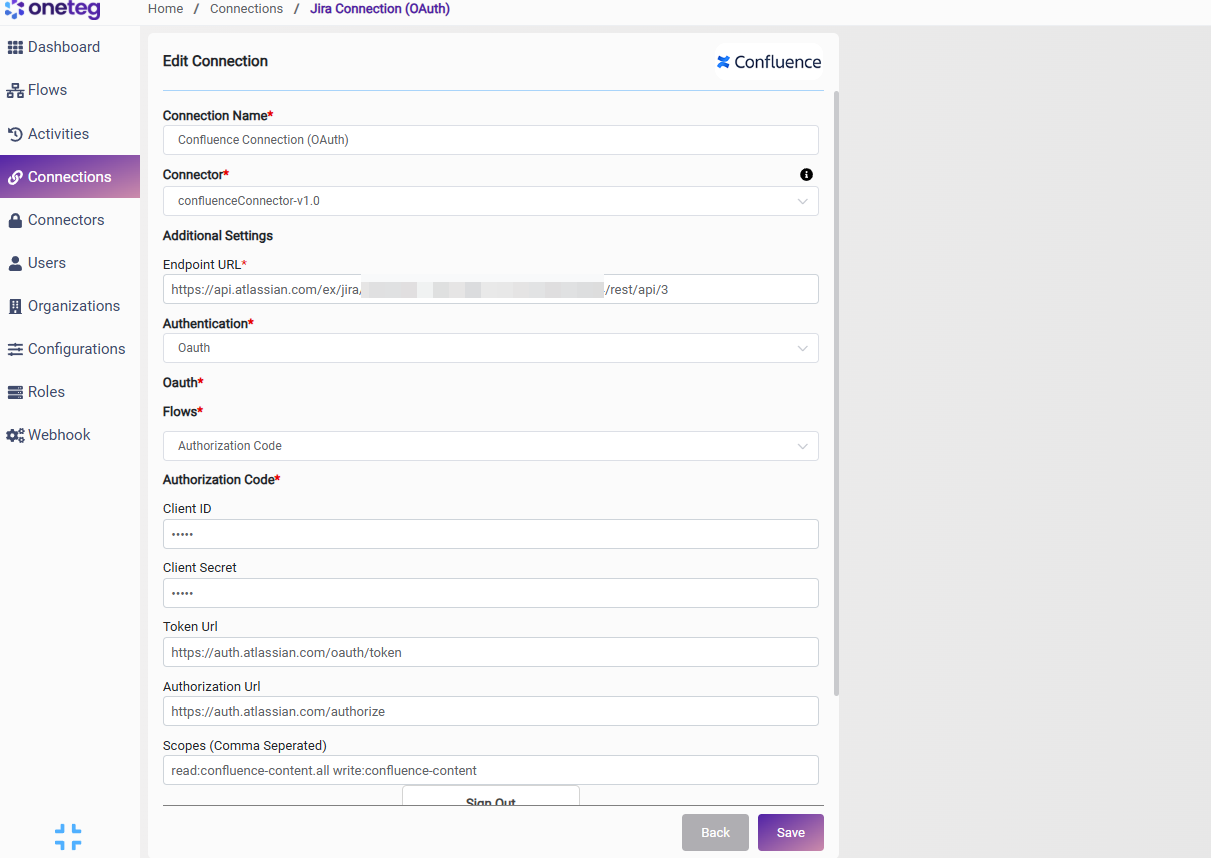
Option 1 — OAuth Authorization Code
Use this option for production integrations requiring scoped, user-delegated access. Requires an Atlassian Developer Console app with the Confluence API added.
|
Settings Parameters |
Value / Sample Value |
Description |
Required (Y/N) |
|
Connection Name |
Confluence Connection |
Choose a name for your Connection |
Y |
|
Connector |
confluenceConnector-v1.0 |
Auto-populated once the Confluence Connector is selected |
Y |
|
Endpoint URL |
https://api.atlassian.com/ex/confluence/{your-cloud-id}/wiki/rest/api |
The Atlassian API gateway URL for OAuth. Replace {your-cloud-id} with the cloud ID for your site |
Y |
|
Authentication |
Oauth |
Select Oauth as the authentication method |
Y |
|
Flows |
Authorization Code |
Select Authorization Code as the OAuth flow |
Y |
|
Client ID |
Your Atlassian app Client ID |
The Client ID from your app's Settings page in the Atlassian Developer Console |
Y |
|
Client Secret |
Your Atlassian app Client Secret |
The Client Secret from your app's Settings page in the Atlassian Developer Console |
Y |
|
Token Url |
The Atlassian OAuth token endpoint used to exchange authorization codes for access tokens |
Y |
|
|
Authorization Url |
The Atlassian OAuth authorization endpoint where users grant access |
Y |
|
|
Scopes |
read:confluence-content.all write:confluence-content |
Space-delimited list of Confluence scopes. Must match the scopes configured on your app in the Developer Console |
Y |
Option 2 — Basic
Use this option for a quick, straightforward connection using an Atlassian API token.
|
Settings Parameters |
Value / Sample Value |
Description |
Required (Y/N) |
|
Connection Name |
Confluence Connection |
Choose a name for your Connection |
Y |
|
Connector |
confluenceConnector-v1.0 |
Auto-populated once the Confluence Connector is selected |
Y |
|
Endpoint URL |
https://{your-domain}.atlassian.net/wiki/rest/api |
The base URL of your Confluence Cloud site. Replace {your-domain} with your own site domain |
Y |
|
Authentication |
Basic |
Select Basic as the authentication method |
Y |
|
Username |
The email address of your Atlassian account |
Y |
|
|
Password |
Your Atlassian API token |
The API token generated per the Jira Connector guide (used in place of your account password) |
Y |
4. Supported Confluence Actions and Options
For the full list of supported endpoints, parameters, and options, see the page below: