
1. General Information
Akeneo is a cloud-based Product Information Management (PIM) platform used to collect, enrich, and distribute product data across sales and marketing channels. The Akeneo REST API provides programmatic access to products, product models, attributes, families, categories, and media files in an Akeneo PIM.
The OneTeg Akeneo Connector integrates with the Akeneo REST API, enabling users to manage product information directly from OneTeg automation workflows. This connector authenticates using OAuth 2.0 with the Password flow.
Akeneo’s Password flow authenticates with four credentials — Client ID, Client Secret, Username, and Password — which OneTeg exchanges at the token endpoint for an access token that is sent as a Bearer token in the Authorization header. Because OneTeg stores these credentials, it can obtain a fresh token automatically when the current one expires (access tokens last about 1 hour), so no manual token updates are needed.
Scopes are not used by the Password flow (the token response returns no scope), so the Scopes field can be left blank. Access scopes apply only to Akeneo’s App (Authorization Code) flow.
2. Connect Akeneo to OneTeg
The Password flow uses credentials generated by an Akeneo connection. Follow the steps below to create the connection and identify the URLs you will enter into OneTeg.
Step 1 - Create a Connection in Akeneo
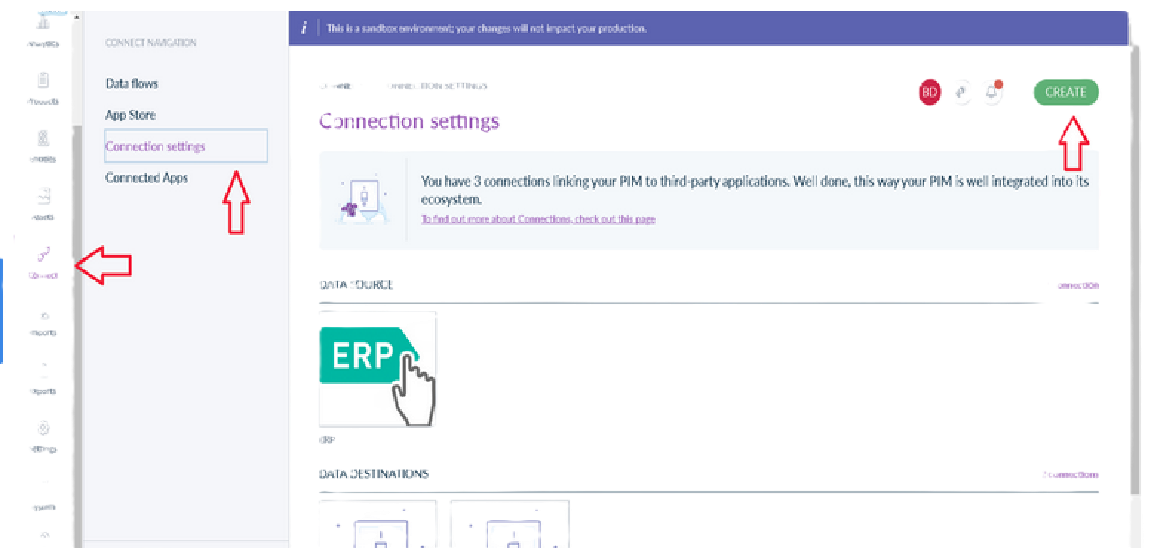
In Akeneo, go to Connect → Connection settings and click Create. Enter a label (for example, OneTeg), select a flow type, and click Save. Akeneo generates a dedicated set of credentials for the connection: a Client ID, a Secret, a Username, and a Password. It is best practice to use a dedicated API connection rather than reusing a UI user, and to ensure its user role has Web API access.
Step 2 - Copy the Credentials and Identify Your URLs
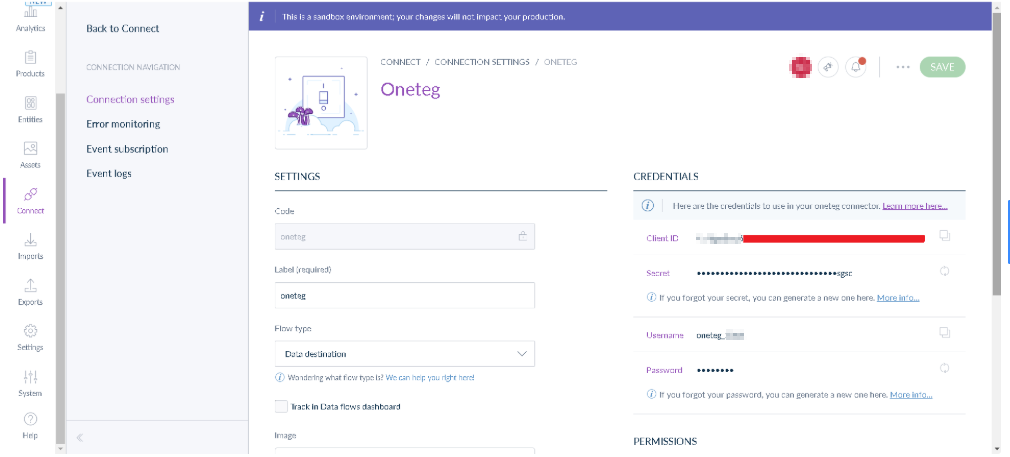
Copy the Username, Password, Client ID, and Secret. Your Token URL is https://{your-akeneo-host}/api/oauth/v1/token and your API Endpoint URL is https://{your-akeneo-host}/api/rest/v1, where {your-akeneo-host} is your Akeneo PIM URL (for example your-pim.cloud.akeneo.com).
3. Connection Settings and Configuration for OneTeg
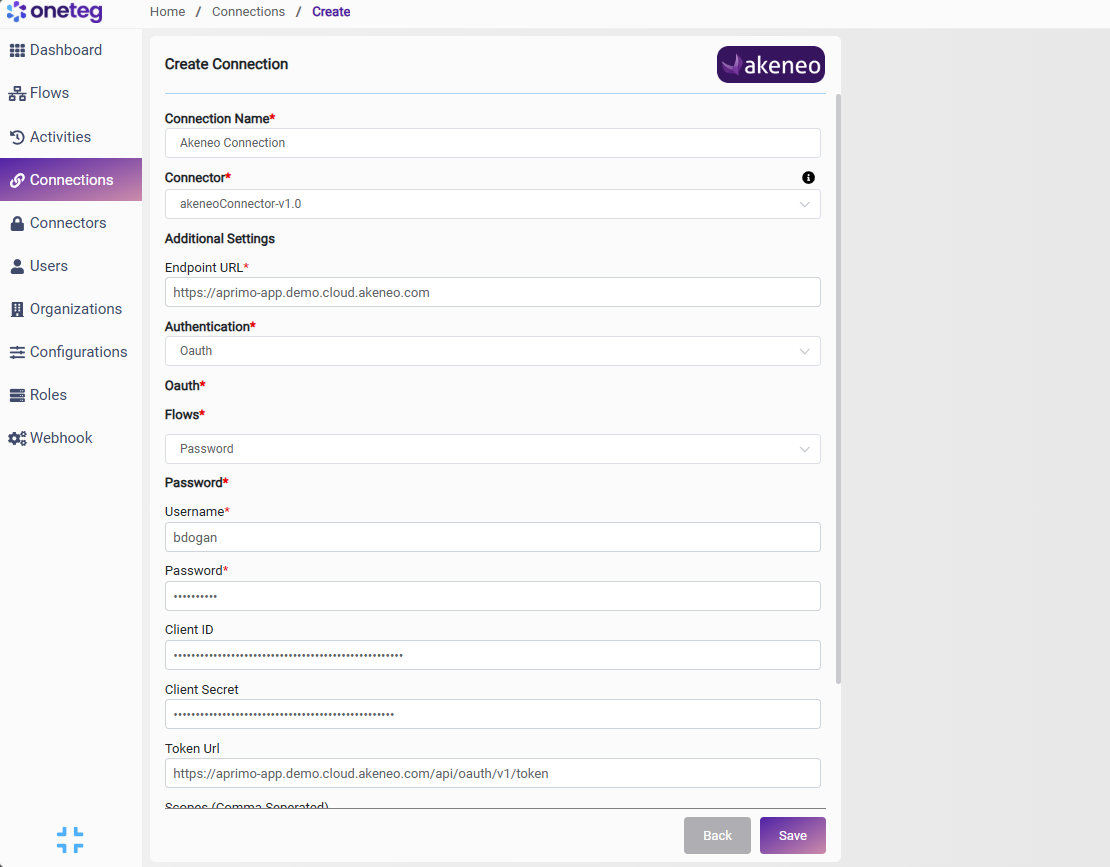
In OneTeg, navigate to Connections and create a new connection using the Akeneo Connector. Enter the settings below.
|
Settings Parameters |
Value / Sample Value |
Description |
Required (Y/N) |
|
Connection Name |
Akeneo Connection |
Choose a name for your Connection |
Y |
|
Connector |
akeneoConnector-v1.0 |
Auto-populated once the Akeneo Connector is selected |
Y |
|
Endpoint URL |
https://{your-akeneo-host}/api/rest/v1 |
The base URL of the Akeneo REST API, where {your-akeneo-host} is your Akeneo PIM URL (for example your-pim.cloud.akeneo.com) |
Y |
|
Authentication |
Oauth |
Select Oauth as the authentication method |
Y |
|
Flows |
Password |
Select Password as the OAuth flow |
Y |
|
Username |
Your Akeneo API username |
The username of the Akeneo API connection |
Y |
|
Password |
Your Akeneo API password |
The password of the Akeneo API connection |
Y |
|
Client ID |
Your Akeneo Client ID |
The Client ID generated by your Akeneo connection (Connect → Connection settings) |
Y |
|
Client Secret |
Your Akeneo Client Secret |
The Secret generated by your Akeneo connection |
Y |
|
Token Url |
https://{your-akeneo-host}/api/oauth/v1/token |
The Akeneo token endpoint used to obtain access tokens |
Y |
|
Scopes |
(leave blank) |
Not used for the Password flow; leave this field blank |
N |
4. Supported Akeneo Actions and Options
For the full list of supported endpoints, parameters, and options, see the page below: