
1. General Information
Acquia DAM (formerly Widen Collective) is a cloud-based digital asset management platform that helps organizations organize, manage, and distribute digital assets such as images, videos, and documents. It provides centralized asset storage, metadata management, brand portals, and workflow tools for creative and marketing teams. Acquia DAM exposes a REST API (v2) that provides programmatic access to assets, metadata, and product information.
The OneTeg Acquia DAM Connector integrates with the Acquia DAM API v2, enabling users to search, retrieve, and manage digital assets directly from OneTeg automation workflows. This connector supports two authentication methods: Basic and Bearer.
Both authentication methods use the same underlying credential: an Acquia DAM access token. For Bearer authentication, the token is sent directly. For Basic authentication, the token is used as the username with a fixed password value of x-oauth-basic.
2. Connect Acquia to OneTeg
The Acquia DAM Connector authenticates using an access token generated from the Acquia DAM Admin panel. The same token is used for both the Basic and Bearer authentication methods. Follow the steps below to generate your token.
Step 1 - Log in to Acquia DAM as an Administrator
Log in to your Acquia DAM (Widen) portal with an administrator account.
Step 2 - Open API Setup
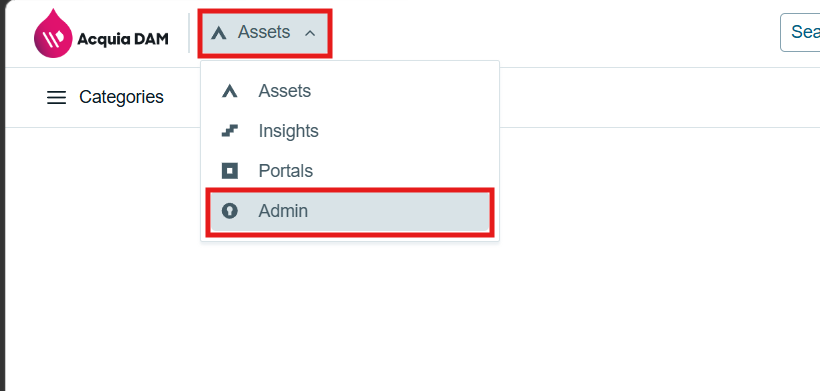
From the global dropdown, select Admin. Click Global Settings, then click API Setup.
Step 3 - Create a New Integration
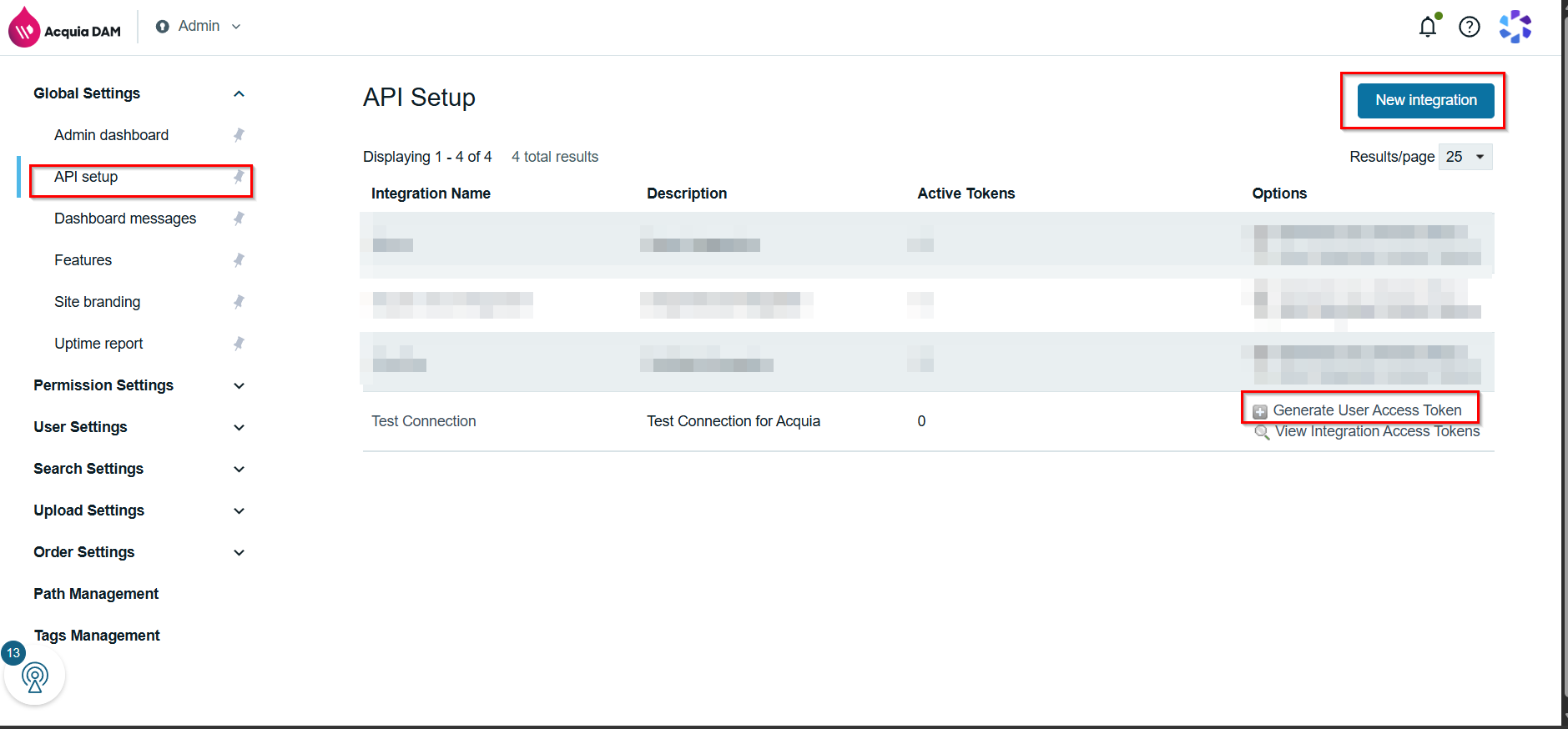
On the API Setup page, click New Integration. Enter a friendly Integration Name — for example, "OneTeg Integration" — and an optional Description. Click Register to create the integration.
Step 4 - Generate a User Access Token
In the row for your new integration, click Generate User Access Token. In the dialog, search for and select your user account in the Search users field, then click Generate Token. The dialog displays the access token — copy it and store it securely, as it will not be shown again.
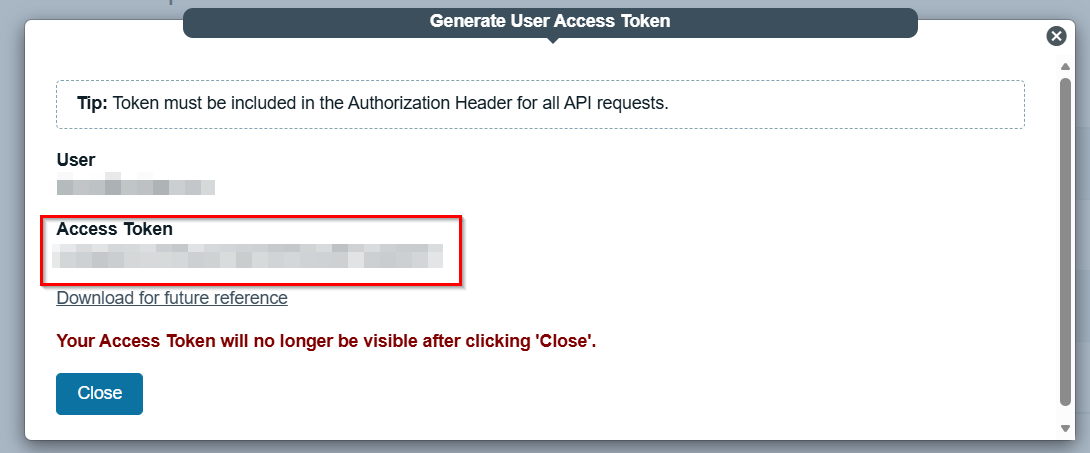
Access tokens inherit the permissions of the user account they were generated for. Deleting or disabling the user account, or disabling the integration from API Setup, will invalidate the token. Keep the token confidential.
3. Connection Settings and Configuration for OneTeg
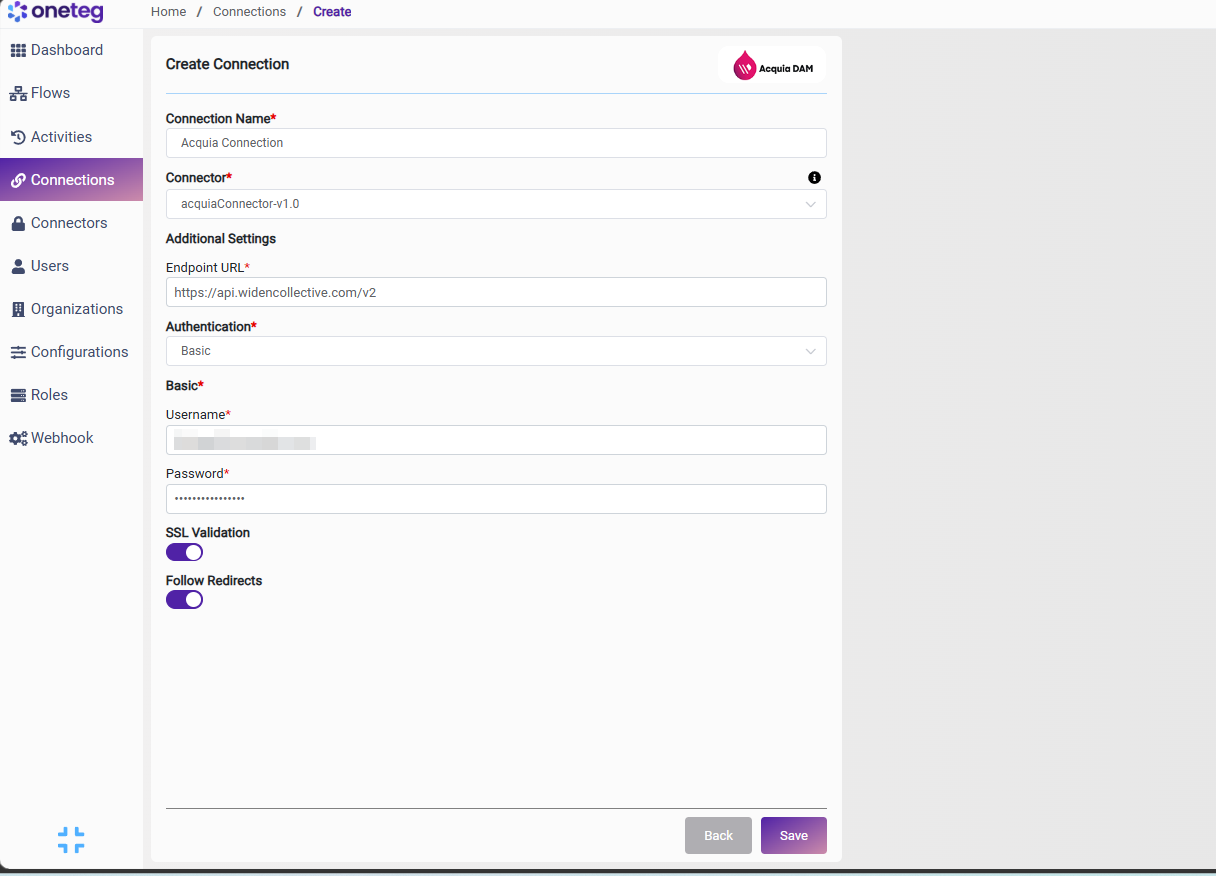
In OneTeg, navigate to Connections and create a new connection using the Acquia DAM Connector. Choose your preferred authentication method below.
Option 1 — Basic
Uses the access token as the username, with the fixed password value x-oauth-basic.
|
Settings Parameters |
Value / Sample Value |
Description |
Required (Y/N) |
|
Connection Name |
Acquia Connection |
Choose a name for your Connection |
Y |
|
Connector |
acquiaConnector-v1.0 |
Auto-populated once the Acquia DAM Connector is selected |
Y |
|
Endpoint URL |
The base URL of the Acquia DAM REST API v2 |
Y |
|
|
Authentication |
Basic |
Select Basic as the authentication method |
Y |
|
Username |
Your Acquia DAM access token |
The access token generated in Section 2, used as the username |
Y |
|
Password |
x-oauth-basic |
A fixed literal value required by the Acquia DAM API for Basic authentication |
Y |
Option 2 — Bearer Token
Uses the same access token sent directly as a Bearer token.
|
Settings Parameters |
Value / Sample Value |
Description |
Required (Y/N) |
|
Connection Name |
Acquia Connection |
Choose a name for your Connection |
Y |
|
Connector |
acquiaConnector-v1.0 |
Auto-populated once the Acquia DAM Connector is selected |
Y |
|
Endpoint URL |
The base URL of the Acquia DAM REST API v2 |
Y |
|
|
Authentication |
Bearer |
Select Bearer as the authentication method |
Y |
|
token |
Your Acquia DAM access token |
The same access token used for Basic authentication, sent directly as a Bearer token |
Y |