
1. General Information
Phrase TMS (formerly Memsource) is a cloud-based translation management system, part of the Phrase Localization Platform. Organizations use it to manage translation projects, jobs, translation memories, term bases, and vendors, combining human and machine translation in automated workflows. The Phrase TMS API provides programmatic access to these resources.
The OneTeg Phrase TMS Connector integrates with the Phrase TMS API, enabling users to manage translation projects and jobs directly from OneTeg automation workflows. This connector supports three authentication options: OAuth Authorization Code, Apitoken, and Custom.
Phrase TMS hosts are specific to your data center. EU accounts use cloud.memsource.com (TMS) and eu.phrase.com (Phrase Platform), while US accounts use us.cloud.memsource.com and us.phrase.com. Use the hosts that match your account in every URL below.
2. Connect Phrase TMS to OneTeg
Each authentication option uses a different credential. Complete the step that matches the option you plan to use.
Step 1 - Register an OAuth App (OAuth Authorization Code)
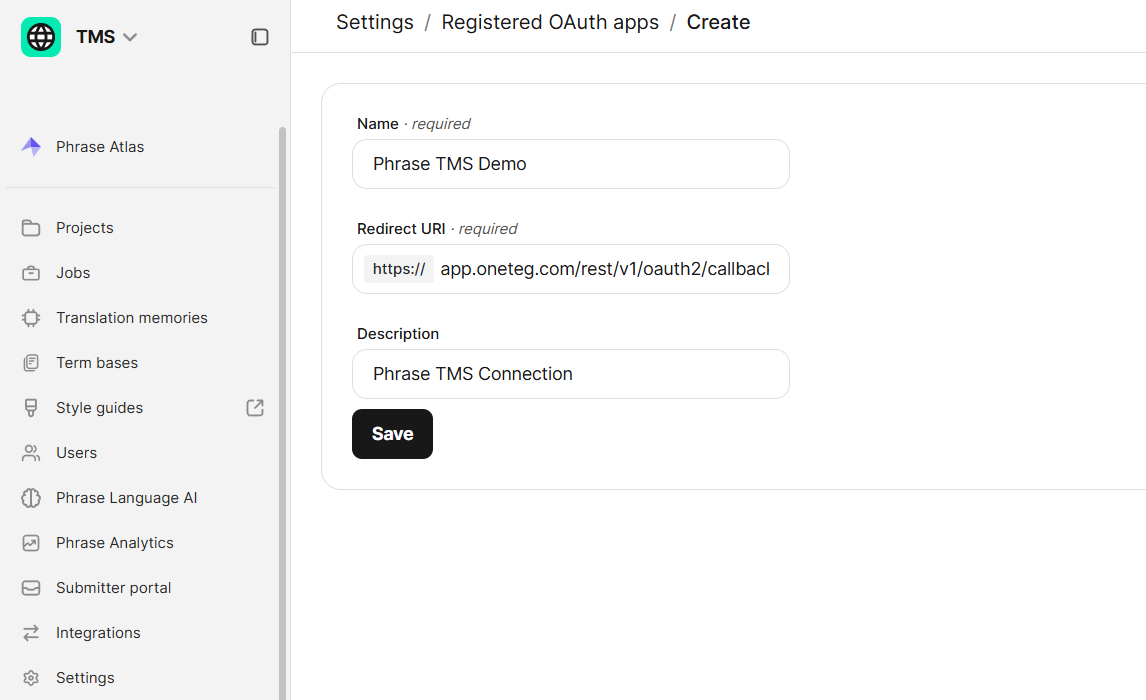
In Phrase TMS, open Settings, scroll to the Integrations section, and click Registered OAuth Apps. Click New, enter a Name, set the Redirect URI to the OneTeg OAuth callback URL (https://app.oneteg.com/rest/v1/oauth2/callback), add an optional Description, and click Save. The new app appears in the list with its Client ID. When you later authorize the connection, log in with an Administrator profile and click Allow.
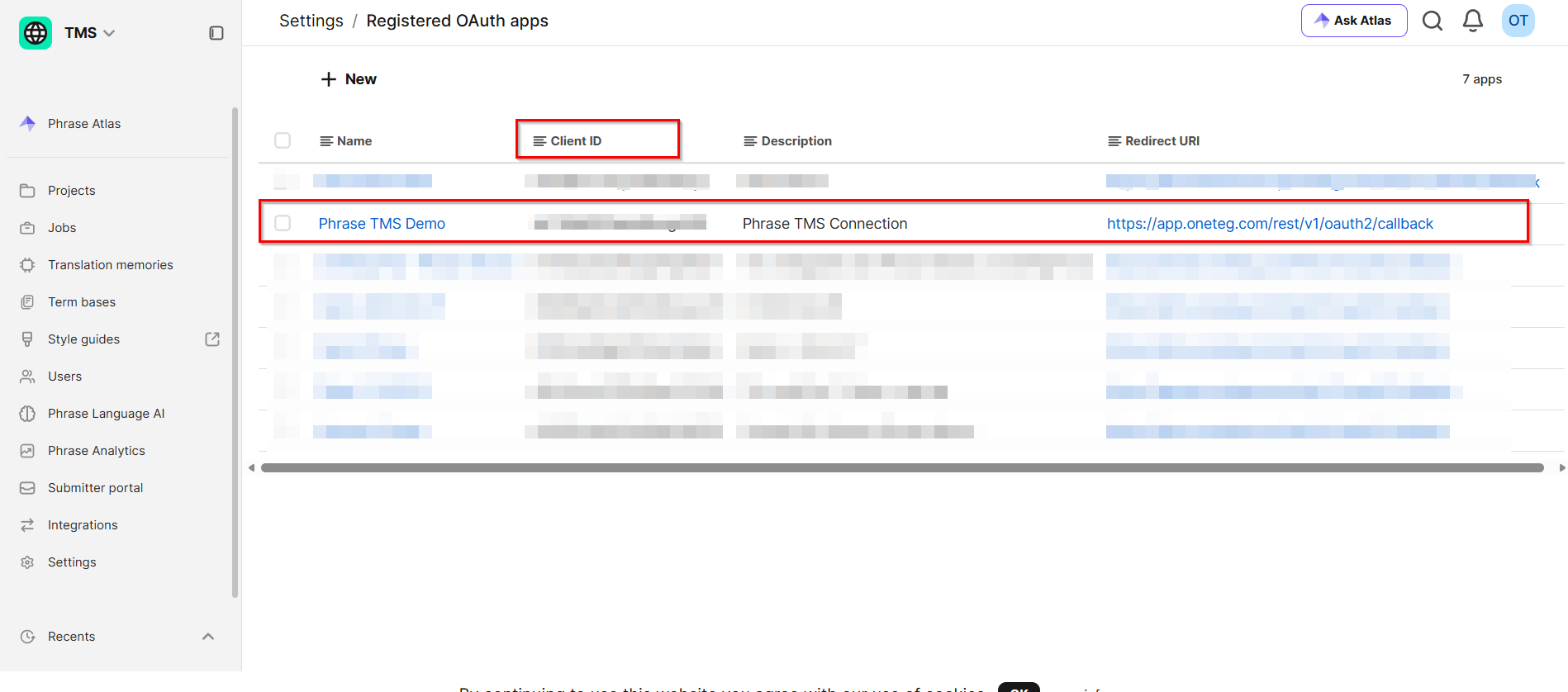
Phrase TMS OAuth is a public-client flow: Phrase issues only a Client ID, with no client secret. Because OneTeg's OAuth configuration still expects a Client Secret value, enter the same Client ID in both the Client ID and Client Secret fields. OAuth login is also not supported for user accounts that belong to more than one TMS organization; use the Apitoken or Custom option for such accounts.
Step 2 - Obtain an API Token (Apitoken)
Call the Phrase TMS auth/login API (for example POST https://cloud.memsource.com/web/api2/v3/auth/login) with a TMS username and password. The response contains a token, which OneTeg sends as ApiToken {token} in the Authorization header. If the user belongs to multiple TMS organizations, include the userUid in the login request to select the organization.
Step 3 - Generate a Phrase Platform API Token (Custom)
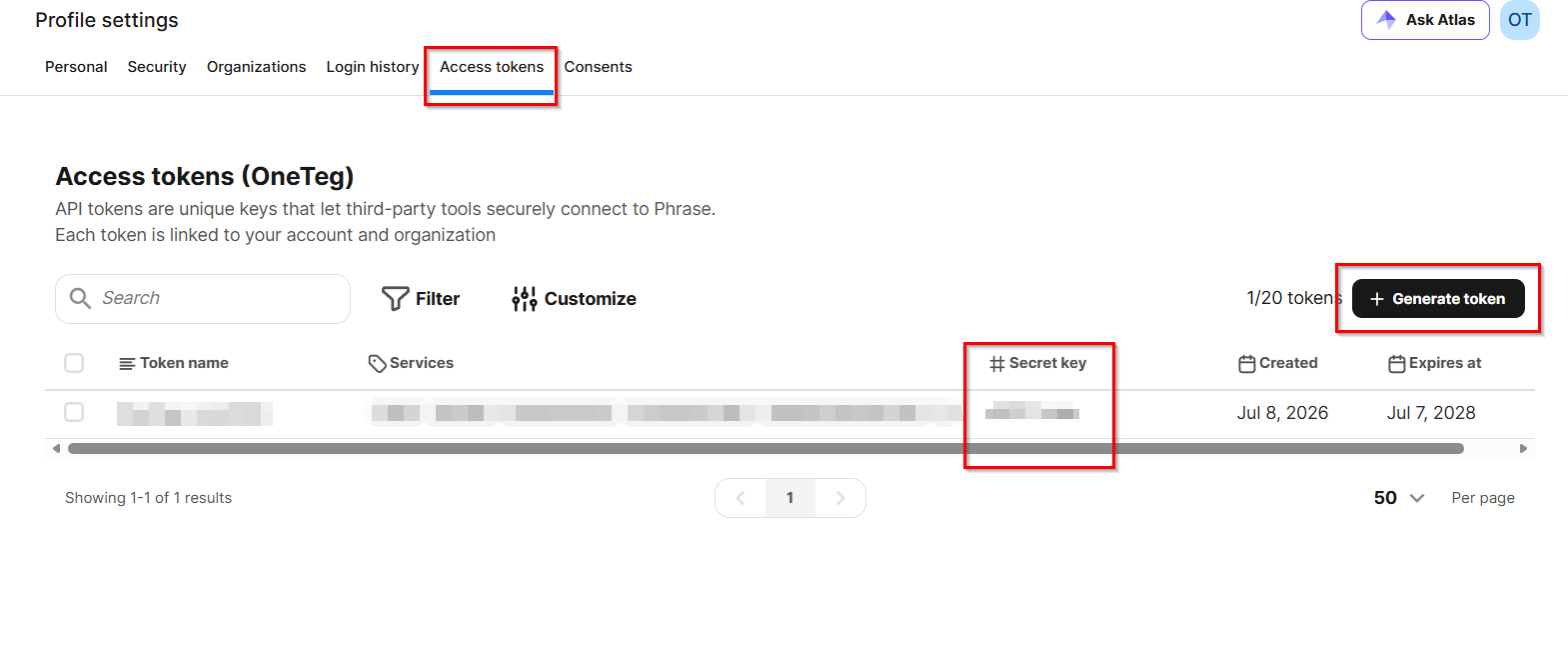
In Phrase Platform Settings, open the User Profile → Access Tokens tab (EU: https://eu.phrase.com/idm-ui/settings/access-tokens) and generate a new API token with access to Phrase TMS. Copy the token and store it securely. OneTeg exchanges this token for a short-lived access token automatically using OAuth 2.0 Token Exchange.
3. Connection Settings and Configuration for OneTeg
In OneTeg, navigate to Connections and create a new connection using the Phrase Connector. Choose one of the authentication options below.
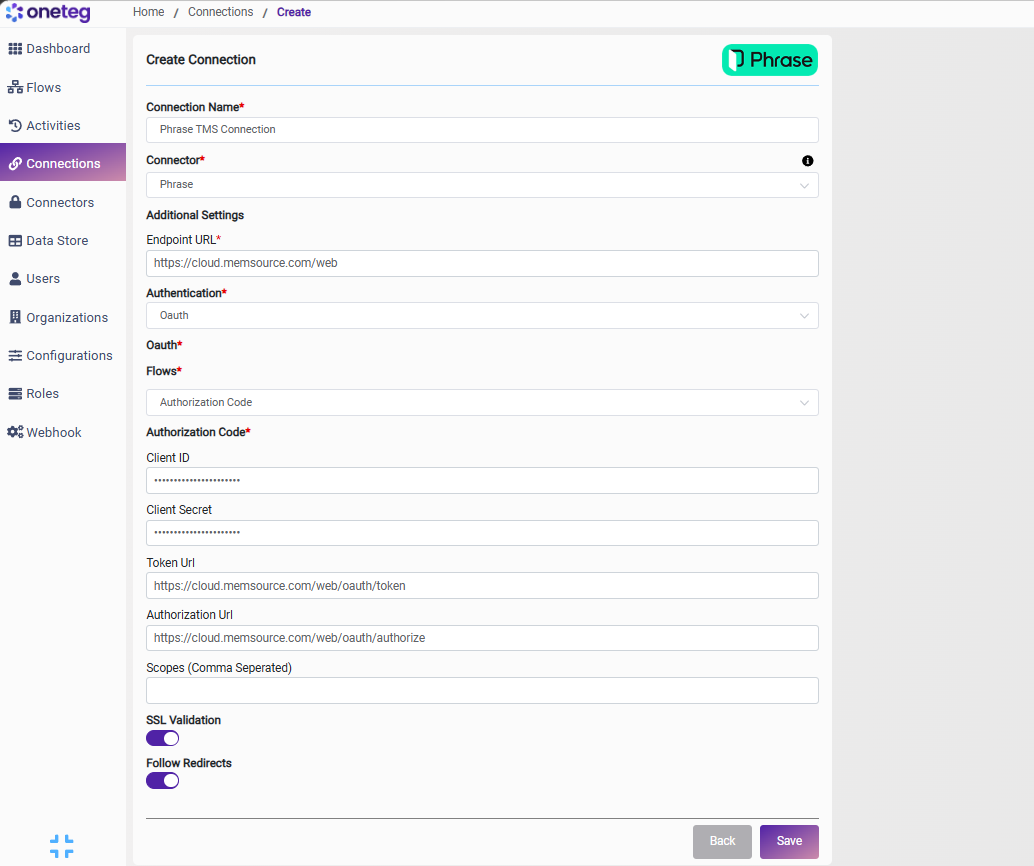
Option 1 — OAuth Authorization Code
|
Settings Parameters |
Value / Sample Value |
Description |
Required (Y/N) |
|
Connection Name |
Phrase TMS Connection |
Choose a name for your Connection |
Y |
|
Connector |
Phrase |
Auto-populated once the Phrase Connector is selected |
Y |
|
Endpoint URL |
The base URL of the Phrase TMS API (EU data center). For the US data center, use https://us.cloud.memsource.com/web |
Y |
|
|
Authentication |
Oauth |
Select Oauth as the authentication method |
Y |
|
Flows |
Authorization Code |
Select Authorization Code as the OAuth flow |
Y |
|
Client ID |
Your Registered OAuth App Client ID |
The Client ID of your app from Settings → Integrations → Registered OAuth Apps |
Y |
|
Client Secret |
Your Registered OAuth App Client ID |
Phrase TMS does not issue a client secret; enter the same value as the Client ID |
Y |
|
Token Url |
The Phrase TMS token endpoint (US: https://us.cloud.memsource.com/web/oauth/token) |
Y |
|
|
Authorization Url |
The Phrase TMS authorization endpoint (US: https://us.cloud.memsource.com/web/oauth/authorize) |
Y |
|
|
Scopes |
(leave blank) |
Not used by the Phrase TMS OAuth flow |
N |
Option 2 — Apitoken
|
Settings Parameters |
Value / Sample Value |
Description |
Required (Y/N) |
|
Connection Name |
Phrase TMS Connection |
Choose a name for your Connection |
Y |
|
Connector |
Phrase |
Auto-populated once the Phrase Connector is selected |
Y |
|
Endpoint URL |
The base URL of the Phrase TMS API (EU data center). For the US data center, use https://us.cloud.memsource.com/web |
Y |
|
|
Authentication |
Apitoken |
Select Apitoken as the authentication method |
Y |
|
Api Key |
Your Phrase TMS API token |
The token returned by the TMS auth/login API, sent as ApiToken {token} in the Authorization header |
Y |
Tokens from the auth/login API are valid for 24 hours and become invalid immediately if the user logs out of the Phrase TMS UI. You will need to update the token when it expires, making this method less suitable for long-running automations.
Option 3 — Custom
|
Settings Parameters |
Value / Sample Value |
Description |
Required (Y/N) |
|
Connection Name |
Phrase TMS Connection |
Choose a name for your Connection |
Y |
|
Connector |
Phrase |
Auto-populated once the Phrase Connector is selected |
Y |
|
Endpoint URL |
The base URL of the Phrase TMS API (EU data center). For the US data center, use https://us.cloud.memsource.com/web |
Y |
|
|
Authentication |
Custom |
Select Custom as the authentication method |
Y |
|
Endpoint |
The Phrase Platform token endpoint OneTeg calls to exchange your API token for an access token (US: https://us.phrase.com/idm/oauth/token) |
Y |
|
|
Session Validity URL |
A TMS endpoint OneTeg uses to verify that the current access token is still valid |
Y |
|
|
grant_type |
urn:ietf:params:oauth:grant-type:token-exchange |
The OAuth 2.0 Token Exchange grant type; enter this value exactly |
Y |
|
subject_token |
Your Phrase Platform API token |
The Phrase Platform API token generated under User Profile → Access Tokens |
Y |
The Phrase Platform API token is a long-lived secret — treat it like a password and store it securely. The access tokens it is exchanged for are short-lived, but OneTeg requests new ones automatically.
4. Supported Phrase TMS Actions and Options
For the full list of supported endpoints, parameters, and options, see the page below: