
1. General Information
Air.inc is a Creative Operations System for creative teams. Air Inc. delivers a robust visual workspace engineered to optimize creative operations. It empowers teams to efficiently aggregate, evaluate, and distribute content, thereby enhancing collaboration and streamlining approval workflows. The Air Public API provides programmatic access to assets, boards, custom fields, and related resources.
The OneTeg Air.inc Connector integrates with the Air Public API, enabling users to manage creative assets and metadata directly from OneTeg automation workflows. This connector authenticates using an API Key — an Air Public API key.
Air authenticates with your Public API key. The key is workspace-scoped, and most Air API requests also require a Workspace ID (sent in the x-air-workspace-id header) to target a specific workspace — provide the Workspace ID in your OneTeg actions where it is required. Your Workspace ID is listed on the same API Access page where you create the key.
API access requires a Business or Enterprise workspace, and only workspace owners or admins can create API keys. The API key is like a password — store it securely.
2. Connect Air.inc to OneTeg
The connector authenticates with an Air Public API key. Follow the steps below to obtain the key you will enter into OneTeg.
Step 1 - Sign in to Air.inc
Access the Air.inc portal using the appropriate credentials.
Step 2 - Open API Access
Navigate to Workspace Settings and select the API Access tab. This page is available to workspace owners and admins on Business and Enterprise workspaces.
Step 3 - Create an API Key
Select Create new API Key and complete the creation. Copy the key, and note your Workspace ID (listed on the same API Access page). Keep the key secure — you will paste it into OneTeg in the next step.
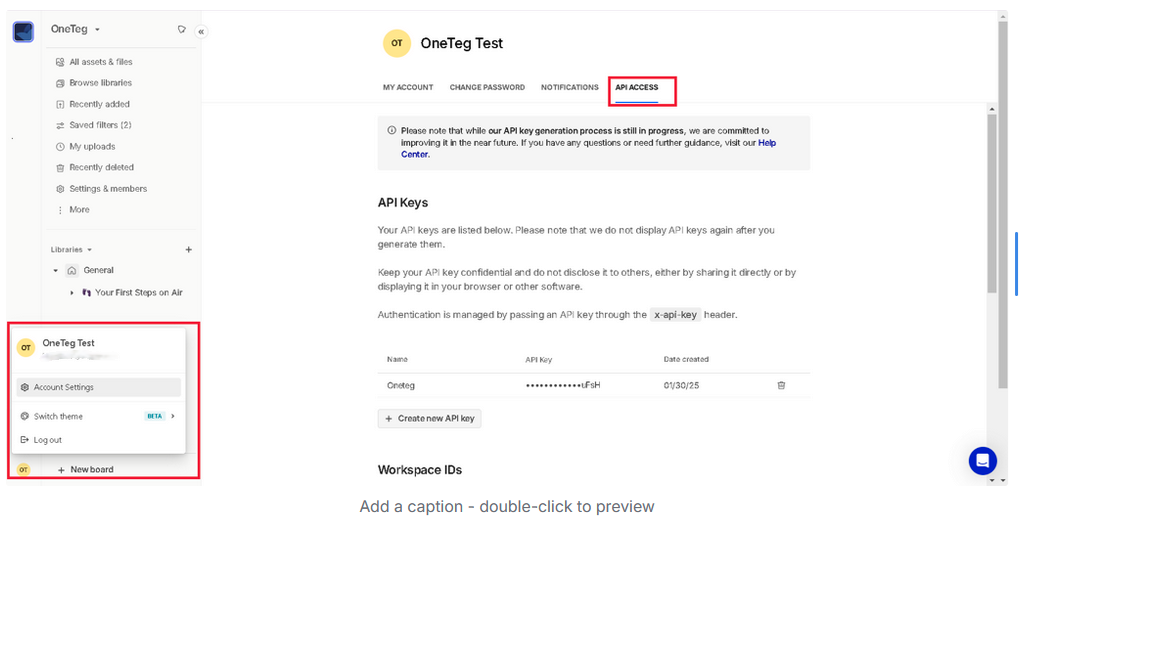
3. Connection Settings and Configuration for OneTeg
In OneTeg, navigate to Connections and create a new connection using the Air.inc Connector. Enter the settings below.
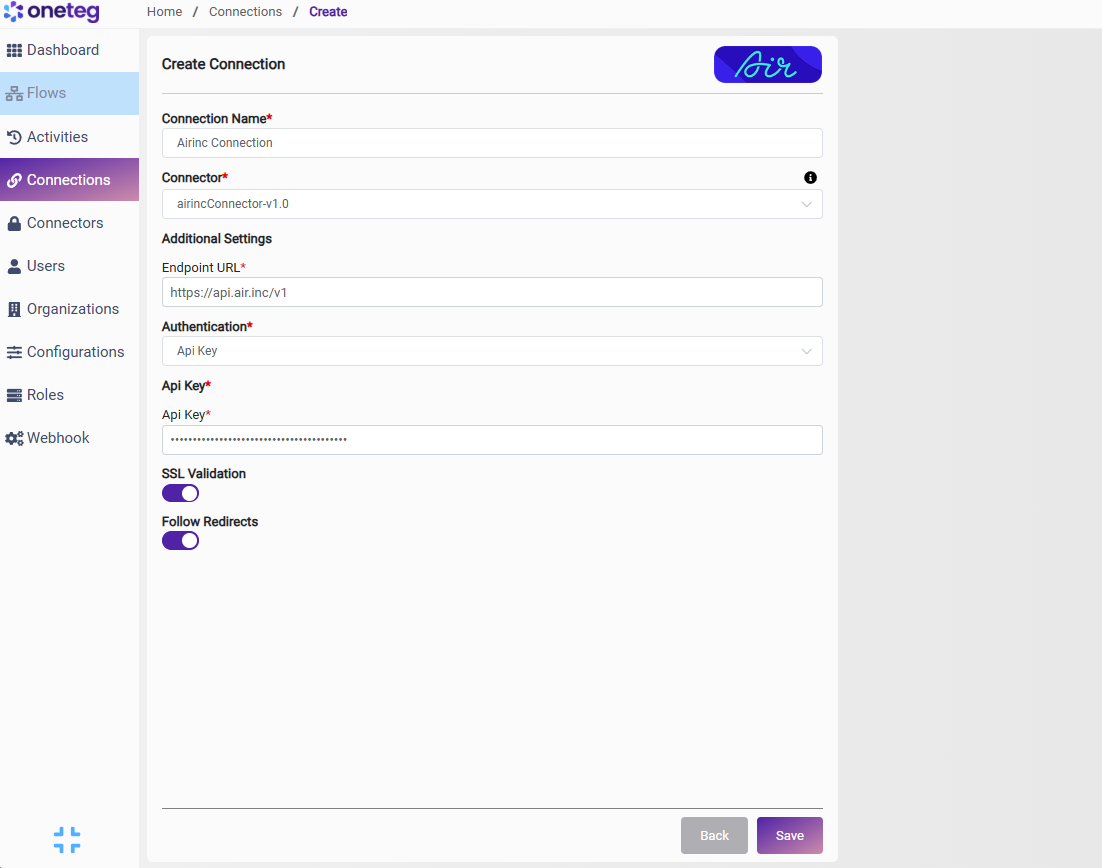
|
Settings Parameters |
Value / Sample Value |
Description |
Required (Y/N) |
|
Connection Name |
Airinc Connection |
Choose a name for your Connection |
Y |
|
Connector |
airincConnector-v1.0 |
Auto-populated once the Air.inc Connector is selected |
Y |
|
Endpoint URL |
https://api.air.inc/v1 |
The base URL of the Air Public API |
Y |
|
Authentication |
Api Key |
Select Api Key as the authentication method |
Y |
|
Api Key |
Your Air API key |
Your Air Public API key, generated in Workspace Settings → API Access, used to authenticate requests |
Y |
4. Supported Air.inc Actions and Options
For the full list of supported endpoints, parameters, and options, see the page below: