
1. General Information
Amplience Dynamic Content is the headless content management system (CMS) part of the Amplience platform. It lets teams model, author, schedule, and publish structured content — organized into hubs, content repositories, content types (schemas), and content items — for delivery across channels. The Dynamic Content Management API provides programmatic access to these resources.
The OneTeg Amplience Dynamic Content Connector integrates with the Dynamic Content Management API, enabling users to manage content items and related resources directly from OneTeg automation workflows. This connector authenticates using a Bearer token — an Amplience access token.
Amplience uses OAuth 2.0: an API key and secret are exchanged for an access token at https://auth.amplience.net, and the token is sent as a Bearer token in the Authorization header. The API key and secret are provided by Amplience at the start of a project or on request from Amplience support. The same credentials authorize both the Dynamic Content Management API and the Asset Management (Content Hub) API.
Amplience OAuth access tokens are short-lived — they generally expire after about 300 seconds (5 minutes) — which makes them impractical to paste into a static token field. For a durable credential, use an Amplience Personal Access Token (PAT) instead, which is designed for authorizing ongoing API access.
2. Connect Amplience Dynamic Content to OneTeg
The connector authenticates with an Amplience access token. Follow the steps below to obtain the token you will enter into OneTeg.
Step 1 - Obtain Your Amplience Credentials
Your API key and secret are provided by Amplience at the beginning of your project, or you can request them from Amplience support. Alternatively, create a Personal Access Token (PAT) in Amplience for a longer-lived credential.
Step 2 - Get a Bearer Token
For an OAuth token, send a POST request to https://auth.amplience.net with your API key (client id) and secret; the returned access token is used as the Bearer token. Alternatively, use your Personal Access Token (PAT) directly. Copy the token you intend to use — you will paste it into OneTeg in the next step.
3. Connection Settings and Configuration for OneTeg
In OneTeg, navigate to Connections and create a new connection using the Amplience Dynamic Content Connector. Enter the settings below.
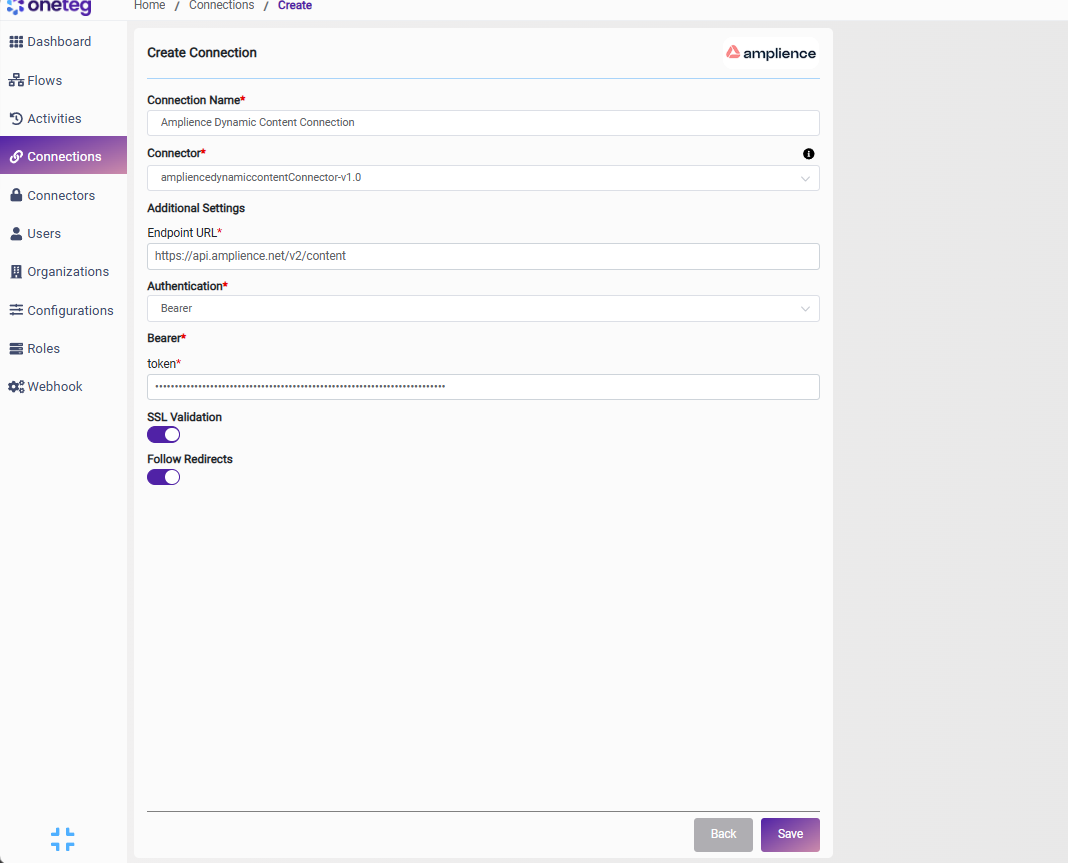
|
Settings Parameters |
Value / Sample Value |
Description |
Required (Y/N) |
|
Connection Name |
Amplience Dynamic Content Connection |
Choose a name for your Connection |
Y |
|
Connector |
ampliencedynamiccontentConnector-v1.0 |
Auto-populated once the Amplience Dynamic Content Connector is selected |
Y |
|
Endpoint URL |
https://api.amplience.net/v2/content |
The base URL of the Amplience Dynamic Content Management API |
Y |
|
Authentication |
Bearer |
Select Bearer as the authentication method |
Y |
|
token |
Your Amplience access token |
An Amplience OAuth 2.0 access token (obtained from https://auth.amplience.net) or a Personal Access Token (PAT), sent as a Bearer token in the Authorization header |
Y |
4. Supported Amplience Dynamic Content Actions and Options
For the full list of supported endpoints, parameters, and options, see the page below: