
1. General Information
Microsoft Planner is a task and project management application that is part of the Microsoft 365 suite. It enables teams to create plans, organize tasks into buckets, assign work to team members, track progress, and collaborate on projects. Planner integrates with Microsoft Teams, SharePoint, and other Microsoft 365 services, and is accessible through the Microsoft Graph API.
The OneTeg MS Planner Connector integrates with the Microsoft Graph API and enables users to build automated workflows for managing plans, tasks, buckets, and assignments directly from the OneTeg flow builder.
The MS Planner Connector uses the Microsoft Graph API — the same unified endpoint used by the Microsoft Teams, SharePoint, OneDrive, and Excel connectors. If you have already registered an Azure AD app for another Microsoft connector, you can reuse it by adding the appropriate Planner permissions.
2. Connect MS Planner to OneTeg
The MS Planner Connector authenticates via OAuth 2.0 Authorization Code flow using Azure Active Directory (Azure AD). The app registration process is identical to other Microsoft connectors.
For the full step-by-step Azure AD setup guide, refer to: Microsoft Teams Connector v1.0 → Section 2: Connect Microsoft Teams to OneTeg
When registering your app, use the name "OneTeg MS Planner Connector" to keep it distinct. The only difference from the Teams setup is in Step 4 — API Permissions, where you need to add the following Microsoft Graph permissions:
Tasks.Read — Read access to tasks and plans in Planner
Tasks.ReadWrite — Read and write access to tasks and plans in Planner
Group.Read.All — Read access to all Microsoft 365 groups (required to access group-based Planner plans)
Group.ReadWrite.All — Read and write access to all Microsoft 365 groups
offline_access — Maintain access without repeated sign-in (required for token refresh)
3. Connection Settings and Configuration for OneTeg
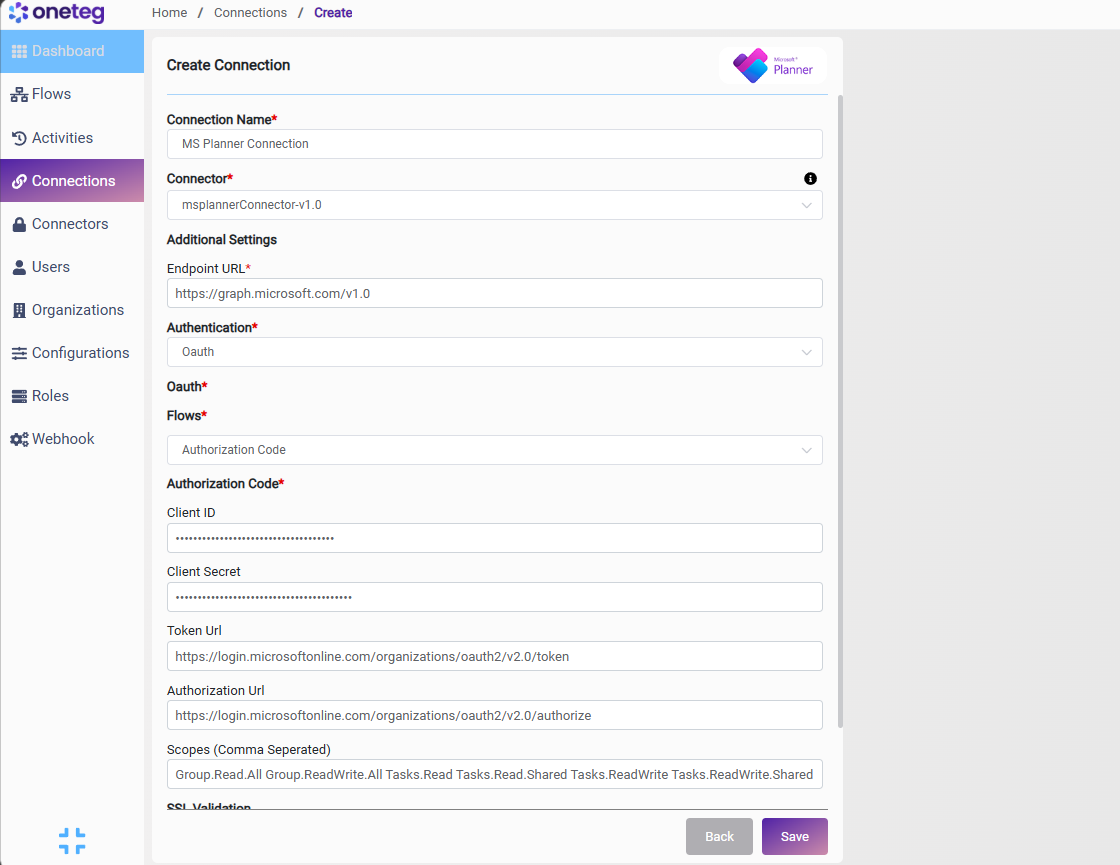
In OneTeg, navigate to Connections and create a new connection using the MS Planner Connector. The connector supports two authentication methods — OAuth (Authorization Code) and Bearer Token. Choose the one that best fits your setup.
Option 1 - OAuth Authentication (Authorization Code)
It authenticates on behalf of a specific Microsoft 365 user, allowing the connector to perform user-level actions across Planner plans and tasks. Access tokens are refreshed automatically by OneTeg.
|
Settings Parameters |
Value / Sample Value |
Description |
Required (Y/N) |
|
Connection Name |
MS Planner Connection |
Choose a name for your Connection |
Y |
|
Connector |
msplannerConnector-v1.0 |
Auto-populated once the MS Planner Connector is selected |
Y |
|
Endpoint URL |
Base URL of the Microsoft Graph API. This value is fixed and does not change |
Y |
|
|
Authentication |
OAuth |
Select OAuth from the dropdown |
Y |
|
Flows |
Authorization Code |
Select Authorization Code as the OAuth grant type |
Y |
|
Client ID |
Application (Client) ID |
Obtained from Azure Portal: Azure Active Directory → App Registrations → your app → Overview → Application (Client) ID |
Y |
|
Client Secret |
Client Secret Value |
Obtained from Azure Portal: Azure Active Directory → App Registrations → your app → Certificates & Secrets → Value. Copy immediately after creation |
Y |
|
Token URL |
https://login.microsoftonline.com/organizations/oauth2/v2.0/token |
Fixed Token URL |
Y |
|
Authorization URL |
https://login.microsoftonline.com/organizations/oauth2/v2.0/authorize |
Fixed Authorization URL |
Y |
|
Scopes |
Tasks.ReadWrite Group.ReadWrite.All offline_access |
Space-separated Microsoft Graph scopes for Planner access. Adjust based on whether your flows require read-only or read/write access |
Y |
Option 2 - Bearer Token Authentication
Use this method if you have a pre-existing Microsoft Graph access token obtained externally or through a custom Azure AD authentication flow. Note that Azure AD access tokens expire after approximately 1 hour — you will need to manually update the token when it expires.
|
Settings Parameters |
Value / Sample Value |
Description |
Required (Y/N) |
|
Connection Name |
MS Planner Connection |
Choose a name for your Connection |
Y |
|
Connector |
msplannerConnector-v1.0 |
Auto-populated once the MS Planner Connector is selected |
Y |
|
Endpoint URL |
Base URL of the Microsoft Graph API. This value is fixed and does not change |
Y |
|
|
Authentication |
Bearer |
Select Bearer from the dropdown |
Y |
|
Token |
Azure AD Access Token |
A valid Microsoft Graph access token scoped to Planner permissions. Obtained by calling the Azure AD token endpoint manually. Expires in ~1 hour |
Y |
4. Supported MS Planner Actions and Options
For the full list of supported endpoints, parameters, and options, see the page below: