
1. General Information
OpenText Customer Data Platform (OT CDP) is a cloud-based platform that enables organizations to unify, analyze, and activate customer data across touchpoints and channels. It collects and consolidates customer data from multiple sources into a single profile, enabling personalized experiences, audience segmentation, and data-driven marketing and service operations.
The OneTeg OpenText CDP Connector integrates with the OT CDP API and enables users to build automated workflows for managing customer profiles, segments, and data operations directly from the OneTeg flow builder.
The OpenText CDP Endpoint URL is specific to your OT CDP deployment. Replace the placeholder value in this document with your actual OT CDP server URL provided by your OpenText administrator or found in your OT CDP environment settings.
2. Connect OpenText CDP to OneTeg
The OpenText CDP Connector supports two authentication methods — Basic (username and password) and Bearer Token. The Basic method sends credentials with every API request, while the Bearer method uses a pre-obtained token. Follow the steps below to prepare your credentials.
Step 1 - Identify Your OT CDP Server URL and Obtain Credentials
Log in to your OpenText CDP instance and note the base URL from your browser's address bar. The CDP server URL follows the pattern https://your-instance.opentext.com/cdp-server. This is the value you will enter as the Endpoint URL in OneTeg.
Contact your OpenText CDP administrator to obtain the integration user credentials (username and password) or a Bearer Token, depending on which authentication method you intend to use.
3. Connection Settings and Configuration for OneTeg
In OneTeg, navigate to Connections and create a new connection using the OpenText CDP Connector. The connector supports two authentication methods — Basic and Bearer Token. Choose the one that best fits your setup.
Option 1 - Basic Authentication
Basic Authentication sends your OT CDP username and password with every API request. It is a straightforward method suitable for server-to-server integrations where token management is not required.
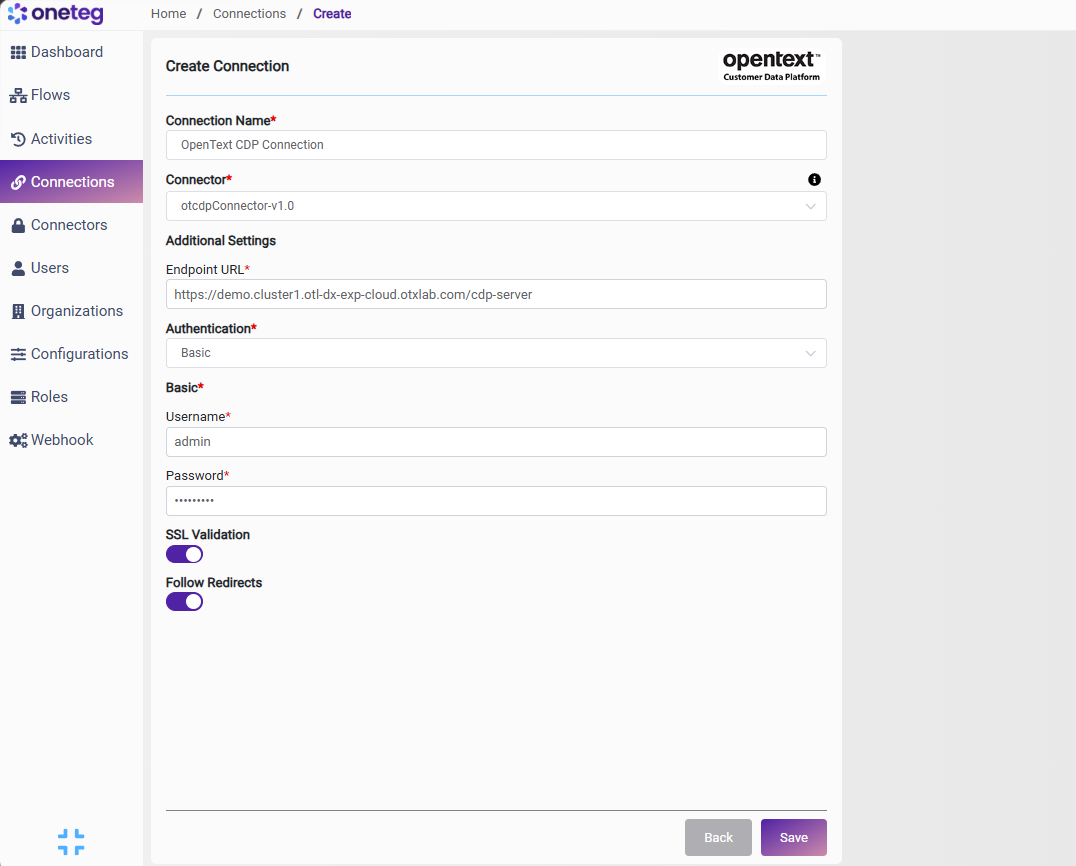
|
Settings Parameters |
Value / Sample Value |
Description |
Required (Y/N) |
|
Connection Name |
OpenText CDP |
Choose a name for your Connection |
Y |
|
Connector |
otcdpConnector-v1.0 |
Auto-populated once the OpenText CDP Connector is selected |
Y |
|
Endpoint URL |
Base URL of your OT CDP server. Replace your-instance.opentext.com with your actual OT CDP server hostname |
Y |
|
|
Authentication |
Basic |
Select Basic from the dropdown |
Y |
|
Username |
The username of the OT CDP integration user. Provided by your OpenText CDP administrator |
Y |
|
|
Password |
OT CDP user password |
The password of the OT CDP integration user. Provided by your OpenText CDP administrator |
Y |
Option 2 - Bearer Token Authentication
Use this method if you have a pre-existing OT CDP access token obtained externally or through a custom authentication flow. Note that OT CDP tokens may expire — you will need to manually update the token when it expires, making this method less suitable for long-running automations.
|
Settings Parameters |
Value / Sample Value |
Description |
Required (Y/N) |
|
Connection Name |
OpenText CDP |
Choose a name for your Connection |
Y |
|
Connector |
otcdpConnector-v1.0 |
Auto-populated once the OpenText CDP Connector is selected |
Y |
|
Endpoint URL |
Base URL of your OT CDP server |
Y |
|
|
Authentication |
Bearer |
Select Bearer from the dropdown |
Y |
|
Token |
OT CDP access token |
A valid OT CDP access token obtained externally or through a custom authentication process. Must be updated when it expires |
Y |
4. Supported OpenText CDP Actions and Options
For the full list of supported endpoints, parameters, and options, see the page below: