
1. General Information
Google Analytics is Google's web and app analytics platform, providing organizations with detailed insights into user behavior, traffic sources, conversion rates, and engagement metrics across websites and mobile applications. Google Analytics 4 (GA4), the current generation of the platform, uses an event-based data model and offers a comprehensive Data API for programmatic access to reports, metrics, and dimensions.
The OneTeg Google Analytics Connector integrates with the Google Analytics Data API v1, enabling users to query analytics reports and retrieve performance data directly from OneTeg automation workflows. This connector authenticates using OAuth Authorization Code.
This connector requires a Google Analytics 4 (GA4) property. Universal Analytics (UA) properties are no longer supported by Google. Ensure your Google Cloud project has access to the GA4 property you intend to query.
2. Connect Google Analytics to OneTeg
The Google Analytics Connector uses the same Google Cloud Console setup process as the Google Sheets Connector. Please follow the full credential setup guide in:
When following that guide, enable the Google Analytics Data API v1 instead of the Google Sheets API in Step 3, and use the Analytics-specific scope listed in Section 3 of this document. All other steps — creating a project, configuring the OAuth consent screen, creating OAuth 2.0 credentials, and adding the OneTeg redirect URI — are identical.
When enabling APIs in Step 3, search for "Google Analytics Data API" and click Enable. The redirect URI to add in Step 5 is: https://app.oneteg.com/rest/v1/oauth2/callback
3. Connection Settings and Configuration for OneTeg
In OneTeg, navigate to Connections and create a new connection using the Google Analytics Connector. Fill in the fields below using the credentials obtained in Section 2.
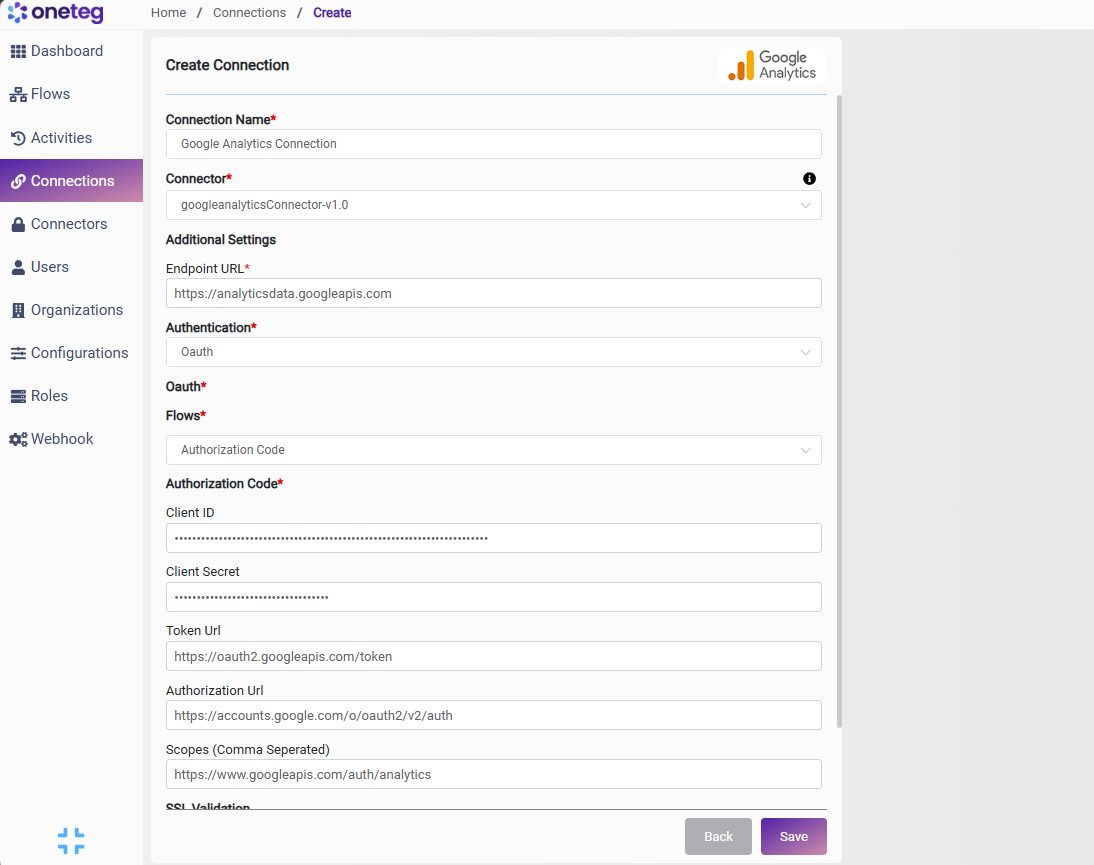
|
Settings Parameters |
Value / Sample Value |
Description |
Required (Y/N) |
|
Connection Name |
Google Analytics Connection |
Choose a name for your Connection |
Y |
|
Connector |
googleanalyticsConnector-v1.0 |
Auto-populated once the Google Analytics Connector is selected |
Y |
|
Endpoint URL |
The base URL of the Google Analytics Data API v1 |
Y |
|
|
Authentication |
Oauth |
Select Oauth as the authentication method |
Y |
|
Flows |
Authorization Code |
Select Authorization Code as the OAuth flow |
Y |
|
Client ID |
Your Google OAuth Client ID |
The Client ID from your OAuth 2.0 credentials in the Google Cloud Console |
Y |
|
Client Secret |
Your Google OAuth Client Secret |
The Client Secret from your OAuth 2.0 credentials in the Google Cloud Console |
Y |
|
Token URL |
The Google OAuth 2.0 token endpoint used to exchange authorization codes for access tokens |
Y |
|
|
Authorization URL |
The Google OAuth 2.0 authorization endpoint where users grant access |
Y |
|
|
Scopes |
The Google Analytics read-only scope. Use https://www.googleapis.com/auth/analytics for full access |
Y |
4. Supported Google Analytics Actions and Options
For the full list of supported endpoints, parameters, and options, see the page below: