
1. General Information
Canto is a cloud-based digital asset management (DAM) platform that organizations use to store, organize, find, share, and distribute images, videos, and other brand and marketing assets. The Canto API is a RESTful web service that lets you access, create, and modify assets, folders, and albums in your Canto account.
The OneTeg Canto Connector integrates with the Canto API, enabling users to manage digital assets and metadata directly from OneTeg automation workflows. This connector supports four authentication options: OAuth with two flows — Client Credentials (recommended) and Authorization Code — plus Bearer Token and Custom.
Canto authorizes via OAuth 2.0 using an API Key (App ID + App Secret). The same API Key is used for both OAuth flows; the Bearer option uses an access token produced by an OAuth flow. Canto’s OAuth server and API base URL are specific to your account’s domain (for example .com or .global). Canto access tokens are valid for 30 days.
2. Connect Canto to OneTeg
The OAuth flows use an API Key generated in Canto. Follow the steps below to create the API Key and identify the URLs you will enter into OneTeg.
Step 1 - Create a Canto API Key
In Canto, go to Settings → Configuration Options → API → API Keys and click Create API Key. Give it a descriptive name. If you plan to use the Authorization Code flow, set the Redirect URL to the OneTeg OAuth callback URL (https://app.oneteg.com/rest/v1/oauth2/callback). Note down the App ID, App Secret, and Website values of the new key. If you need assistance, Canto support can provide an API Key.
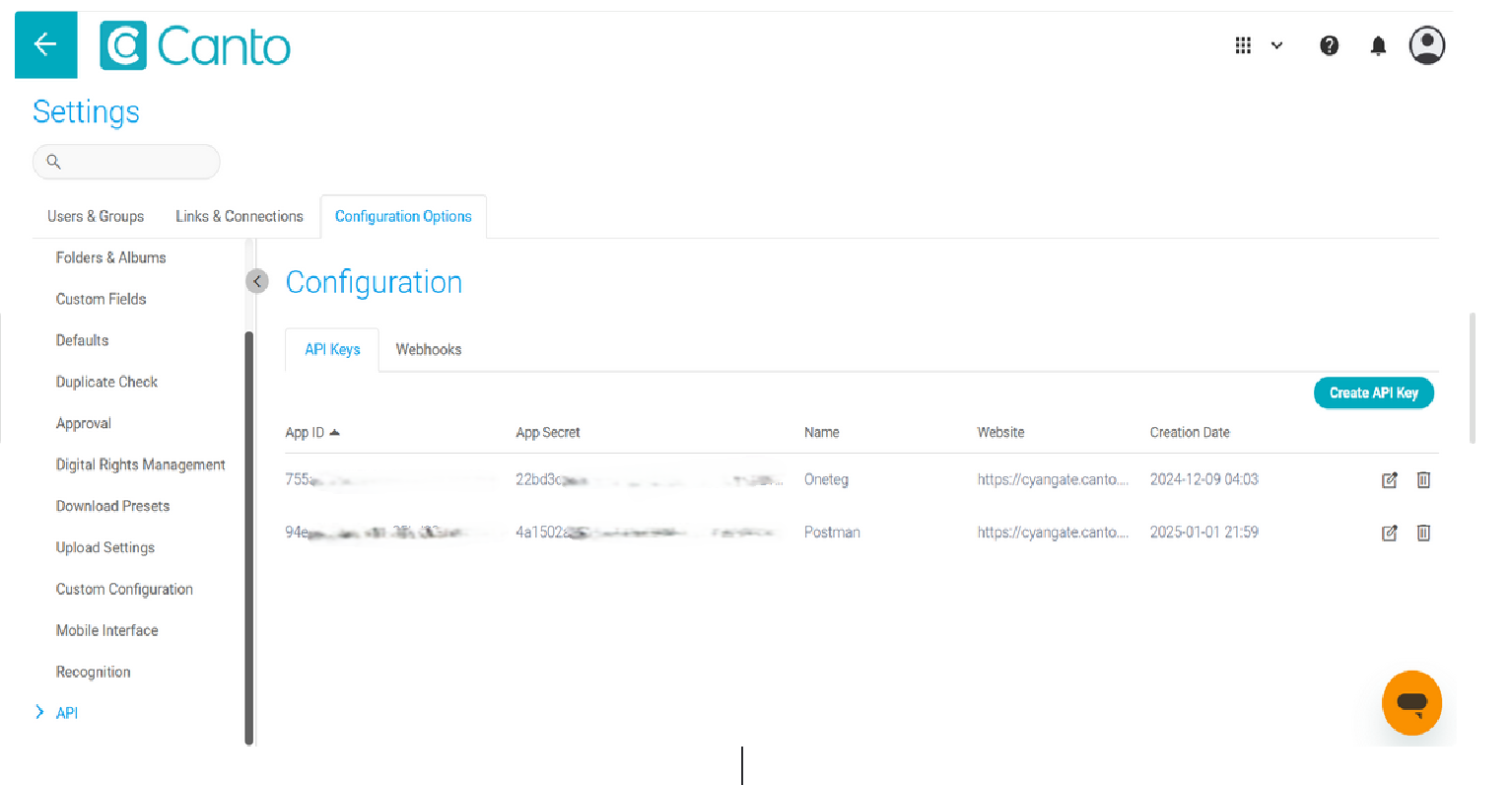
The App ID is your Client ID and the App Secret is your Client Secret. The same API Key is used for both the Client Credentials and Authorization Code flows.
Step 2 - Enable Client Credentials Mode
For the recommended Client Credentials flow, edit the API Key, enable “Support Client Credentials Mode”, and click Save. This step is not required for the Authorization Code flow.
Step 3 - Identify Your OAuth Server and API Base URL
Canto uses domain-specific servers. Your API base URL (Endpoint URL) is the Website value of your API Key followed by /api/v1 — for example https://acme.canto.com/api/v1. Your OAuth server is https://oauth.canto.{tld}/oauth/api/oauth2, using the same top-level domain as your account (for example oauth.canto.com for a .com account, or oauth.canto.global for a .global account).
3. Connection Settings and Configuration for OneTeg
In OneTeg, navigate to Connections and create a new connection using the Canto Connector. Choose your preferred authentication option below.
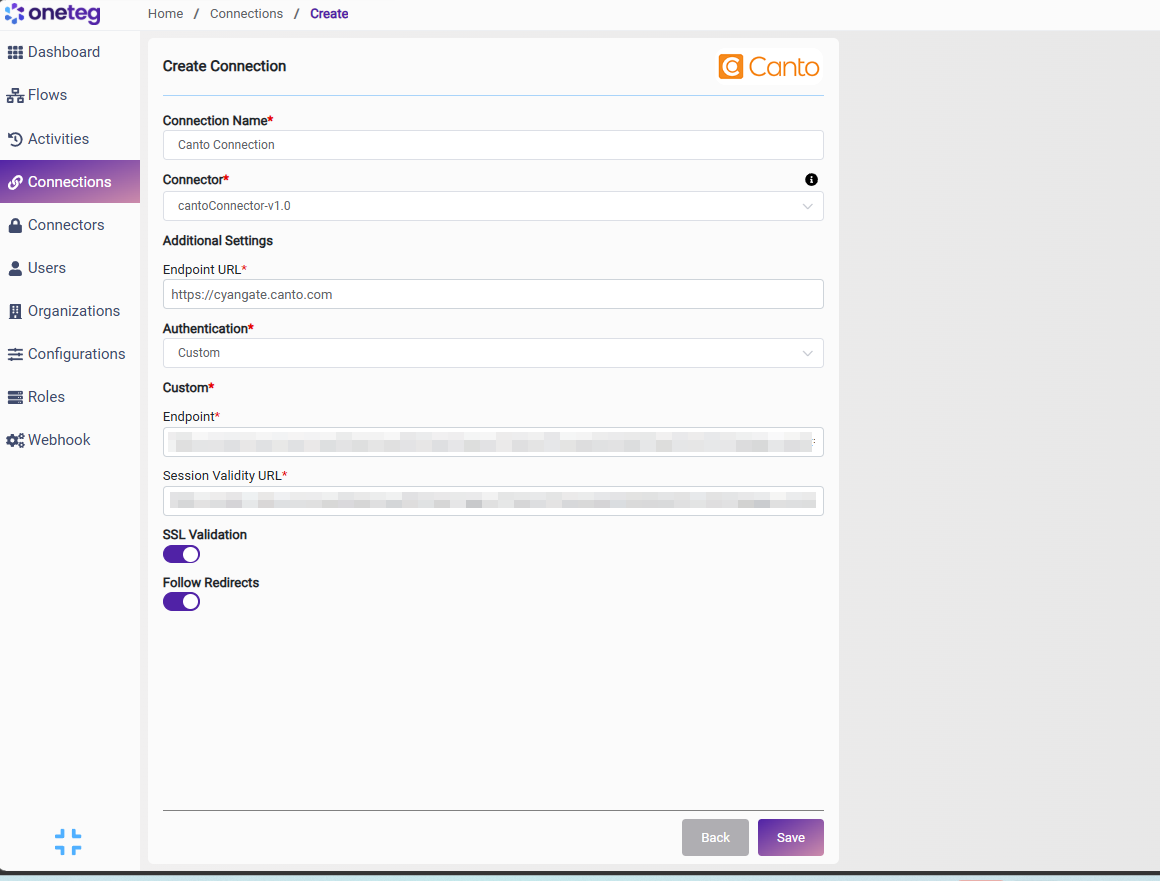
Option 1 — OAuth Client Credentials
Use this flow for unattended, application-level automation. It authenticates the application directly, with no user login or browser interaction, and is Canto’s recommended mode for backend integrations. Requires “Support Client Credentials Mode” to be enabled on the API Key.
|
Settings Parameters |
Value / Sample Value |
Description |
Required (Y/N) |
|
Connection Name |
Canto Connection |
Choose a name for your Connection |
Y |
|
Connector |
cantoConnector-v1.0 |
Auto-populated once the Canto Connector is selected |
Y |
|
Endpoint URL |
https://{yourdomain}.canto.com/api/v1 |
The base URL of the Canto API — your Canto account domain (the “Website” value of your API Key) followed by /api/v1. Use your account’s domain (.com, .global, etc.) |
Y |
|
Authentication |
Oauth |
Select Oauth as the authentication method |
Y |
|
Flows |
Client Credentials |
Select Client Credentials as the OAuth flow |
Y |
|
Token Url |
https://oauth.canto.com/oauth/api/oauth2/compatible/token |
The Canto token endpoint used to obtain application access tokens. Use the OAuth server matching your account’s domain |
Y |
|
Client ID |
Your App ID |
The App ID of your Canto API Key (Settings → Configuration Options → API → API Keys) |
Y |
|
Client Secret |
Your App Secret |
The App Secret of your Canto API Key |
Y |
|
Scopes |
(leave blank unless provided) |
Optional. Consult your Canto Admin for the appropriate scope, if any |
N |
Option 2 — OAuth Authorization Code
Use this flow when API actions should run on behalf of a specific Canto user. It requires a one-time browser login to grant access. The API Key’s Redirect URL must be set to the OneTeg OAuth callback URL.
|
Settings Parameters |
Value / Sample Value |
Description |
Required (Y/N) |
|
Connection Name |
Canto Connection |
Choose a name for your Connection |
Y |
|
Connector |
cantoConnector-v1.0 |
Auto-populated once the Canto Connector is selected |
Y |
|
Endpoint URL |
https://{yourdomain}.canto.com/api/v1 |
The base URL of the Canto API — your Canto account domain (the “Website” value of your API Key) followed by /api/v1. Use your account’s domain (.com, .global, etc.) |
Y |
|
Authentication |
Oauth |
Select Oauth as the authentication method |
Y |
|
Flows |
Authorization Code |
Select Authorization Code as the OAuth flow |
Y |
|
Client ID |
Your App ID |
The App ID of your Canto API Key |
Y |
|
Client Secret |
Your App Secret |
The App Secret of your Canto API Key |
Y |
|
Token Url |
https://oauth.canto.com/oauth/api/oauth2/token |
The Canto token endpoint used to exchange authorization codes for access tokens (use your account’s domain) |
Y |
|
Authorization Url |
https://oauth.canto.com/oauth/api/oauth2/authorize |
The Canto authorization endpoint where the user grants access (use your account’s domain) |
Y |
|
Scopes |
(leave blank unless provided) |
Optional. Consult your Canto Admin for the appropriate scope, if any |
N |
Option 3 — Bearer Token
Use this flow to authenticate with a Canto OAuth 2.0 access token that you have already obtained (via one of the OAuth flows above).
|
Settings Parameters |
Value / Sample Value |
Description |
Required (Y/N) |
|
Connection Name |
Canto Connection |
Choose a name for your Connection |
Y |
|
Connector |
cantoConnector-v1.0 |
Auto-populated once the Canto Connector is selected |
Y |
|
Endpoint URL |
https://{yourdomain}.canto.com/api/v1 |
The base URL of the Canto API — your Canto account domain (the “Website” value of your API Key) followed by /api/v1. Use your account’s domain (.com, .global, etc.) |
Y |
|
Authentication |
Bearer |
Select Bearer as the authentication method |
Y |
|
token |
Your Canto access token |
A Canto OAuth 2.0 access token obtained via one of the OAuth flows above, passed as a Bearer token in the Authorization header |
Y |
Note that Canto access tokens expire after approximately 30 days — you will need to manually update the token when it expires, making this method less suitable for long-running automations.
Option 4 — Custom
Use this flow to have OneTeg obtain and maintain a session automatically against a token endpoint. Provide the token endpoint and a URL OneTeg can use to verify that the session is still valid.
|
Settings Parameters |
Value / Sample Value |
Description |
Required (Y/N) |
|
Connection Name |
Canto Connection |
Choose a name for your Connection |
Y |
|
Connector |
cantoConnector-v1.0 |
Auto-populated once the Canto Connector is selected |
Y |
|
Endpoint URL |
https://{yourdomain}.canto.com/api/v1 |
The base URL of the Canto API — your Canto account domain (the “Website” value of your API Key) followed by /api/v1. Use your account’s domain (.com, .global, etc.) |
Y |
|
Authentication |
Custom |
Select Custom as the authentication method |
Y |
|
Endpoint |
https://oauth.canto.com/oauth/api/oauth2/compatible/token |
The Canto token endpoint used to obtain an access token (use your account’s domain) |
Y |
|
Session Validity URL |
https://{yourdomain}.canto.com/api/v1/user |
An endpoint OneTeg uses to verify that the current session/token is still valid |
Y |
4. Supported Canto Actions and Options
For the full list of supported endpoints, parameters, and options, see the page below: