
1. General Information
Salesforce CRM is a cloud-based customer relationship management platform that enables organizations to manage sales pipelines, customer accounts, contacts, opportunities, cases, and service interactions. It is one of the most widely adopted CRM platforms globally, offering deep customization, automation, and integration capabilities through its API ecosystem.
The OneTeg Salesforce CRM Connector integrates with the Salesforce REST API and enables users to build automated workflows for managing accounts, contacts, leads, opportunities, cases, and custom objects directly from the OneTeg flow builder.
2. Connect Salesforce CRM to OneTeg
The Salesforce CRM Connector authenticates via OAuth 2.0 using Salesforce's identity platform. The app registration process is identical to the S-Drive Connector.
For the full step-by-step Salesforce Connected App setup guide, refer to: S-Drive Connector v1.0 → Section 2: Connect S-Drive to OneTeg
When registering your Connected App, use the name "OneTeg Salesforce CRM Connector" to keep it distinct. The Salesforce CRM Connector supports three OAuth flow options: Authorization Code, Password, and Client Credentials. Choose the one that best fits your integration requirements.
For sandbox environments, replace http://login.salesforce.com with http://test.salesforce.com in the Token URL and Authorization URL fields.
3. Connection Settings and Configuration for OneTeg
In OneTeg, navigate to Connections and create a new connection using the Salesforce CRM Connector. Choose one of the three OAuth flow options below based on your integration requirements.
Option 1 - OAuth Authorization Code
This is the recommended method for user-delegated integrations. It authenticates on behalf of a specific Salesforce user via an interactive consent screen. Best suited for workflows that require access to user-specific data and permissions.
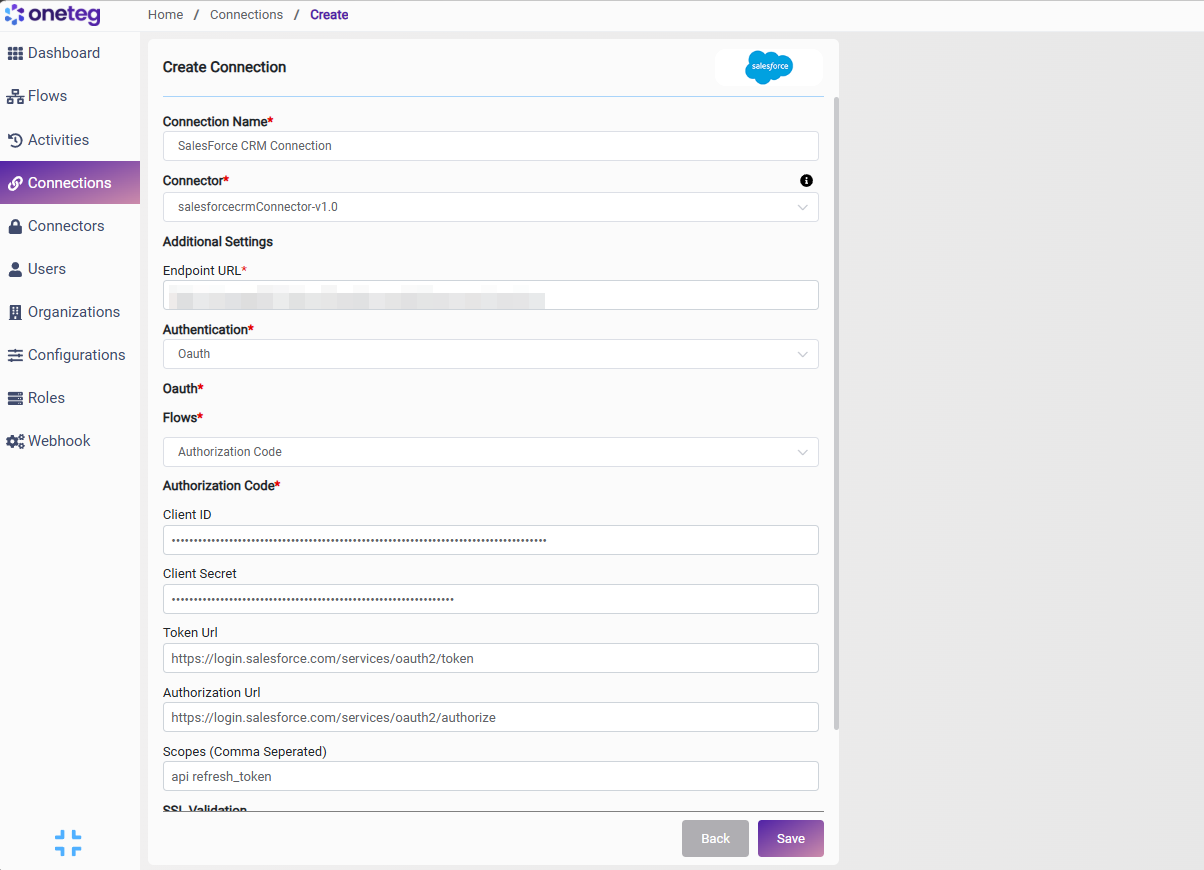
|
Settings Parameters |
Value / Sample Value |
Description |
Required (Y/N) |
|
Connection Name |
SalesForce CRM Connection |
Choose a name for your Connection |
Y |
|
Connector |
salesforcecrmConnector-v1.0 |
Auto-populated once the Salesforce CRM Connector is selected |
Y |
|
Endpoint URL |
Your Salesforce org URL. Replace your-instance with your actual Salesforce instance subdomain |
Y |
|
|
Authentication |
OAuth |
Select OAuth from the dropdown |
Y |
|
Flows |
Authorization Code |
Select Authorization Code as the OAuth grant type |
Y |
|
Client ID |
Salesforce Consumer Key |
Obtained from Salesforce Setup: App Manager → your Connected App → View → Manage Consumer Details → Consumer Key |
Y |
|
Client Secret |
Salesforce Consumer Secret |
Obtained from Salesforce Setup: App Manager → your Connected App → View → Manage Consumer Details → Consumer Secret |
Y |
|
Token URL |
Standard Salesforce OAuth token endpoint. Use https://test.salesforce.com/services/oauth2/token for sandbox environments |
Y |
|
|
Authorization URL |
Standard Salesforce OAuth authorization endpoint. Use https://test.salesforce.com/services/oauth2/authorize for sandbox environments |
Y |
|
|
Scopes |
api refresh_token |
Space-separated Salesforce OAuth scopes. api grants REST API access. refresh_token enables token refresh without re-authorization |
Y |
Option 2 - OAuth Password Grant
Use this method for server-to-server integrations where a specific Salesforce user's credentials are used directly. This flow does not require an interactive consent screen, making it suitable for automated backend workflows. Note that Salesforce recommends avoiding this flow for new integrations in favor of Authorization Code or Client Credentials.
|
Settings Parameters |
Value / Sample Value |
Description |
Required (Y/N) |
|
Connection Name |
SalesForce CRM Connection |
Choose a name for your Connection |
Y |
|
Connector |
salesforcecrmConnector-v1.0 |
Auto-populated once the Salesforce CRM Connector is selected |
Y |
|
Endpoint URL |
Your Salesforce org URL. Replace your-instance with your actual Salesforce instance subdomain |
Y |
|
|
Authentication |
OAuth |
Select OAuth from the dropdown |
Y |
|
Flows |
Password |
Select Password as the OAuth grant type |
Y |
|
Password |
Salesforce user password + security token |
The Salesforce user's password concatenated with their Salesforce security token (e.g., MyPassword + MyToken = MyPasswordMyToken) |
Y |
|
Username |
Salesforce username |
The username (email) of the Salesforce user on whose behalf the connector will authenticate |
Y |
|
Token URL |
Standard Salesforce OAuth token endpoint. Use https://test.salesforce.com/services/oauth2/token for sandbox environments |
Y |
|
|
Client ID |
Salesforce Consumer Key |
Obtained from Salesforce Setup: App Manager → your Connected App → Manage Consumer Details → Consumer Key |
Y |
|
Client Secret |
Salesforce Consumer Secret |
Obtained from Salesforce Setup: App Manager → your Connected App → Manage Consumer Details → Consumer Secret |
Y |
|
Scopes |
api refresh_token |
Space-separated Salesforce OAuth scopes. api grants REST API access. refresh_token enables token refresh |
Y |
Option 3 - OAuth Client Credentials
Use this method for machine-to-machine integrations that do not require a user context. The connector authenticates as the application itself using only the Consumer Key and Consumer Secret. This is the cleanest option for fully automated server-to-server workflows where no user delegation is needed.
|
Settings Parameters |
Value / Sample Value |
Description |
Required (Y/N) |
|
Connection Name |
SalesForce CRM Connection |
Choose a name for your Connection |
Y |
|
Connector |
salesforcecrmConnector-v1.0 |
Auto-populated once the Salesforce CRM Connector is selected |
Y |
|
Endpoint URL |
Your Salesforce org URL. Replace your-instance with your actual Salesforce instance subdomain |
Y |
|
|
Authentication |
OAuth |
Select OAuth from the dropdown |
Y |
|
Flows |
Client Credentials |
Select Client Credentials as the OAuth grant type |
Y |
|
Token URL |
Standard Salesforce OAuth token endpoint. Use https://test.salesforce.com/services/oauth2/token for sandbox environments |
Y |
|
|
Client ID |
Salesforce Consumer Key |
Obtained from Salesforce Setup: App Manager → your Connected App → Manage Consumer Details → Consumer Key |
Y |
|
Client Secret |
Salesforce Consumer Secret |
Obtained from Salesforce Setup: App Manager → your Connected App → Manage Consumer Details → Consumer Secret |
Y |
|
Scopes |
api |
Salesforce OAuth scope. api grants REST API access. refresh_token is not required for Client Credentials flow |
Y |
4. Supported Salesforce CRM Actions and Options
For the full list of supported endpoints, parameters, and options, see the page below: