
1. General Information
Adobe InDesign is Adobe's professional desktop publishing and page layout application, used to design and produce print and digital documents such as brochures, magazines, books, and marketing materials. The Adobe InDesign API (part of Adobe Firefly Services) brings InDesign's layout and rendering capabilities to the cloud, allowing developers to automate document generation, rendering, and data merge operations programmatically.
The OneTeg Adobe InDesign Connector integrates with the Adobe InDesign API, enabling users to automate InDesign document processing and rendering directly from OneTeg automation workflows. This connector authenticates using a TOKEN — an Adobe access token obtained through the Adobe Developer Console.
The Adobe InDesign API uses OAuth Server-to-Server credentials managed in the Adobe Developer Console. Access tokens are valid for 24 hours, after which a new token must be generated. The token is entered directly into the Auth Token field in OneTeg.
2. Connect Adobe InDesign to OneTeg
The Adobe InDesign Connector authenticates using an Adobe access token. You will need an Adobe Developer Console project with InDesign API access and OAuth Server-to-Server credentials. Follow the steps below.
Step 1 - Create a Project in the Adobe Developer Console
Navigate to https://developer.adobe.com/console and sign in with your Adobe ID. Click Create new project (or open an existing project).
Step 2 - Add the InDesign API to Your Project
In your project, click Add API and select the InDesign API (under Adobe Firefly Services). When prompted, choose OAuth Server-to-Server as the authentication type and complete the setup. This generates a Client ID and Client Secret for your project.
Step 3 - Generate an Access Token
Open the OAuth Server-to-Server credential in your project. You can generate an access token directly from the Developer Console UI by clicking Generate access token, or programmatically by calling the Adobe IMS token endpoint:
POST https://ims-na1.adobelogin.com/ims/token/v3
with the parameters grant_type=client_credentials, your client_id, your client_secret, and scope=openid,AdobeID,indesign_services. Copy the returned access_token — this is the value you will enter into the Auth Token field in OneTeg.
Adobe access tokens are valid for 24 hours. When the token expires, you will need to generate a new one (from the Developer Console UI or via the IMS token endpoint) and update it in your OneTeg connection. Keep your Client Secret confidential.
3. Connection Settings and Configuration for OneTeg
In OneTeg, navigate to Connections and create a new connection using the Adobe InDesign Connector. Fill in the fields below using the access token obtained in Section 2.
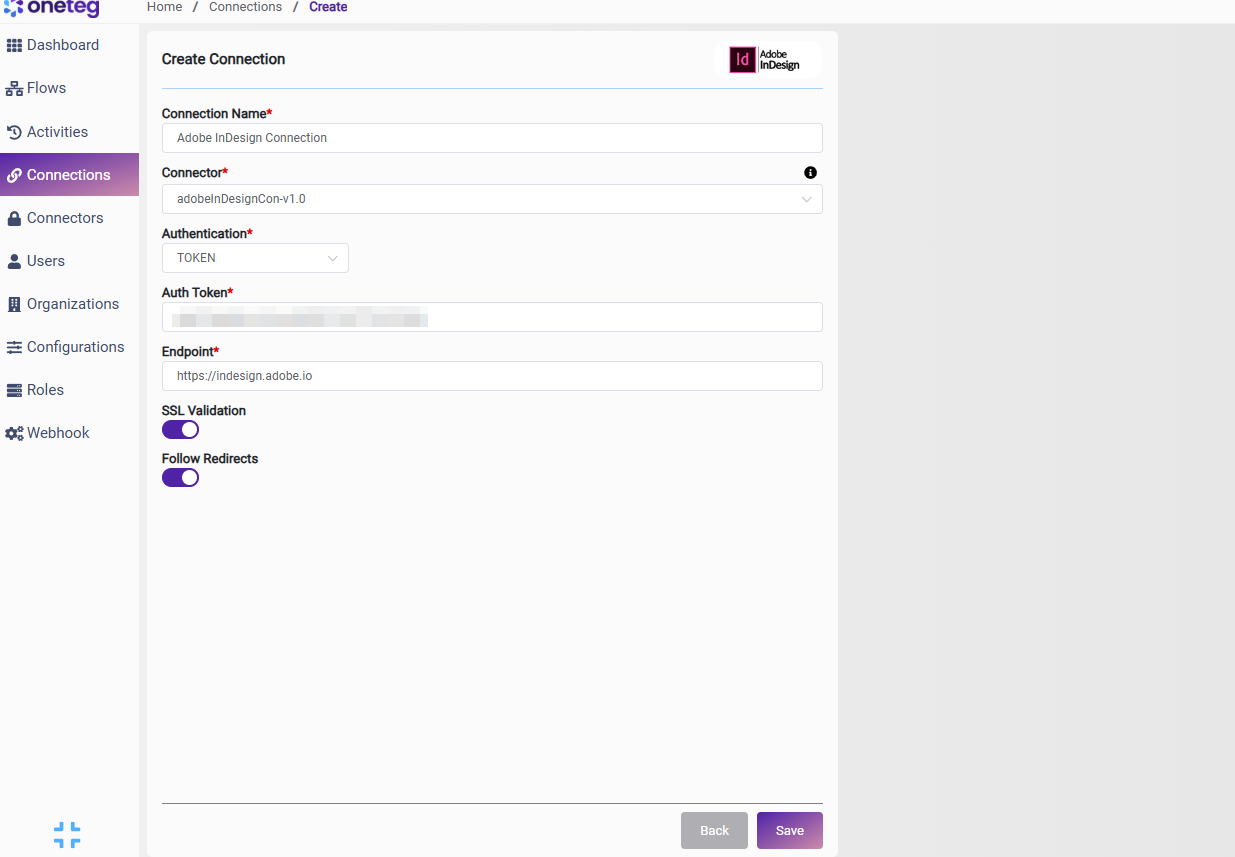
|
Settings Parameters |
Value / Sample Value |
Description |
Required (Y/N) |
|
Connection Name |
Adobe InDesign Connection |
Choose a name for your Connection |
Y |
|
Connector |
adobeInDesignCon-v1.0 |
Auto-populated once the Adobe InDesign Connector is selected |
Y |
|
Authentication |
TOKEN |
Select TOKEN as the authentication method |
Y |
|
Auth Token |
Your Adobe access token |
The Adobe access token generated from the Adobe Developer Console (see Section 2). Tokens are valid for 24 hours |
Y |
|
Endpoint |
https://indesign.adobe.io |
The base URL of the Adobe InDesign API |
Y |
4. Supported Adobe InDesign Actions and Options
For the full list of supported endpoints, parameters, and options, see the page below: