
1. General Information
Sanity is a headless content management system (CMS) and structured content platform. It provides a real-time content backend with a flexible data model, allowing developers and content teams to define custom content schemas and manage content programmatically. Sanity is widely used for websites, e-commerce, apps, and omnichannel publishing, offering a powerful query language (GROQ) and a fully customizable editing studio.
The OneTeg Sanity Connector integrates with the Sanity Content API and enables users to build automated workflows for querying, creating, updating, and managing content documents and assets within Sanity projects directly from the OneTeg flow builder.
The Sanity Connector Endpoint URL is project-specific — it includes your unique Sanity Project ID. You can find your Project ID in the Sanity management console at sanity.io/manage.
2. Connect Sanity to OneTeg
The Sanity Connector authenticates using a Sanity API Token. Tokens are generated from the Sanity management console and grant access to your Sanity project's content API. Follow the steps below to obtain your API Token and Project ID.
Step 1 - Find Your Project ID
Go to sanity.io/manage and log in with your Sanity account. Select your project from the list. Your Project ID is displayed on the project overview page. Copy it. You will need it to construct the Endpoint URL in OneTeg.
Step 2 - Generate an API Token
In the Sanity management console, navigate to your project and click API → Tokens. Click Add API token. Enter a name for the token (e.g., "OneTeg Integration") and select the appropriate permission level: Viewer for read-only access, or Editor for read and write access. Click Save. Copy the token immediately! It will not be shown again after you navigate away from this screen.
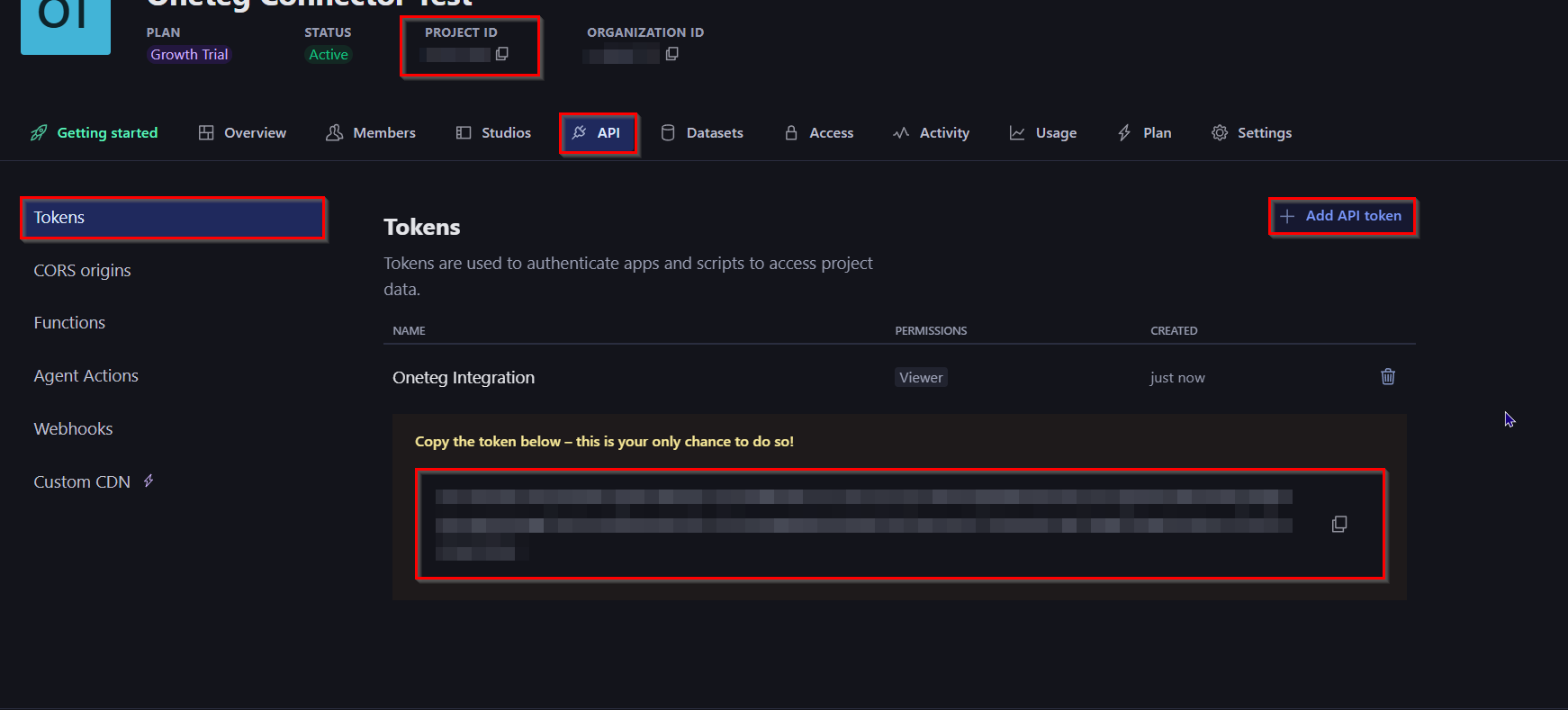
Sanity API Tokens do not expire by default. Select the minimum permission level your OneTeg flows require — use Viewer for read-only workflows and Editor only when your flows need to create or update content.
3. Connection Settings and Configuration for OneTeg
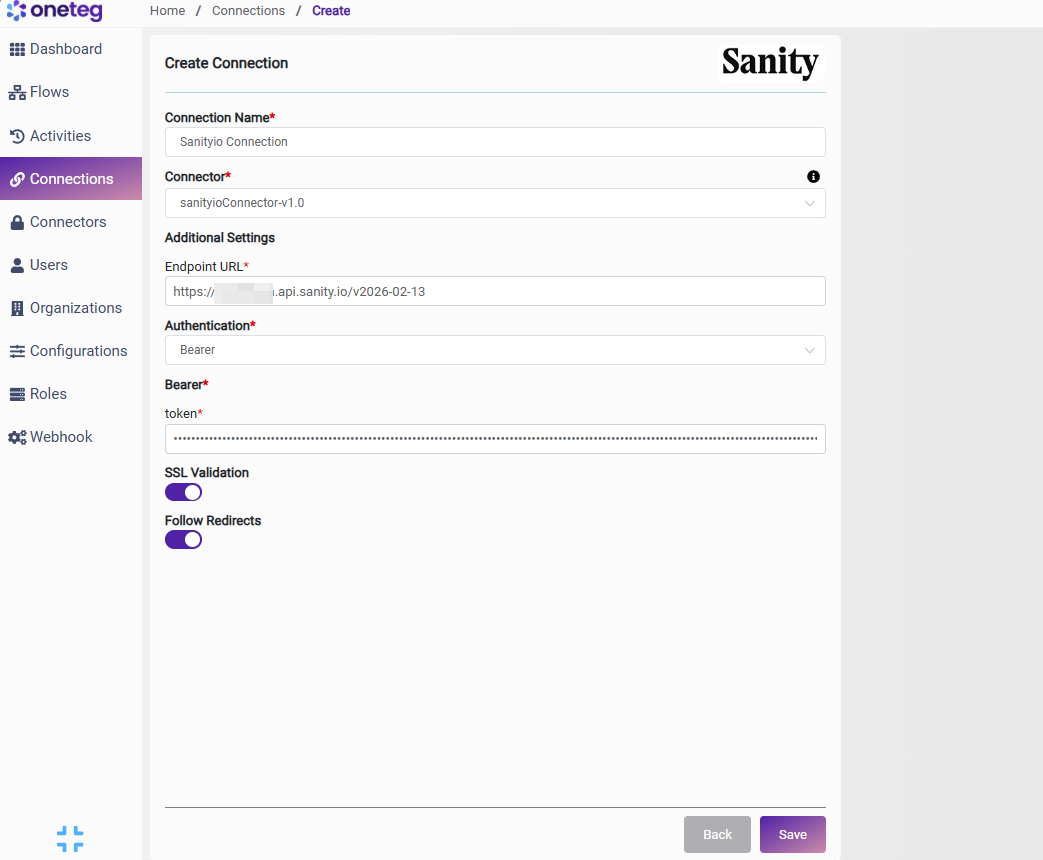
In OneTeg, navigate to Connections and create a new connection using the Sanity Connector. Fill in the settings below using your Project ID and the API Token obtained from the Sanity management console.
|
Settings Parameters |
Value / Sample Value |
Description |
Required (Y/N) |
|
Connection Name |
Sanity Connection |
Choose a name for your Connection |
Y |
|
Connector |
sanityioConnector-v1.0 |
Auto-populated once the Sanityio Connector is selected |
Y |
|
Endpoint URL |
Your project-specific Sanity Content API URL. Replace your-project-id with your Sanity Project ID found in sanityio/manage → your project → Overview |
Y |
|
|
Authentication |
Bearer |
Select Bearer from the dropdown |
Y |
|
token |
Sanity API Token |
Obtained from sanityio/manage → your project → API → Tokens → Add API token. Select Viewer for read-only access or Editor for read and write access. Token is shown only once — store securely |
Y |
4. Supported Sanity Actions and Options
For the full list of supported endpoints, parameters, and options, see the page below: