
1. General Information
OpenText Documentum is an enterprise content management (ECM) platform widely used in regulated industries such as life sciences, financial services, and government. It provides robust document management, records management, compliance, and workflow capabilities. Documentum is available as an on-premise deployment or as a cloud-hosted solution, and exposes its functionality through a REST API that supports document and object management operations.
The OneTeg OpenText Documentum Connector integrates with the Documentum REST API and enables users to build automated workflows for managing documents, cabinets, folders, objects, and metadata directly from the OneTeg flow builder.
OpenText Documentum can be deployed on-premise or in the cloud. The Endpoint URL is specific to your Documentum deployment. The REST API is typically accessible at the /dctm-rest path on your Documentum server. Contact your Documentum administrator to confirm the correct URL for your environment.
2. Connect OpenText Documentum to OneTeg
The OpenText Documentum Connector authenticates using HTTP Basic Authentication — your Documentum username and password are sent with each API request. No additional token exchange or session management is required. Follow the steps below to prepare your credentials.
Step 1 - Identify Your Documentum Server URL and Integration User
Log in to your Documentum environment and note the server base URL. The Documentum REST API is typically accessible at https://your-documentum-server.com/dctm-rest. This is the value you will enter as the Endpoint URL in OneTeg.
If a dedicated integration user does not already exist, ask your Documentum administrator to create one in Documentum Administrator → User Management → Users with the minimum permissions required for your OneTeg workflows. Note the username and password — these are the credentials you will enter in the OneTeg connection form.
3. Connection Settings and Configuration for OneTeg
In OneTeg, navigate to Connections and create a new connection using the OpenText Documentum Connector. Fill in the settings below using your Documentum server URL and integration user credentials.
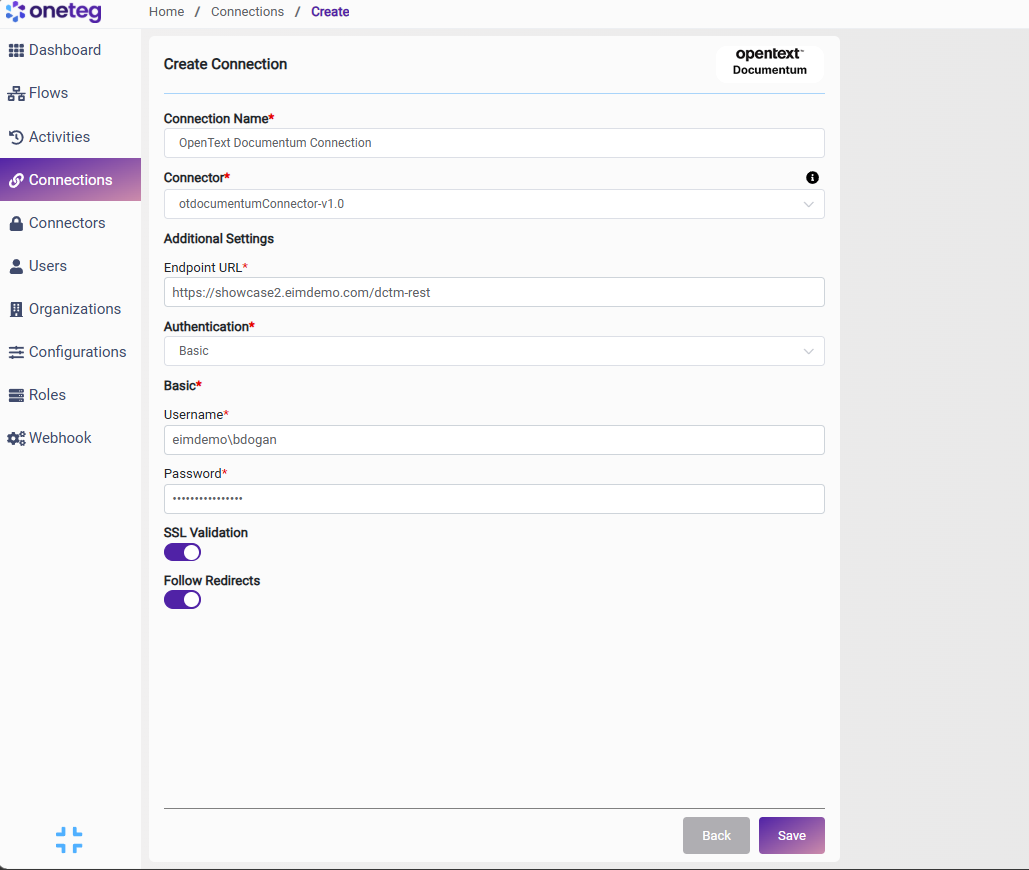
|
Settings Parameters |
Value / Sample Value |
Description |
Required (Y/N) |
|
Connection Name |
OpenText Documentum Connection |
Choose a name for your Connection |
Y |
|
Connector |
otdocumentumConnector-v1.0 |
Auto-populated once the OpenText Documentum Connector is selected |
Y |
|
Endpoint URL |
Base URL of the Documentum REST API. Replace your-documentum-server.com with your actual Documentum server hostname. The /dctm-rest path is standard for Documentum REST API deployments |
Y |
|
|
Authentication |
Basic |
Select Basic from the dropdown. Documentum uses HTTP Basic Authentication — credentials are sent with every API request |
Y |
|
Username |
The username of the dedicated Documentum integration user |
Y |
|
|
Password |
Documentum user password |
The password of the Documentum integration user. Keep this up to date to avoid connection failures |
Y |
4. Supported OpenText Documentum Actions and Options
For the full list of supported endpoints, parameters, and options, see the page below: