
1. General Information
Rightsline is a cloud-based rights management platform designed for media and entertainment companies. It enables organizations to manage, track, and monetize intellectual property rights — including licensing agreements, deal terms, royalties, and rights availability — across content libraries and distribution channels. Rightsline provides a centralized system of record for complex rights data, supporting both linear and digital media workflows.
The OneTeg Rightsline Connector integrates with the Rightsline API and enables users to build automated workflows for managing rights data, licensing information, and content metadata directly from the OneTeg flow builder.
The Rightsline Connector uses AWS Signature Version 4 (SigV4) as its primary authentication method. It requires three credentials: a Rightsline Company API Key, a Rightsline User API Key (used as the Access Key), and an AWS Secret Key. The first two are obtained directly from the Rightsline platform, while the Secret Key is an AWS credential.
2. Connect Rightsline to OneTeg
The Rightsline Connector supports two authentication methods — AWS Signature Version 4 (Awssigv4) and Bearer Token. The Awssigv4 method is the recommended approach for production integrations, as it uses a combination of Rightsline and AWS credentials to generate secure, time-limited request signatures. Follow the steps below to obtain the required credentials.
Step 1 - Obtain Your Rightsline Company API Key
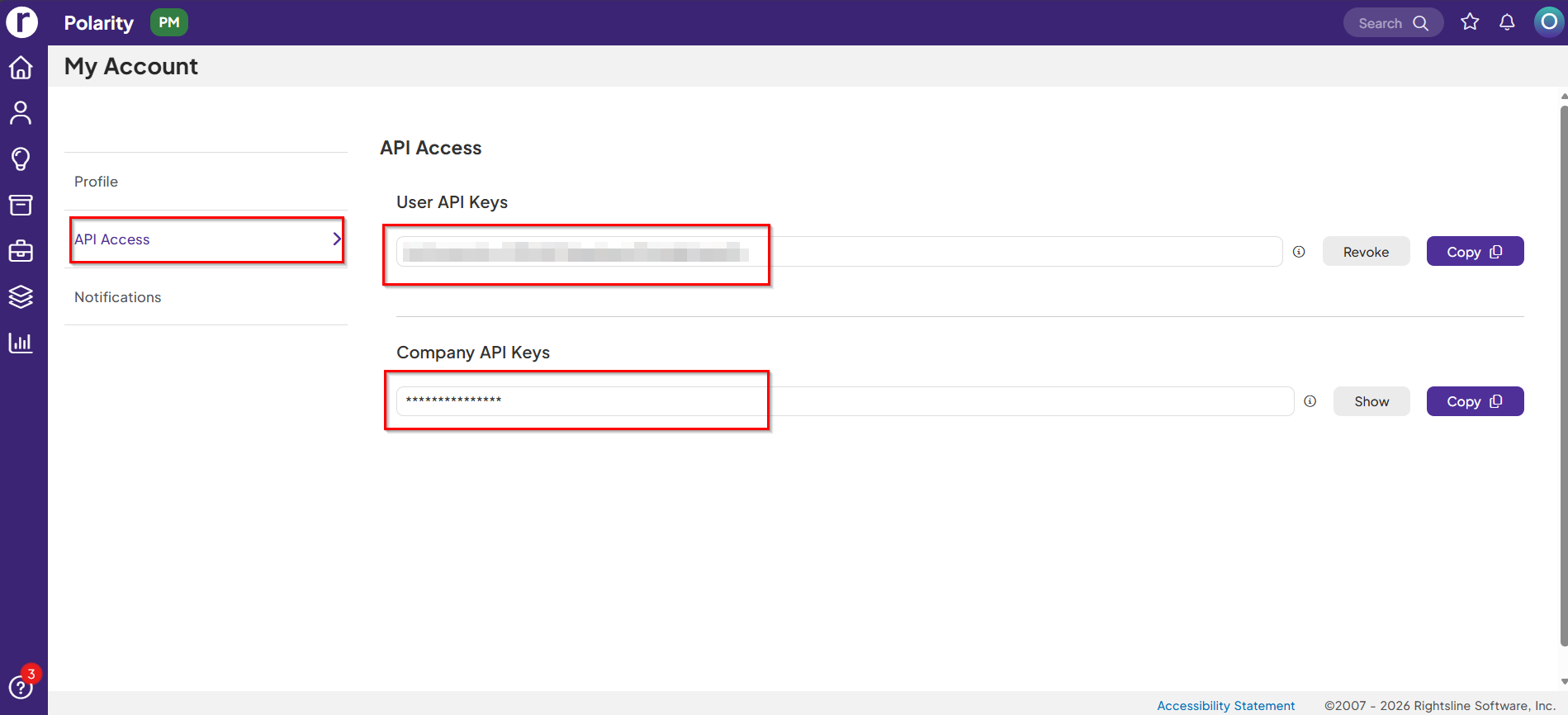
Log in to the Rightsline platform at http://app-pm.rightsline.com . Click your profile icon in the top right corner and select My Account from the dropdown. In the left sidebar, click API Access. You will see two sections. Copy these values:
User API Keys: It is used as the Access Key field in the OneTeg connection form.
Company API Keys: This is used as the API Key field in the OneTeg connection form.
Step 2 - Obtain Your AWS Access Key and Secret Key
The Secret Key is an AWS credential used to sign requests to the Rightsline API. Log in to the AWS Management Console and navigate to IAM → Users → your integration user → Security credentials → Access keys. Click Create access key if one does not already exist. Copy the Secret access key value immediately — it is only shown once. This is the value you will enter in the Secret Key field in OneTeg.
The AWS Secret Key is only shown once at creation time. If you lose it you will need to create a new access key. Use a dedicated IAM user or role with the minimum permissions required for the Rightsline API. Avoid using root account credentials.
3. Connection Settings and Configuration for OneTeg
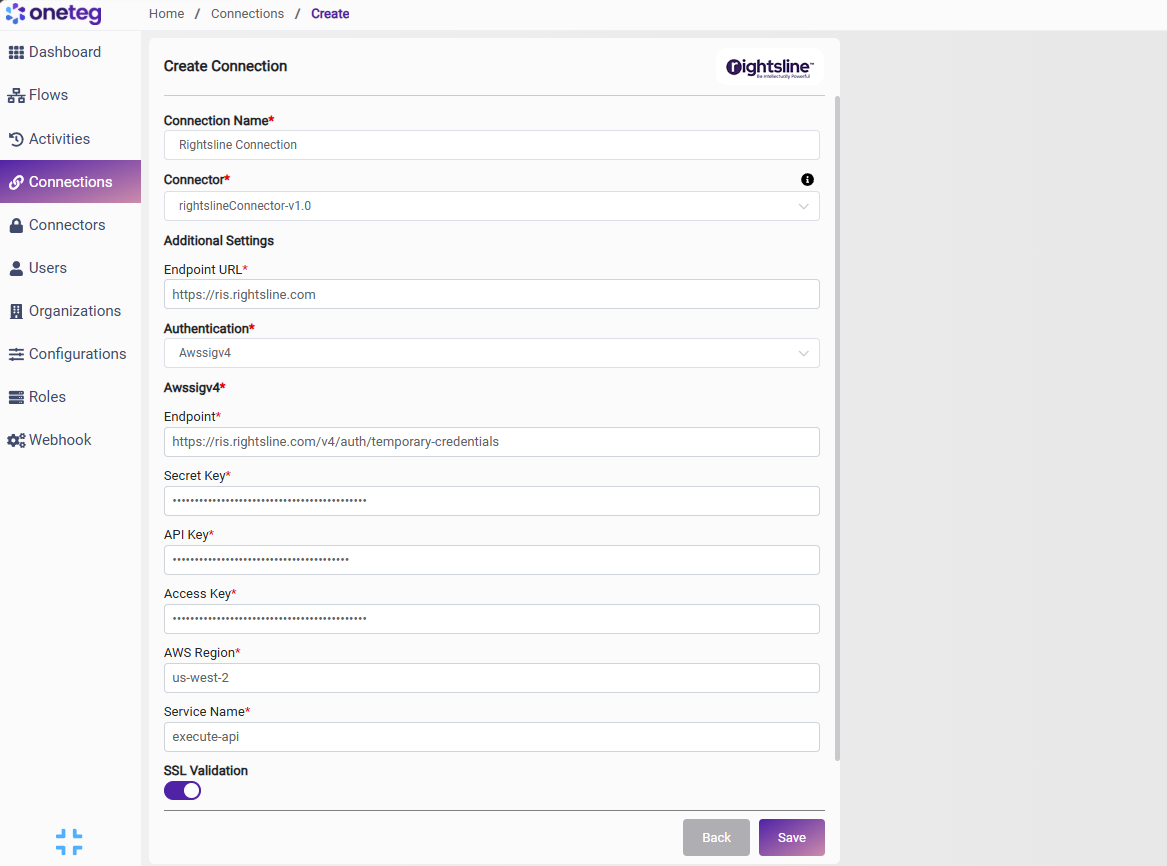
In OneTeg, navigate to Connections and create a new connection using the Rightsline Connector. The connector supports two authentication methods — Awssigv4 and Bearer Token. Choose the one that best fits your setup.
Option 1 - Awssigv4 Authentication
AWS Signature Version 4 generates a cryptographic signature for each request using your AWS credentials, providing secure and auditable access to the Rightsline API.
|
Settings Parameters |
Value / Sample Value |
Description |
Required (Y/N) |
|
Connection Name |
Rightsline Connection |
Choose a name for your Connection |
Y |
|
Connector |
rightslineConnector-v1.0 |
Auto-populated once the Rightsline Connector is selected |
Y |
|
Endpoint URL |
Base URL of the Rightsline API. This value is fixed and does not change |
Y |
|
|
Authentication |
Awssigv4 |
Select Awssigv4 from the dropdown |
Y |
|
Endpoint |
The Rightsline authentication endpoint used to obtain temporary AWS credentials. This value is fixed and does not change |
Y |
|
|
Secret Key |
AWS Secret Access Key |
AWS credential used to sign API requests. Obtained from AWS Management Console: IAM → Users → your user → Security credentials → Access keys → Secret access key. |
Y |
|
API Key |
Rightsline Company API Key |
Your Rightsline Company API Key. Obtained from Rightsline: profile icon → My Account → API Access → Company API Keys |
Y |
|
Access Key |
AWS Access Key ID |
Your Rightsline User API Key. Obtained from Rightsline: profile icon → My Account → API Access → User API Keys |
Y |
|
AWS Region |
us-west-2 |
The AWS region where your Rightsline environment is hosted. This may vary depending on your organization's Rightsline deployment region. |
Y |
|
Service Name |
execute-api |
The AWS service name used for request signing. This value is fixed for Rightsline API Gateway integrations and does not change |
Y |
Option 2 - Bearer Token Authentication
Use this method if you have a pre-existing Rightsline access token obtained externally. Note that Rightsline access tokens are time-limited — you will need to manually update the token when it expires, making this method less suitable for long-running automations.
|
Settings Parameters |
Value / Sample Value |
Description |
Required (Y/N) |
|
Connection Name |
Rightsline Connection |
Choose a name for your Connection |
Y |
|
Connector |
rightslineConnector-v1.0 |
Auto-populated once the Rightsline Connector is selected |
Y |
|
Endpoint URL |
Base URL of the Rightsline API. This value is fixed and does not change |
Y |
|
|
Authentication |
Bearer |
Select Bearer from the dropdown |
Y |
|
Token |
Rightsline access token |
A valid Rightsline access token obtained by calling the authentication endpoint manually. Time-limited — must be updated when expired |
Y |
4. Supported Rightsline Actions and Options
For the full list of supported endpoints, parameters, and options, see the page below: