
1. General Information
Lionbridge is a global leader in translation, localization, and content services. Its content API enables organizations to programmatically submit content for translation, manage translation jobs, retrieve translated content, and track the status of localization workflows. Lionbridge integrates with enterprise CMS, DAM, and PIM platforms to automate multilingual content delivery at scale.
The OneTeg LionBridge Connector integrates with the Lionbridge Content API and enables users to build automated workflows for submitting content for translation, managing translation jobs, and retrieving localized content directly from the OneTeg flow builder.
2. Connect LionBridge to OneTeg
The LionBridge Connector supports three authentication methods — OAuth (Client Credentials), Bearer Token, and API Key. The OAuth Client Credentials method is recommended for production integrations as it handles token management automatically. Follow the steps below to obtain your credentials.
Step 1 - Obtain Your LionBridge API Credentials
Contact your LionBridge account manager or the LionBridge support team to request API access for your organization. They will provide you with a Client ID and Client Secret for OAuth authentication, or an API Key depending on your integration requirements. Store all credentials securely.
You can verify your Client ID and Client Secret by making a test token request to https://login.lionbridge.com/connect/token using the Client Credentials grant type. A successful response will return an access_token that can be used to authenticate API requests.
3. Connection Settings and Configuration for OneTeg
In OneTeg, navigate to Connections and create a new connection using the LionBridge Connector. The connector supports three authentication methods — OAuth (Client Credentials), Bearer Token, and API Key. Choose the one that best fits your setup.
Option 1 — OAuth Client Credentials
OneTeg authenticates as a client application using the Client ID and Secret, with tokens managed automatically.
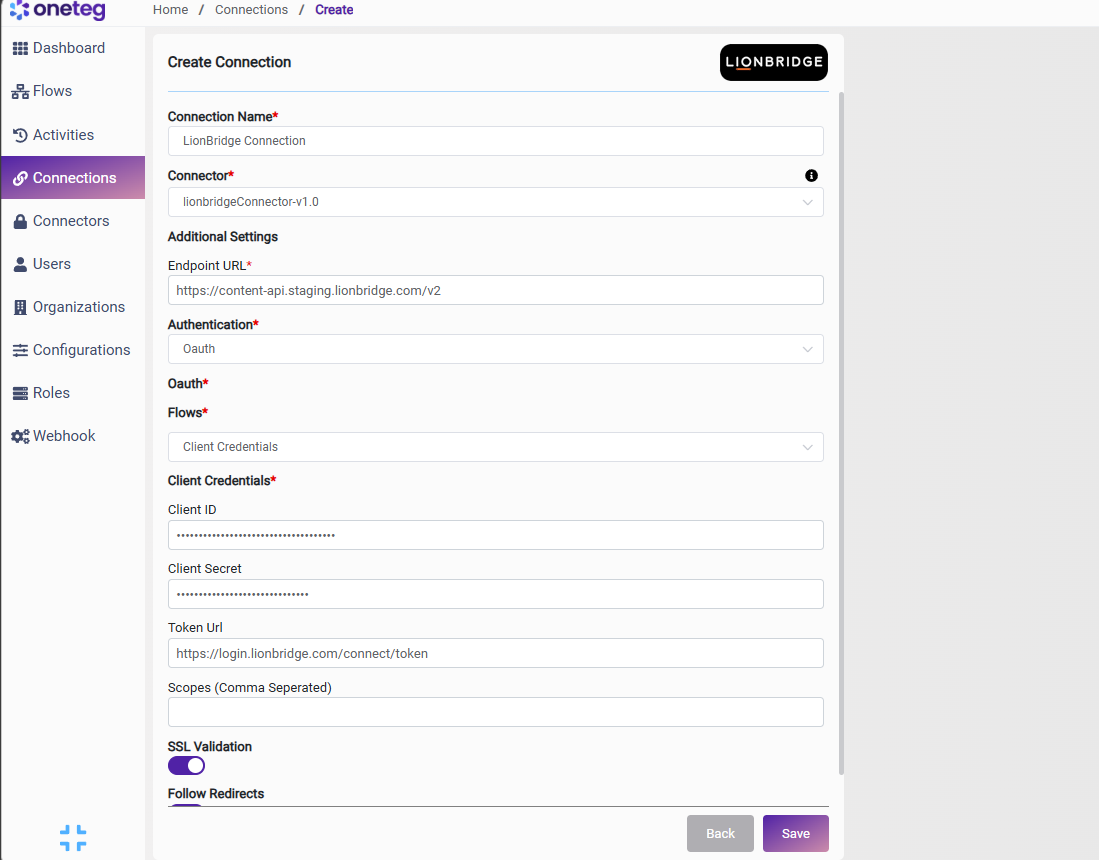
|
Settings Parameters |
Value / Sample Value |
Description |
Required (Y/N) |
|
Connection Name |
LionBridge Connection |
Choose a name for your Connection |
Y |
|
Connector |
lionbridgeConnector-v1.0 |
Auto-populated once the LionBridge Connector is selected |
Y |
|
Endpoint URL |
Base URL of the LionBridge Content API |
Y |
|
|
Authentication |
OAuth |
Select OAuth from the dropdown |
Y |
|
Flows |
Client Credentials |
Select Client Credentials as the OAuth grant type |
Y |
|
Client ID |
LionBridge Client ID |
Provided by your LionBridge account manager or support team |
Y |
|
Client Secret |
LionBridge Client Secret |
Provided by your LionBridge account manager or support team. Store securely and do not share |
Y |
|
Token URL |
Fixed LionBridge identity server token endpoint. This value is standard and does not change |
Y |
|
|
Scopes |
|
Leave blank unless your LionBridge account manager specifies required scopes for your integration |
|
Option 2 - Bearer Token Authentication
Use this method if you have a pre-existing LionBridge access token obtained externally. LionBridge access tokens expire after 1 hour — you will need to manually update the token when it expires, making this method less suitable for long-running automations.
|
Settings Parameters |
Value / Sample Value |
Description |
Required (Y/N) |
|
Connection Name |
LionBridge Connection |
Choose a name for your Connection |
Y |
|
Connector |
lionbridgeConnector-v1.0 |
Auto-populated once the LionBridge Connector is selected |
Y |
|
Endpoint URL |
Base URL of the LionBridge Content API |
Y |
|
|
Authentication |
Bearer |
Select Bearer from the dropdown |
Y |
|
Token |
LionBridge access token |
A valid LionBridge access token obtained by calling https://login.lionbridge.com/connect/token with Client Credentials. Expires after 1 hour |
Y |
Option 3 - API Key Authentication
Use this method if your LionBridge account manager has provided you with a dedicated API Key for your integration. Contact your LionBridge account manager or support team to obtain an API Key.
|
Settings Parameters |
Value / Sample Value |
Description |
Required (Y/N) |
|
Connection Name |
LionBridge Connection |
Choose a name for your Connection |
Y |
|
Connector |
lionbridgeConnector-v1.0 |
Auto-populated once the LionBridge Connector is selected |
Y |
|
Endpoint URL |
Base URL of the LionBridge Content API |
Y |
|
|
Authentication |
Api Key |
Select Api Key from the dropdown |
Y |
|
Api Key |
LionBridge API Key |
Provided by your LionBridge account manager or support team |
Y |
4. Supported LionBridge Actions and Options
For the full list of supported endpoints, parameters, and options, see the page below: