
1. General Information
Aprimo is a cloud-based marketing operations and digital asset management (DAM) platform used to manage content, assets, workflows, planning, and collaboration. The Aprimo DAM REST API provides programmatic access to records (assets), files, metadata, search, and download orders in an Aprimo tenant.
The OneTeg Aprimo Connector integrates with the Aprimo DAM API, enabling users to manage digital assets and metadata directly from OneTeg automation workflows. This connector supports two authentication options: OAuth Authorization Code and Bearer.
Aprimo’s DAM API and its OAuth server are on different subdomains: the API is at {yourtenant}.dam.aprimo.com, while the OAuth token and authorization endpoints are at {yourtenant}.aprimo.com (without dam). Both authentication options ultimately authenticate with an OAuth 2.0 access token, sent as a Bearer token in the Authorization header.
Aprimo DAM API requests also require an API-VERSION header (value 1); the connector sends this for you.
2. Connect Aprimo to OneTeg
The OAuth flow uses a Client Registration created in Aprimo. Follow the steps below to create the registration and identify the URLs you will enter into OneTeg.
Step 1 - Create a Client Registration
In Aprimo, go to Administration → Integration → Registrations and create a new registration. Enter a Client Name, choose the Authorization Code OAuth flow, assign the user whose permissions the integration will use, and set the Access Token Lifetime. For the Authorization Code flow, set the redirect URI to the OneTeg OAuth callback URL (https://app.oneteg.com/rest/v1/oauth2/callback), then Save. Allow up to 15 minutes for the registration to become active.
Step 2 - Copy the Client ID and Client Secret
Copy the Client ID and Client Secret generated for the registration.
The Client Secret is shown only once and cannot be retrieved later. Copy it immediately and store it securely; if it is lost you must generate a new one.
Step 3 - Identify Your Tenant URLs
Your API Endpoint URL is https://{yourtenant}.dam.aprimo.com/api/core (on the dam subdomain), while your OAuth Token URL is https://{yourtenant}.aprimo.com/login/connect/token and your Authorization URL is https://{yourtenant}.aprimo.com/login/connect/authorize (both without dam). Replace {yourtenant} with your Aprimo tenant name.
3. Connection Settings and Configuration for OneTeg
In OneTeg, navigate to Connections and create a new connection using the Aprimo Connector. Choose one of the authentication options below.
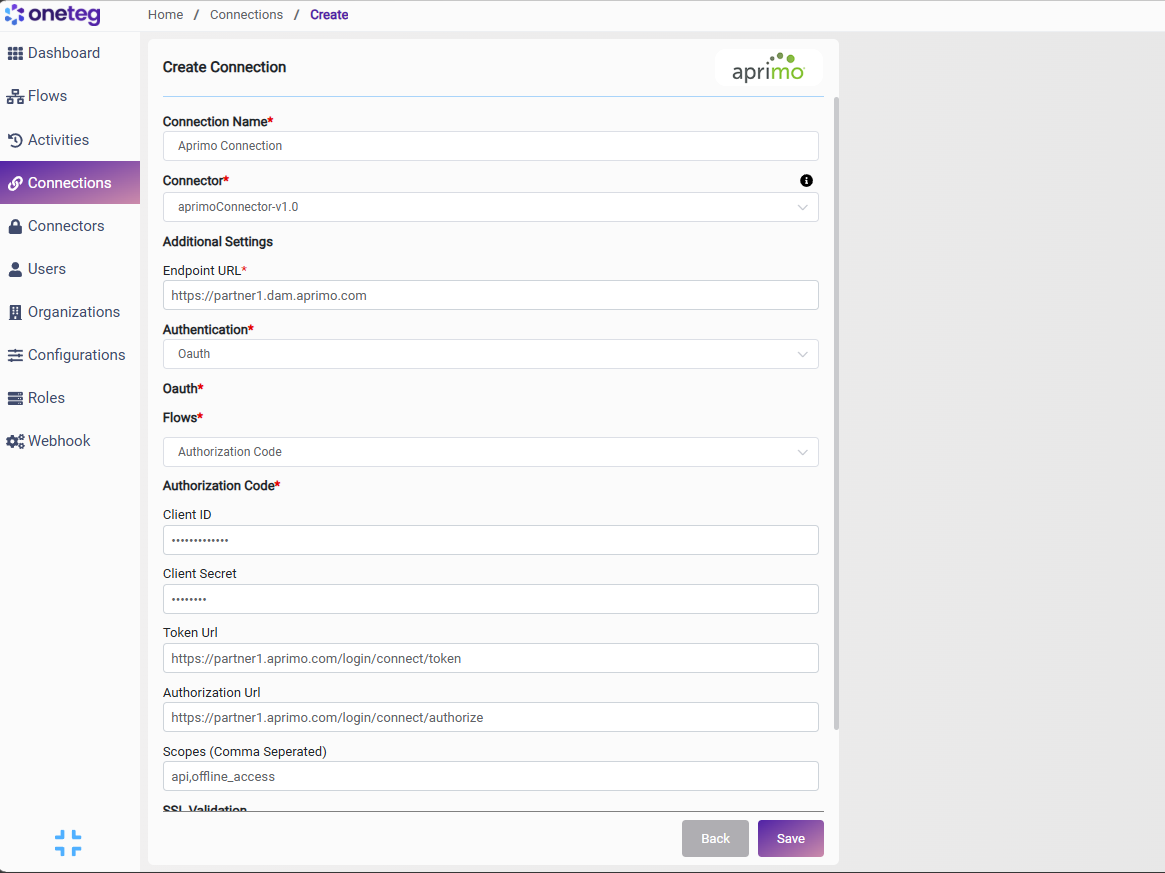
Option 1 — OAuth Authorization Code
|
Settings Parameters |
Value / Sample Value |
Description |
Required (Y/N) |
|
Connection Name |
Aprimo Connection |
Choose a name for your Connection |
Y |
|
Connector |
aprimoConnector-v1.0 |
Auto-populated once the Aprimo Connector is selected |
Y |
|
Endpoint URL |
https://{yourtenant}.dam.aprimo.com/api/core |
The base URL of the Aprimo DAM API, where {yourtenant} is your Aprimo tenant. Note the dam subdomain |
Y |
|
Authentication |
Oauth |
Select Oauth as the authentication method |
Y |
|
Flows |
Authorization Code |
Select Authorization Code as the OAuth flow |
Y |
|
Client ID |
Your Aprimo Client ID |
The Client ID from your Aprimo Client Registration (Administration → Integration → Registrations) |
Y |
|
Client Secret |
Your Aprimo Client Secret |
The Client Secret from your Aprimo Client Registration (shown only once at creation) |
Y |
|
Token Url |
https://{yourtenant}.aprimo.com/login/connect/token |
The Aprimo OAuth token endpoint (on the {yourtenant}.aprimo.com domain, not the dam subdomain) |
Y |
|
Authorization Url |
https://{yourtenant}.aprimo.com/login/connect/authorize |
The Aprimo authorization endpoint where the user grants access |
Y |
|
Scopes |
api, offline_access |
The scopes to request. Include api for API access and offline_access to receive a refresh token so access renews automatically |
N |
Option 2 — Bearer
|
Settings Parameters |
Value / Sample Value |
Description |
Required (Y/N) |
|
Connection Name |
Aprimo Connection |
Choose a name for your Connection |
Y |
|
Connector |
aprimoConnector-v1.0 |
Auto-populated once the Aprimo Connector is selected |
Y |
|
Endpoint URL |
https://{yourtenant}.dam.aprimo.com/api/core |
The base URL of the Aprimo DAM API, where {yourtenant} is your Aprimo tenant. Note the dam subdomain |
Y |
|
Authentication |
Bearer |
Select Bearer as the authentication method |
Y |
|
token |
Your Aprimo access token |
An Aprimo OAuth 2.0 access token, sent as a Bearer token in the Authorization header |
Y |
Note that Aprimo access tokens are short-lived — the access token lifetime is configured on the Client Registration and can be set from 1 to 60 minutes. You will need to manually update the token when it expires, making this method less suitable for long-running automations.
4. Supported Aprimo Actions and Options
For the full list of supported endpoints, parameters, and options, see the page below: