
1. General Information
Syndigo is a content experience platform specializing in product content management, digital shelf analytics, and syndication. It enables brands, manufacturers, and retailers to create, manage, and distribute rich product content — including images, descriptions, specifications, and digital assets — across retail channels and e-commerce platforms. Syndigo's platform supports the full product content lifecycle from creation and enrichment through to distribution and performance measurement.
The OneTeg Syndigo Connector integrates with the Syndigo API and enables users to build automated workflows for managing product content, assets, and catalog data directly from the OneTeg flow builder.
2. Connect Syndigo to OneTeg
The Syndigo Connector uses a custom authentication method. OneTeg authenticates against the Syndigo API using your username and API secret, obtains a session token, and manages the session lifecycle automatically. No OAuth app registration is required — credentials are provided directly by Syndigo.
Your Syndigo API credentials (username and secret) are provisioned by Syndigo. Contact your Syndigo account manager or Syndigo support to obtain API access credentials for your organization.
Step 1 - Locate Your API Credentials in Syndigo
Log in to the Syndigo platform and click your profile icon in the top right corner. Select My Account from the dropdown menu. In the left sidebar, click API Settings. You will find your Username, Secret, and DataOwnerId displayed on this screen. Copy username and Secret values and store them securely.
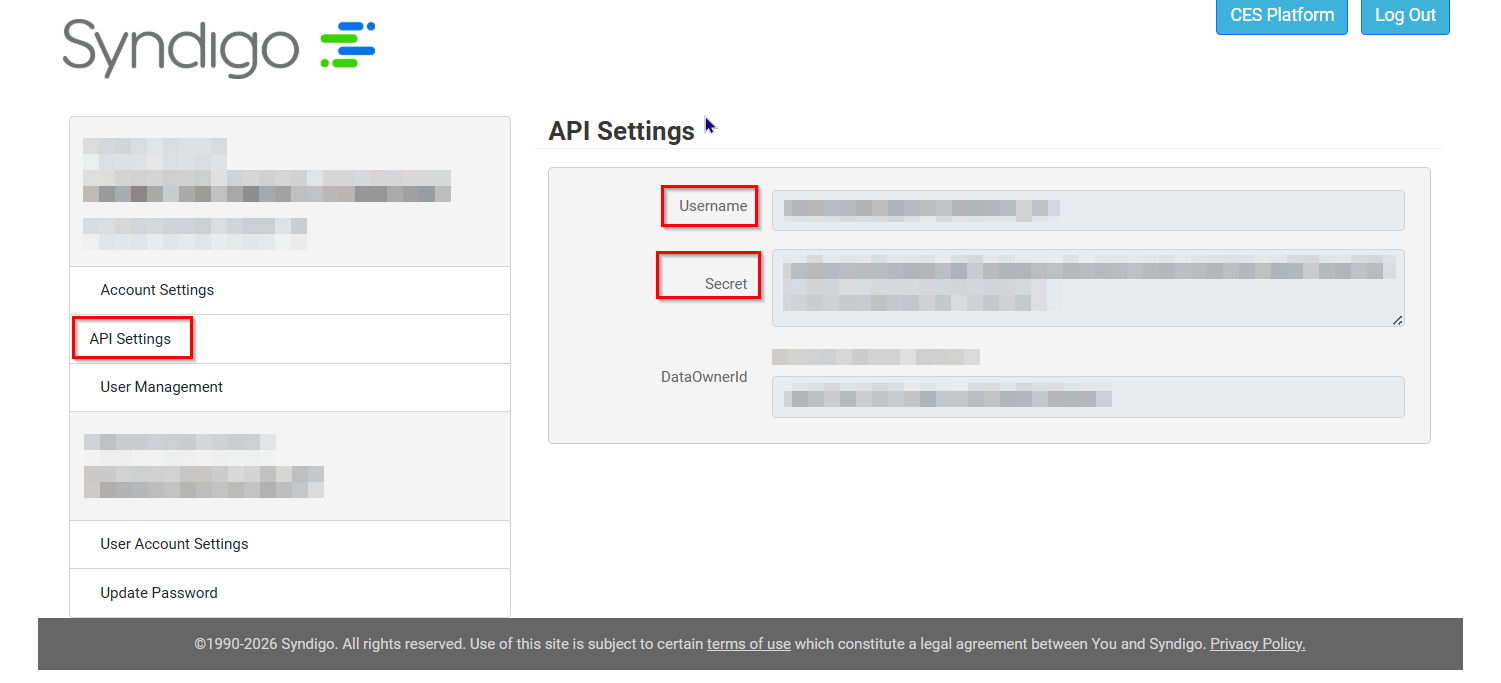
The Endpoint, and Session Validity URL values in the settings table below are based on standard Syndigo API patterns. Confirm these URLs with your Syndigo account manager or technical contact before configuring the connector, as they may differ for your specific account or region.
3. Connection Settings and Configuration for OneTeg
In OneTeg, navigate to Connections and create a new connection using the Syndigo Connector. Fill in the settings below using the credentials and endpoint URLs provided by Syndigo.
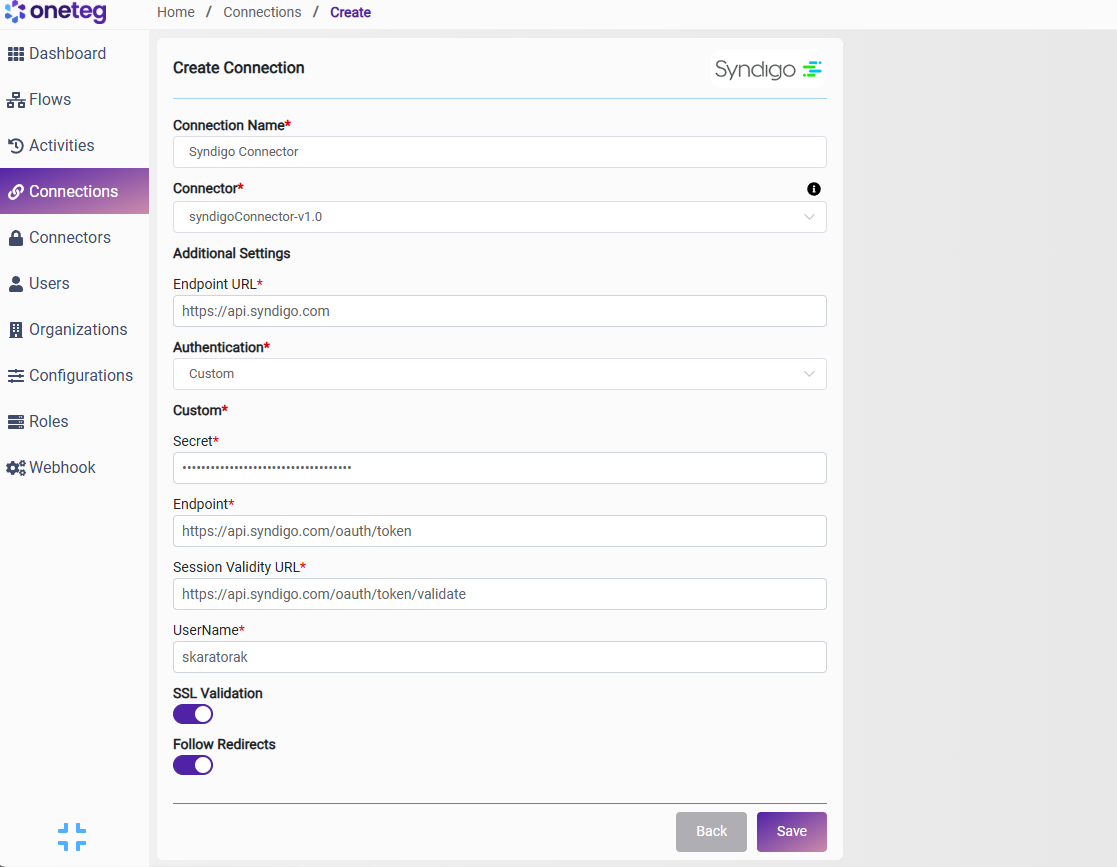
|
Settings Parameters |
Value / Sample Value |
Description |
Required (Y/N) |
|
Connection Name |
Syndigo Connection |
Choose a name for your Connection |
Y |
|
Connector |
syndigoConnector-v1.0 |
Auto-populated once the Syndigo Connector is selected |
Y |
|
Endpoint URL |
Base URL of the Syndigo API. Confirm this value with your Syndigo account manager as it may vary by region or account configuration |
Y |
|
|
Authentication |
Custom |
Select Custom from the dropdown |
Y |
|
Secret |
Syndigo API Secret |
Obtained from Syndigo platform: profile icon → My Account → API Settings → Secret. Store securely and do not share |
Y |
|
Endpoint |
The Syndigo authentication endpoint. OneTeg submits credentials here to obtain a session token. Confirm this value with your Syndigo account manager |
Y |
|
|
Session Validity URL |
The Syndigo session validation endpoint. OneTeg calls this URL periodically to validate and extend the active session. Confirm this value with your Syndigo account manager |
Y |
|
|
UserName |
your-syndigo-username |
Obtained from Syndigo platform: profile icon → My Account → API Settings → Username |
Y |
4. Supported Syndigo Actions and Options
For the full list of supported endpoints, parameters, and options, see the page below: