
1. General Information
Bluestone PIM is a cloud-based, MACH-certified (Microservices, API-first, Cloud-native SaaS, and Headless) Product Information Management platform. Organizations use it to manage and enrich product data — descriptions, attributes, media, and category structures — and to distribute accurate product information across sales and marketing channels. Bluestone offers a read-focused Public API for serving product data efficiently to external systems.
The OneTeg Bluestone PIM Connector integrates with the Bluestone Public API, enabling users to read product data directly from OneTeg automation workflows. This connector authenticates using an API Key — a Bluestone Public API key.
Bluestone authenticates the Public API with your API key, sent in the api-key request header. The API base URL is versioned and environment-specific (a separate host for production and test).
Bluestone has two APIs: the read-focused Public API (authenticated with an API key) and the Management API (authenticated with OAuth2). This connector uses the Public API, so an API key is required — not OAuth credentials.
Public API keys are issued directly by Bluestone — there is no self-service generation in the app. Contact Bluestone (through the in-app chat or your Bluestone representative) to obtain one, and treat the key as a secret.
2. Connect Bluestone PIM to OneTeg
The connector authenticates with a Bluestone Public API key. Follow the steps below to obtain the key and identify the URL you will enter into OneTeg.
Step 1 - Request a Public API Key
Public API keys are provisioned by Bluestone. Contact Bluestone through the in-app chat (or your Bluestone representative) to request a Public API key for your organization, then keep it somewhere secure.
Step 2 - Identify Your Endpoint URL
Determine which environment you are connecting to. The production base URL is https://api.bluestonepim.com/v1, and the test base URL is https://api.test.bluestonepim.com/v1. Use the one that matches the environment your API key was issued for.
3. Connection Settings and Configuration for OneTeg
In OneTeg, navigate to Connections and create a new connection using the Bluestone PIM Connector. Enter the settings below.
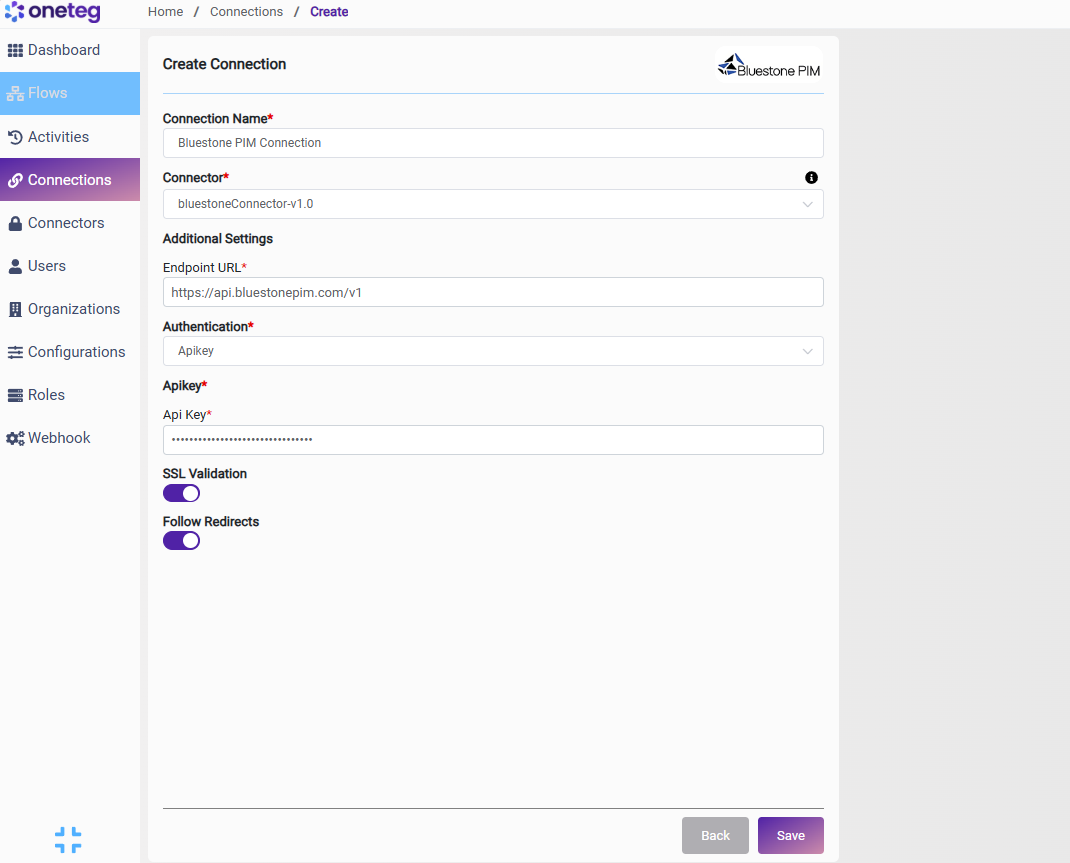
|
Settings Parameters |
Value / Sample Value |
Description |
Required (Y/N) |
|
Connection Name |
Bluestone PIM Connection |
Choose a name for your Connection |
Y |
|
Connector |
bluestoneConnector-v1.0 |
Auto-populated once the Bluestone PIM Connector is selected |
Y |
|
Endpoint URL |
https://api.bluestonepim.com/v1 |
The base URL of the Bluestone PIM Public API (production). For the test environment, use https://api.test.bluestonepim.com/v1 |
Y |
|
Authentication |
Apikey |
Select Apikey as the authentication method |
Y |
|
Api Key |
Your Bluestone Public API key |
The Public API key issued to you by Bluestone, sent in the api-key request header to authenticate requests |
Y |
4. Supported Bluestone PIM Actions and Options
For the full list of supported endpoints, parameters, and options, see the page below: