
1. General Information
VIP (http://vtinfo.com ) is a B2B commerce and distribution platform designed for the beverage and consumer goods industry. It connects retailers, distributors, and suppliers through a centralized system that manages item catalogs, order management, pricing, payments, route scheduling, and retail portal operations. The platform integrates with multiple payment providers (Stripe, Mastercard BPS, FTNI) and supports complex supply chain workflows across the full distribution lifecycle.
The OneTeg VIP Connector integrates with the VIP REST API and enables users to build automated workflows that interact with VIP's core modules, including item catalog, order management, pricing, payments, and retailer data from within the OneTeg flow builder.
2. Connect VIP to OneTeg
The VIP Connector authenticates via OAuth 2.0 Authorization Code flow using VIP's ADFS (Active Directory Federation Services) identity provider. To configure the connector, you will need a registered client application in the VIP identity system with the appropriate scopes assigned. Follow the steps below.
Step 1 - Obtain a Client ID and Client Secret from VIP
Contact your VIP platform administrator or VIP support to register a client application in the VIP identity system. You will receive a Client ID and Client Secret assigned to your integration. These credentials are used by OneTeg to authenticate against the VIP ADFS OAuth 2.0 endpoint.
Step 2 — Confirm Required Scopes
When requesting your client application registration, confirm with your VIP administrator that the required scopes are assigned to your client. Refer to the Scopes table in Section 3 below for the recommended set of scopes for OneTeg integration.
Step 3 — Configure the Redirect URI
Provide your VIP administrator with the OneTeg OAuth callback URL to register as an allowed redirect URI for your client application. This is required for the Authorization Code flow to work correctly — VIP will redirect users back to this URL after they authorize the app. Contact your OneTeg administrator if you are unsure of the correct callback URL.
The VIP platform uses ADFS (Active Directory Federation Services) as its identity provider. The Token URL and Authorization URL are fixed ADFS endpoints. Do not modify them unless your VIP administrator instructs otherwise.
3. Connection Settings and Configuration for OneTeg
In OneTeg, navigate to Connections and create a new connection using the VIP Connector. Fill in the settings below using the credentials provided by your VIP administrator.
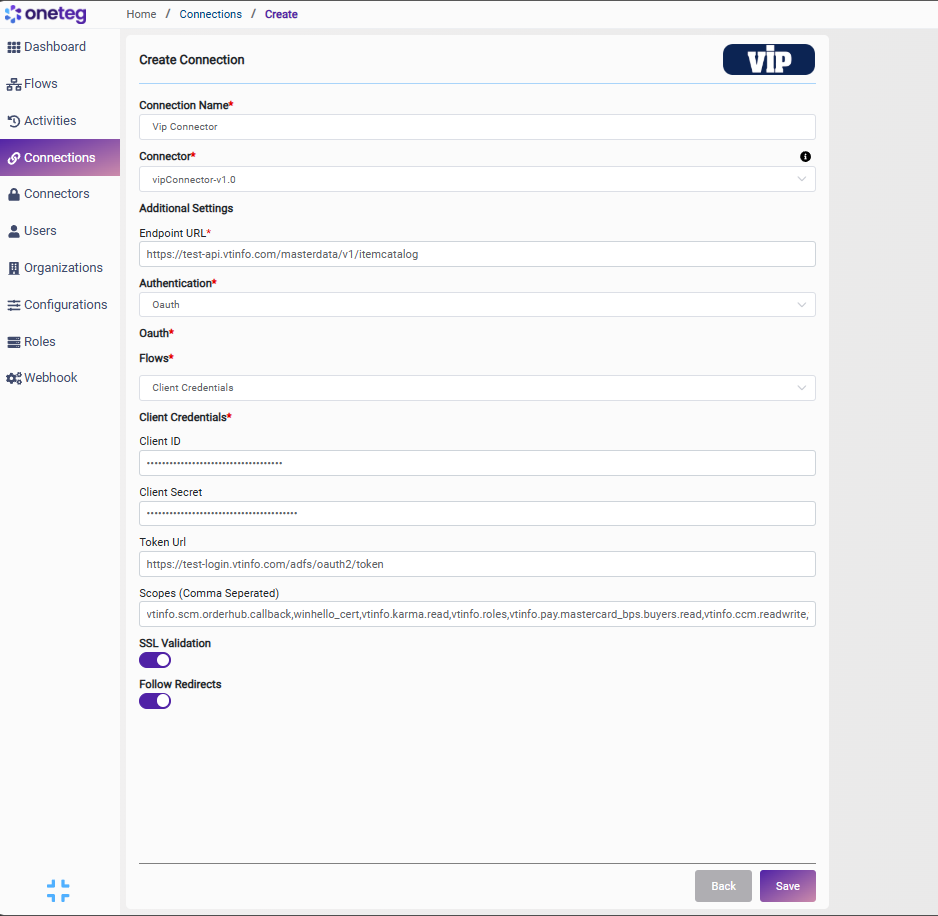
|
Settings Parameters |
Value / Sample Value |
Description |
Required (Y/N) |
|
Connection Name |
Vip Connection |
Choose a name for your Connection |
Y |
|
Connector |
vipConnector-v1.0 |
Auto-populated once the VIP Connector is selected |
Y |
|
Endpoint URL |
Base URL of the VIP REST API. Replace the test-api subdomain with the production API URL when deploying to production |
Y |
|
|
Authentication |
OAuth |
Select OAuth from the dropdown |
Y |
|
Flows |
Client Credantials |
Select Client Credantials as the OAuth grant type |
Y |
|
Client ID |
VIP Client ID |
Provided by your VIP platform administrator upon client application registration |
Y |
|
Client Secret |
VIP Client Secret |
Provided by your VIP platform administrator upon client application registration. Store securely and do not share |
Y |
|
Token URL |
Fixed VIP ADFS endpoint used to exchange authorization codes for access tokens. Replace test-login with the production login subdomain when deploying to production |
Y |
|
|
Scopes |
openid profile email vtinfo.ccm.readwrite ... |
Space-separated list of VIP API permission scopes. See the Scopes Reference table below for the recommended set |
Y |
Scopes Reference
The following scopes are recommended for the OneTeg VIP Connector integration. Include only the scopes that correspond to the VIP modules your workflows will interact with. Scopes must be pre-approved and assigned to your client application by your VIP administrator.
|
Scope |
Description |
|
openid |
Standard OIDC scope required for all OAuth 2.0 flows using ADFS |
|
profile |
Access to the user's basic profile information |
|
|
Access to the authenticated user's email address |
|
user_impersonation |
Allows the application to act on behalf of the authenticated user across VIP services |
|
vtinfo.ccm.readwrite |
Read and write access to Contract & Commitment Management (CCM) data |
|
vtinfo.ccm.read |
Read-only access to Contract & Commitment Management (CCM) data |
|
vtinfo.ccm.mandates.read |
Read-only access to CCM mandate records |
|
vtinfo.rsp.readwrite |
Read and write access to Retail Sales Platform (RSP) data |
|
vtinfo.rsp.read |
Read-only access to Retail Sales Platform (RSP) data |
|
vtinfo.scm.orderhub.readwrite |
Read and write access to Supply Chain Management (SCM) Order Hub |
|
vtinfo.scm.orderhub.read |
Read-only access to SCM Order Hub data |
|
vtinfo.scm.orderhub.callback |
Enables callback notifications from the SCM Order Hub |
|
vtinfo.scm.forecasting.readwrite |
Read and write access to SCM forecasting data |
|
vtinfo.scm.ordergen.readwrite |
Read and write access to SCM order generation workflows |
|
vtinfo.itemcatalog.direct.read |
Read-only access to the direct item catalog |
|
vtinfo.itemcatalog.distributor.read |
Read-only access to the distributor item catalog |
|
vtinfo.itemcatalog.consumer.read |
Read-only access to the consumer item catalog |
|
vtinfo.itemcatalog.supplier.read |
Read-only access to the supplier item catalog |
|
vtinfo.ors.retailer.orders.readwrite |
Read and write access to retailer order records in ORS |
|
vtinfo.ors.retailers.read |
Read-only access to retailer data in the Order Routing System (ORS) |
|
vtinfo.ors.distributor.orders.readwrite |
Read and write access to distributor order records in ORS |
|
vtinfo.pay.stripe.intents.readwrite |
Read and write access to Stripe payment intent records |
|
vtinfo.pay.mastercard_bps.buyers.readwrite |
Read and write access to Mastercard BPS buyer payment data |
|
vtinfo.pay.ftni.sellers.readwrite |
Read and write access to FTNI seller payment data |
|
vtinfo.settings.vip.readwrite |
Read and write access to VIP platform settings |
|
vtinfo.settings.vip.read |
Read-only access to VIP platform settings |
|
vtinfo.des.readwrite |
Read and write access to Data Exchange Service (DES) |
|
vtinfo.des.read |
Read-only access to Data Exchange Service (DES) |
|
vtinfo.karma.readwrite |
Read and write access to Karma loyalty/rewards data |
|
vtinfo.karma.read |
Read-only access to Karma loyalty/rewards data |
|
vtinfo.sem.routes.readwrite |
Read and write access to route management in SEM |
|
vtinfo.sem.routes.read |
Read-only access to route data in SEM |
|
vtinfo.pos.readwrite |
Read and write access to Point of Sale (POS) data |
|
vtinfo.pos.read |
Read-only access to Point of Sale (POS) data |
|
vtinfo.dam.readwrite |
Read and write access to Digital Asset Management (DAM) |
|
vtinfo.pre.orders.read |
Read-only access to pre-order data |
|
vtinfo.pre.items.read |
Read-only access to pre-order item data |
|
vtinfo.datawarehouse.events.read |
Read-only access to data warehouse event streams |
|
vtinfo.topsale.read |
Read-only access to top sale reporting data |
|
vtinfo.srs.readwrite |
Read and write access to Sales Reporting System (SRS) |
|
vtinfo.srs.read |
Read-only access to Sales Reporting System (SRS) |
|
vtinfo.idig.readwrite |
Read and write access to iDig distribution intelligence data |
|
vtinfo.rpc.readwrite |
Read and write access to RPC module data |
|
vtinfo.knapsack.readwrite |
Read and write access to Knapsack optimization data |
|
vtinfo.price.deal.query.read |
Read-only access to price and deal query data |
|
vtinfo.retailerportal.users.provision |
Provision and manage retailer portal user accounts |
4. Supported VIP Actions and Options
For the full list of supported endpoints, parameters, and options, see the page below: