
1. General Information
Drupal is a free, open-source content management system (CMS) used to build and manage websites, web applications, and digital experiences. Known for its flexibility and extensibility, Drupal powers everything from personal blogs to large enterprise and government sites. Modern Drupal exposes content through the JSON:API module, which provides a standards-compliant REST interface for reading and writing content entities such as nodes, taxonomy terms, and users.
The OneTeg Drupal Connector integrates with the Drupal JSON:API, enabling users to read and manage content entities directly from OneTeg automation workflows. This connector authenticates using Basic authentication with a Drupal username and password.
Because Drupal is self-hosted, the endpoint URL is specific to your Drupal site. Basic authentication requires the Basic Auth module to be enabled on your Drupal installation, and the user account used must have permission to access the content via JSON:API.
2. Connect Drupal to OneTeg
The Drupal Connector authenticates using a Drupal user account via Basic authentication. You will need a user account with appropriate permissions, and the JSON:API and Basic Auth modules enabled on your Drupal site. Follow the steps below.
Step 1 - Enable the Required Drupal Modules
Log in to your Drupal site as an administrator and navigate to Extend (admin/modules). Ensure the JSON:API module and the HTTP Basic Authentication module are both enabled. Enable them if they are not already, and save the configuration.
Step 2 - Identify or Create a User Account
Use an existing Drupal user account, or create a dedicated account for the integration under People (admin/people). Ensure the account has the roles and permissions required to access the content you intend to work with through JSON:API. Note the account's username and password.
Step 3 - Confirm Your JSON:API Endpoint URL
The Drupal JSON:API is served from the /jsonapi path on your site. The endpoint for accessing nodes is:
https://{your-drupal-site}/jsonapi/node
Replace the domain with your own Drupal site. For example, your endpoint may look like https://your-drupal-site.com/jsonapi/node. Confirm the correct base URL for your installation.
Keep the integration account's credentials confidential. For better security, use a dedicated user account with only the permissions required, rather than an administrator account.
3. Connection Settings and Configuration for OneTeg
In OneTeg, navigate to Connections and create a new connection using the Drupal Connector. Fill in the fields below using the account credentials and endpoint confirmed in Section 2.
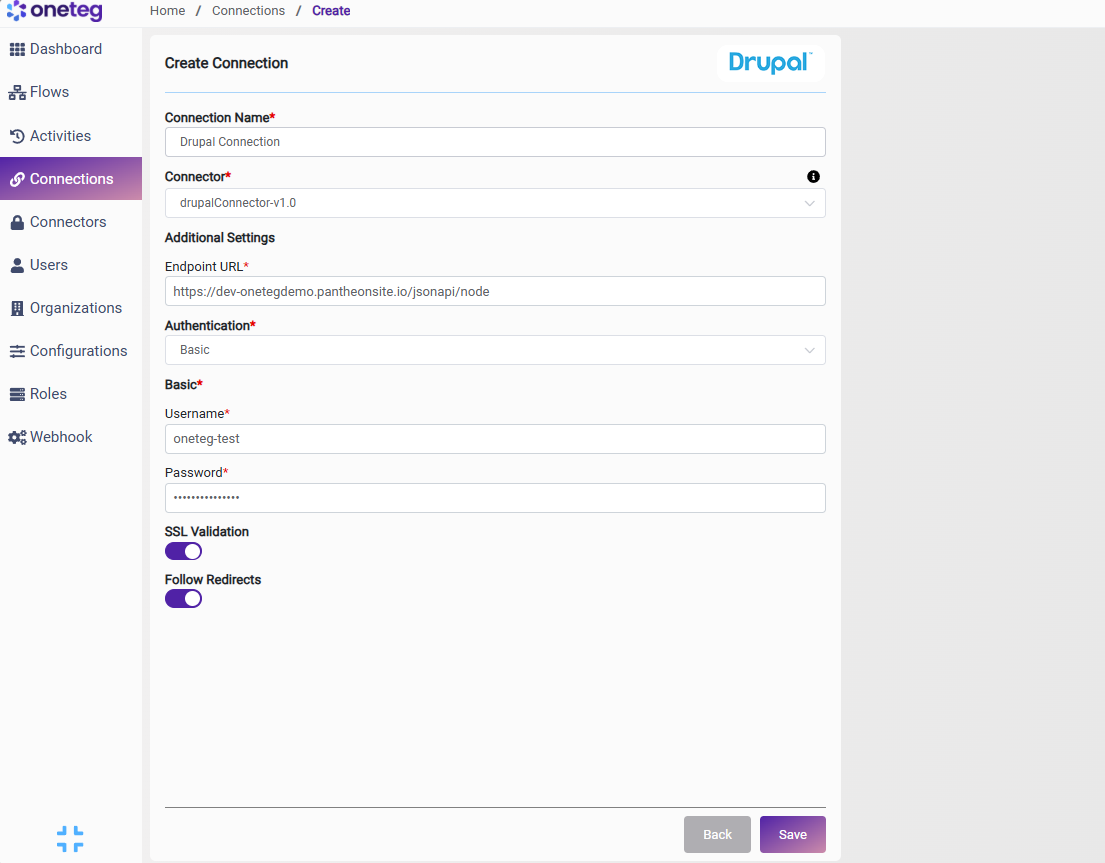
|
Settings Parameters |
Value / Sample Value |
Description |
Required (Y/N) |
|
Connection Name |
Drupal Connection |
Choose a name for your Connection |
Y |
|
Connector |
drupalConnector-v1.0 |
Auto-populated once the Drupal Connector is selected |
Y |
|
Endpoint URL |
https://{your-drupal-site}/jsonapi/node |
The Drupal JSON:API endpoint. Replace the domain with your own Drupal site (e.g. https://your-drupal-site.com/jsonapi/node) |
Y |
|
Authentication |
Basic |
Select Basic as the authentication method |
Y |
|
Username |
Your Drupal username |
The username of the Drupal account used for authentication |
Y |
|
Password |
Your Drupal password |
The password for the Drupal account |
Y |
4. Supported Drupal Actions and Options
For the full list of supported endpoints, parameters, and options, see the page below: