
1. General Information
Orange Logic (OrangeDAM) is a cloud-based Digital Asset Management (DAM) platform designed for enterprises managing large volumes of media assets. It provides tools for storing, organizing, searching, and distributing digital assets — including images, videos, and documents — with advanced metadata management, access control, and multi-channel distribution capabilities.
The OneTeg Orange Logic Connector integrates with the OrangeDAM API and enables users to build automated workflows for searching, uploading, managing, and distributing digital assets directly from the OneTeg flow builder.
2. Connect Orange Logic to OneTeg
The Orange Logic Connector supports two authentication methods — OAuth 2.0 Client Credentials (recommended) and Bearer Token. Both methods require an Orange Logic administrator to first enable bearer authentication on the integration user account. Follow the steps below.
Step 1 - Enable Bearer Authentication on the Integration User Account
Log in to the Orange Logic interface as an administrator. Navigate to Administration → Contacts → Accounts and select OAuth Client Application Accounts. Search for the integration user account and click View. In the account details, set the SSO Status field to Non SSO Authentication allowed, then check the Allow Bearer Authentication checkbox. Save the changes.
Bearer authentication cannot be enabled on SSO user accounts. If your integration user is an SSO account, you must either create a new non-SSO user account specifically for the integration, or contact Orange Logic support to change the SSO status of an existing account.
Step 2 - Register an OAuth 2.0 Client Application
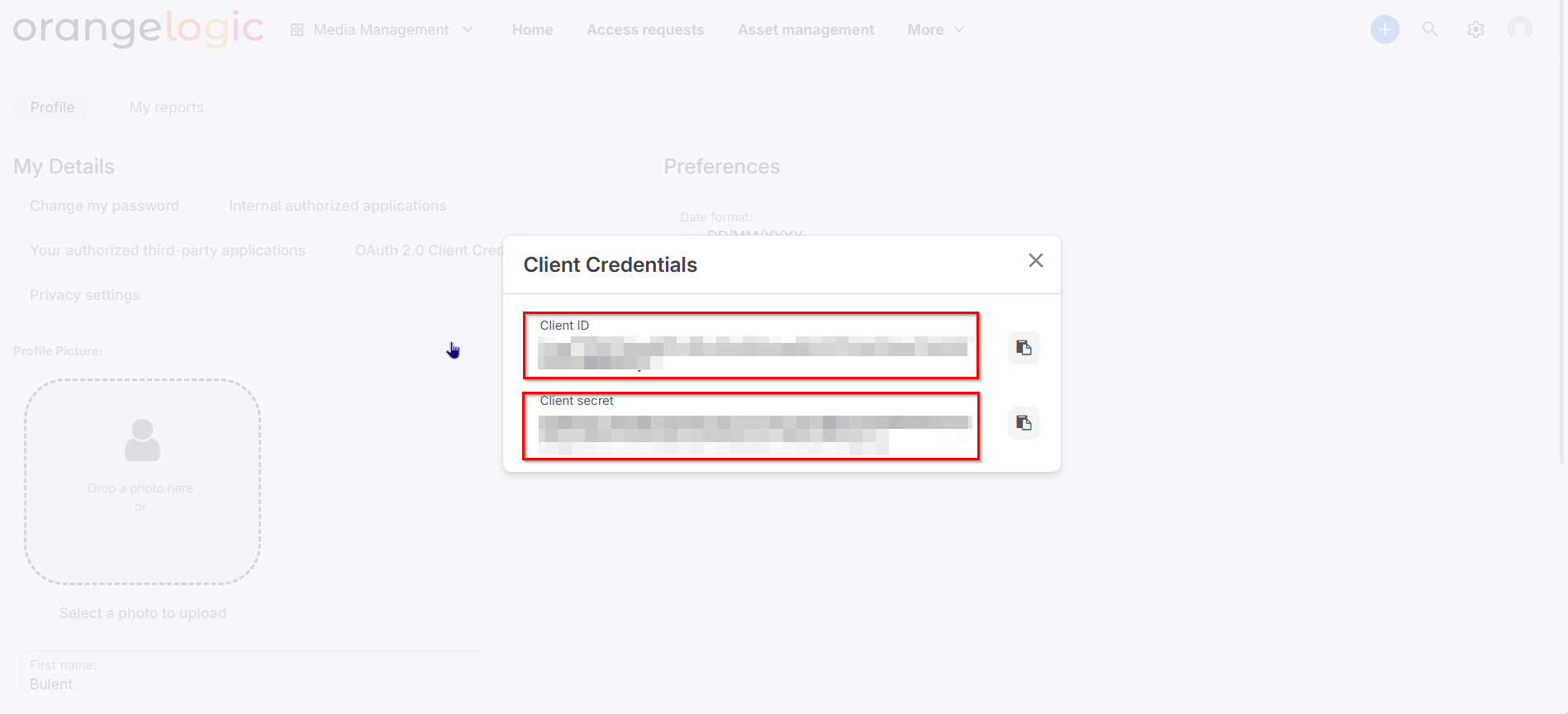
To use the OAuth 2.0 Client Credentials flow, register a client application in Orange Logic. Navigate to Administration → Contacts → Accounts → OAuth Client Application Accounts and create a new application account. After registration, Orange Logic will provide a Client ID and Client Secret for the application. Copy both values and store them securely.
3. Connection Settings and Configuration for OneTeg
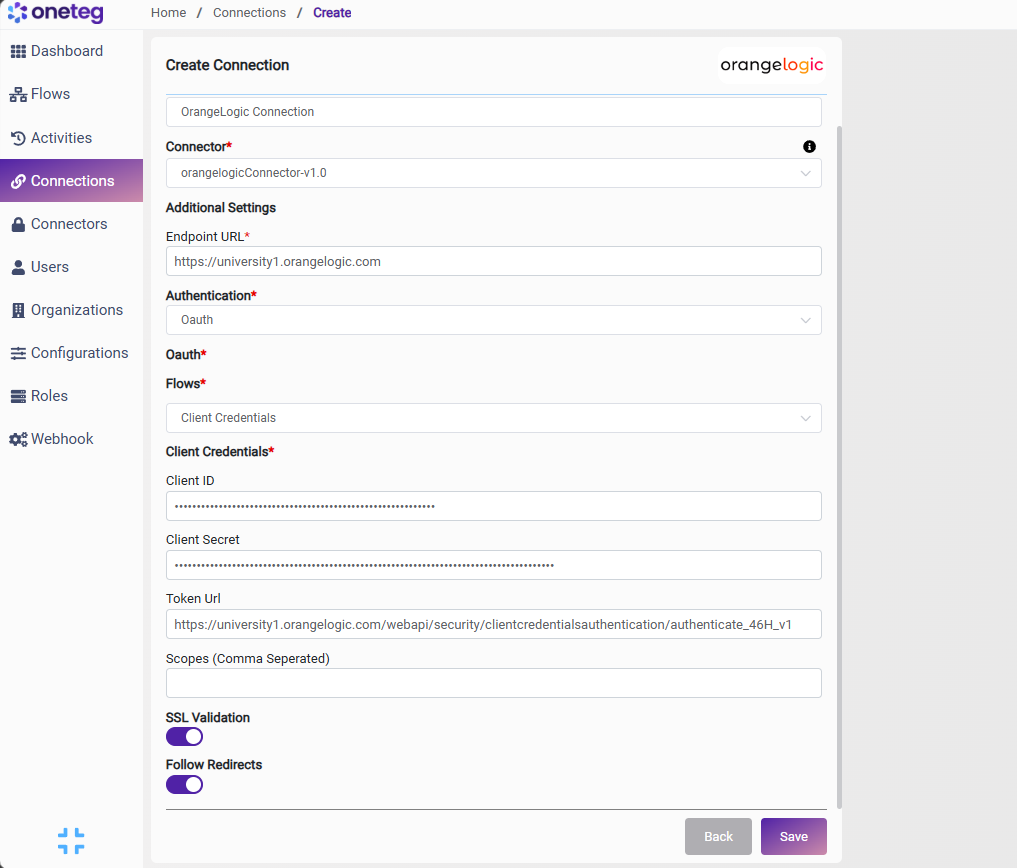
In OneTeg, navigate to Connections and create a new connection using the Orange Logic Connector. The connector supports two authentication methods: OAuth (Client Credentials) and Bearer Token. Choose the one that best fits your setup.
Option 1 - OAuth Client Credentials
It authenticates as a registered client application using the Client ID and Secret, with tokens managed automatically by OneTeg.
|
Settings Parameters |
Value / Sample Value |
Description |
Required (Y/N) |
|
Connection Name |
OrangeLogic Connection |
Choose a name for your Connection |
Y |
|
Connector |
orangelogicConnector-v1.0 |
Auto-populated once the Orange Logic Connector is selected |
Y |
|
Endpoint URL |
Base URL of your Orange Logic instance. This is your organization's specific Orange Logic domain |
Y |
|
|
Authentication |
OAuth |
Select OAuth from the dropdown |
Y |
|
Flows |
Client Credentials |
Select Client Credentials as the OAuth grant type |
Y |
|
Client ID |
Orange Logic OAuth Client ID |
Obtained from Orange Logic: Administration → Contacts → Accounts → OAuth Client Application Accounts → your app → Client ID |
Y |
|
Client Secret |
Orange Logic OAuth Client Secret |
Obtained from Orange Logic: Administration → Contacts → Accounts → OAuth Client Application Accounts → your app → Client Secret. Store securely |
Y |
|
Token URL |
The Orange Logic OAuth token endpoint. Specific to your organization's instance |
Y |
|
|
Scopes |
|
Leave blank — Orange Logic Client Credentials flow does not require explicit scope values |
|
Option 2 - Bearer Token Authentication
Orange Logic supports non-expiring Bearer Tokens tied to a specific user account. This method is simpler to set up but requires bearer authentication to be enabled on the user account first (see Step 1 in Section 2). The token does not expire by default, making it suitable for stable long-running integrations.
|
Settings Parameters |
Value / Sample Value |
Description |
Required (Y/N) |
|
Connection Name |
OrangeLogic Connection |
Choose a name for your Connection |
Y |
|
Connector |
orangelogicConnector-v1.0 |
Auto-populated once the Orange Logic Connector is selected |
Y |
|
Endpoint URL |
Base URL of your Orange Logic instance |
Y |
|
|
Authentication |
Bearer |
Select Bearer from the dropdown |
Y |
|
Token |
Orange Logic Bearer Token |
A non-expiring bearer token generated from the Orange Logic user account. Requires Allow Bearer Authentication to be enabled on the account by an administrator |
Y |
4. Supported Orange Logic Actions and Options
For the full list of supported endpoints, parameters, and options, see the page below: