
1. General Information
OpenText Extended ECM (formerly OpenText Content Server) is an enterprise content management platform that provides document management, records management, collaboration, and business process automation capabilities. It integrates deeply with enterprise applications such as SAP, Salesforce, and Microsoft 365, enabling organizations to manage content in the context of their business processes. Extended ECM can be deployed on-premise or in the cloud.
The OneTeg OpenText Extended ECM Connector integrates with the Content Server REST API and enables users to build automated workflows for managing documents, nodes, workspaces, and metadata directly from the OneTeg flow builder.
OpenText Extended ECM can be deployed on-premise or in the cloud. The Endpoint URL and authentication URLs are specific to your deployment. Replace the placeholder values in this document with your actual Content Server URL.
2. Connect OpenText Extended ECM to OneTeg
The OpenText Extended ECM Connector supports two authentication methods — Custom (username/password) and Otcsticket (API Key). The Custom method is recommended for most integrations as OneTeg manages the session automatically. The Otcsticket method uses a pre-obtained Content Server ticket as an API Key.
A Content Server ticket (OTCS Ticket) is a session token issued by the Content Server authentication endpoint. It is tied to a specific user session and expires after a period of inactivity. The Custom auth method obtains and refreshes this ticket automatically, while the Otcsticket method requires you to provide and update it manually.
Step 1 - Identify Your Content Server URL and Integration User
Log in to your OpenText Extended ECM instance and note the base URL from your browser's address bar. The Content Server REST API follows the pattern https://your-otcs-instance.com/otcs/cs.exe/api. This is the Endpoint URL in OneTeg. The authentication endpoint is constructed by appending /v1/auth to this base URL.
If a dedicated integration user does not already exist, ask your Content Server administrator to create one under Administration → User Management with the minimum permissions required for your OneTeg workflows.
3. Connection Settings and Configuration for OneTeg
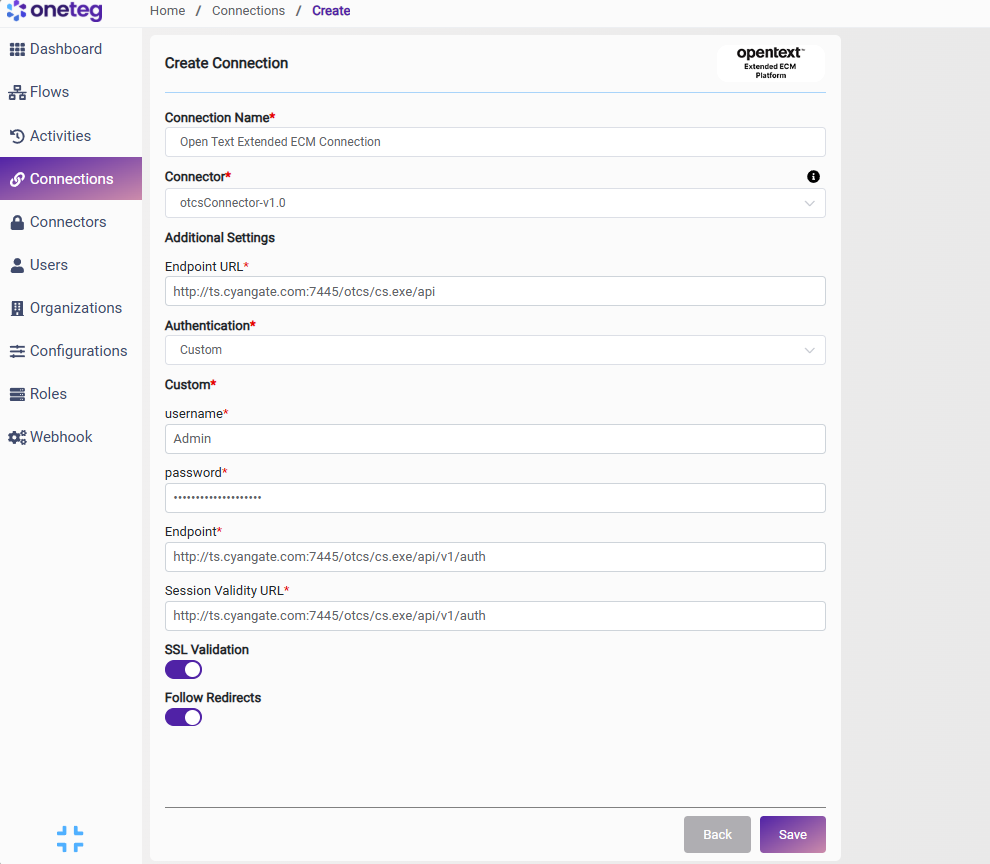
In OneTeg, navigate to Connections and create a new connection using the OpenText Extended ECM Connector. The connector supports two authentication methods — Custom and Otcsticket. Choose the one that best fits your setup.
Option 1 - Custom Authentication
OneTeg authenticates against the Content Server using your integration user credentials and automatically manages the session ticket lifecycle.
|
Settings Parameters |
Value / Sample Value |
Description |
Required (Y/N) |
|
Connection Name |
Open Text Extended ECM Connection |
Choose a name for your Connection |
Y |
|
Connector |
otcsConnector-v1.0 |
Auto-populated once the OpenText Extended ECM Connector is selected |
Y |
|
Endpoint URL |
Base URL of the Content Server REST API. Replace your-otcs-instance.com with your actual Content Server hostname |
Y |
|
|
Authentication |
Custom |
Select Custom from the dropdown |
Y |
|
username |
The username of the dedicated Content Server integration user |
Y |
|
|
password |
Content Server user password |
The password of the Content Server integration user. Keep this up to date to avoid connection failures |
Y |
|
Endpoint |
The Content Server authentication endpoint. OneTeg POSTs credentials here to obtain a session ticket. Constructed by appending /v1/auth to your Endpoint URL |
Y |
|
|
Session Validity URL |
The session validation endpoint. OneTeg calls this URL to maintain the active session. Uses the same authentication endpoint as above |
Y |
Option 2 - Otcsticket Authentication
Use this method if you have a pre-existing Content Server session ticket obtained externally. The ticket is passed as an API Key with each request. Note that OTCS tickets expire after a period of inactivity — you will need to manually update the API Key when the ticket expires, making this method less suitable for long-running automations.
|
Settings Parameters |
Value / Sample Value |
Description |
Required (Y/N) |
|
Connection Name |
Open Text Extended ECM Connection |
Choose a name for your Connection |
Y |
|
Connector |
otcsConnector-v1.0 |
Auto-populated once the OpenText Extended ECM Connector is selected |
Y |
|
Endpoint URL |
Base URL of the Content Server REST API |
Y |
|
|
Authentication |
Otcsticket |
Select Otcsticket from the dropdown |
Y |
|
Api Key |
Content Server session ticket |
A valid OTCS session ticket obtained by calling the /v1/auth endpoint manually. Expires after inactivity — must be updated when expired |
Y |
4. Supported OpenText Extended ECM Actions and Options
For the full list of supported endpoints, parameters, and options, see the page below: